10 Best Headsets for Video Calls (October 2026)
The best headsets for video calls include the Poly Voyager Focus 2 for over-ear coverage, the Jabra Evolve2 65 for long wireless days, and the Jabra Evolve2 50 for wired and Bluetooth flexibility.
On this page (4 sections)
The best headset for video calls for most desk workers is the Jabra Evolve2 65, with an included USB-A adapter, dual-ear fit and up to 37 hours of battery life. Choose a wired model for a direct laptop connection or a single-ear headset for calls on the move.
A headset microphone and a connection that fits your computer can make calls easier to manage. Start with your computer's ports, how long you wear a headset and whether you need to move during calls.
For a wider desk plan, see our guide to video conferencing equipment for home offices. If you're deciding whether a separate microphone is useful, read what webcams have built-in microphones.
Our picks at a glance
-
1

-
2
-
3

The best headsets for video calls by use
The best headset for video calls depends on whether you value wireless movement, a direct USB connection or a compact fit. These picks are ordered by score, with each one matched to a specific work pattern.
Poly Voyager Focus 2: Best for over-ear coverage
- Wireless Bluetooth connection
- Over-ear fit
- 19-hour average battery life
- Charging stand
This over-ear Bluetooth headset includes a charging stand. Check its USB and Bluetooth compatibility with your devices.
Pros
- Over-ear fit
- Charging stand
- Bluetooth 5.1
Cons
- 19-hour average battery life
- USB-C-C package name leaves connector needs unclear
The Poly Voyager Focus 2 is the highest-scoring option here for people who prefer an over-ear wireless fit. Its Bluetooth 5.1 connection and USB interface give you connection options to consider for your setup.
The package includes a charging stand, and the headset's average battery life is 19 hours. The Jabra Evolve2 65 has a longer stated battery life if you prefer less frequent charging.
The supplied package information uses both USB-C and USB-A adapter wording, while the specs mention USB. Check connector compatibility with your computer before buying.
Choose it if you want over-ear coverage and a stand for storage between calls. For a wireless headset with longer stated battery life, compare the Jabra Evolve2 65.
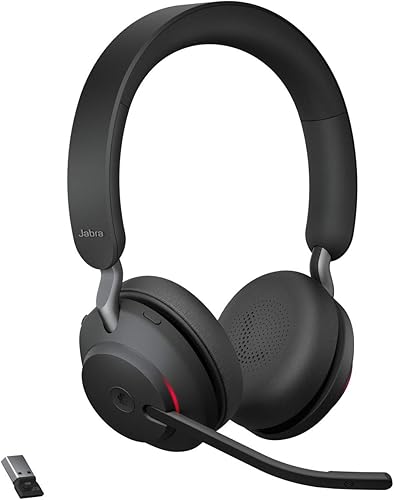
Jabra Evolve2 65: Best for long wireless days
- Up to 37 hours battery
- USB-A Bluetooth adapter
- Three-microphone call technology
- Memory foam cushions
Up to 37 hours of battery life and an included USB-A adapter suit long wireless workdays. Jabra says its three-microphone call technology reduces background conversation noise.
Pros
- Up to 37 hours battery life
- USB-A adapter included
- Works with leading unified communications platforms
Cons
- USB-A adapter may require another adapter for a USB-C-only laptop
- Dual-ear design is less compact than a single-ear headset
The Jabra Evolve2 65 is the strongest fit for a long wireless workday. It offers up to 37 hours of battery life, and the included Jabra Link 380a USB-A adapter gives compatible computers a Bluetooth connection.
Jabra says its three-microphone call technology reduces background conversation noise. Its memory foam cushions and angled design support passive noise cancellation, and it works with leading unified communications platforms.
The dual-ear headset has 40 mm speakers for call audio over both ears. Check whether your laptop has USB-A or needs another adapter.
Pick it if you spend much of the day in calls and want wireless movement. For wired and Bluetooth options, consider the Jabra Evolve2 50.
Jabra Evolve2 50: Best for wired and Bluetooth flexibility
- Wired and Bluetooth connectivity
- USB-A/USB-C adapter
- Active noise cancellation
- Busylight
The Evolve2 50 offers a wired laptop connection and Bluetooth for a second device. Its USB-A and USB-C adapter, plus integrated busylight, suit a desk where connection options matter.
Pros
- USB-A and USB-C adapter
- Can connect to a second device by Bluetooth
- Active noise cancellation
Cons
- Wired connection limits movement during calls
- No battery-life figure is given
The Jabra Evolve2 50 suits a wired desk connection and Bluetooth for a second device. It includes a USB-A/USB-C adapter and can connect to a second device, such as a phone, over Bluetooth.
Jabra describes a noise-canceling microphone and says active noise cancellation helps reduce distractions. The headset has an integrated busylight and is certified for Google Meet and Zoom.
This is a dual-ear model, and wired USB can suit you if you don't want to rely on headset battery life for computer calls. Bluetooth adds another connection path.
Choose it if you want a direct computer connection with the option to pair a phone. For a simpler wired USB headset, the Jabra Evolve2 30 SE has an all-in-one USB-A and USB-C cable.
Logitech Zone Vibe 100: Best for lightweight over-ear wear
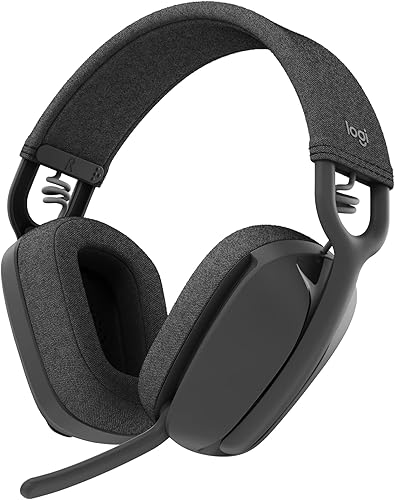
- Wireless Bluetooth
- Memory foam earpads
- Flip-to-mute microphone
- Up to 18 hours talk time
The lightweight over-ear fit, memory foam earpads and flip-to-mute microphone suit home calls mixed with music. Logitech describes compatibility with Microsoft Teams, Google Meet and Zoom.
Pros
- Flip-to-mute microphone
- Multipoint Bluetooth
- Memory foam earpads
Cons
- No cable included
- Bluetooth-only connection
The Logitech Zone Vibe 100 suits home workers who want wireless over-ear headphones with a microphone that flips away. Logitech describes its design as lightweight and lists memory foam earpads, multipoint Bluetooth and up to 18 hours of talk time.
Its flip-to-mute microphone provides a way to mute during a call. Logitech describes compatibility with Microsoft Teams, Google Meet and Zoom.
There is no cable included, so plan to use Bluetooth. The headset can connect to multiple devices, which may help if you switch between a computer and phone.
Pick it if comfort and a flip-to-mute microphone matter more than a wired option. For help setting up video and audio together, see our video interview camera and sound setup.
Jabra Evolve2 30 SE: Best for a simple USB desk setup

- Wired USB-A and USB-C cable
- Two-microphone technology
- 28 mm speakers
- Noise isolation
Its all-in-one USB-A and USB-C cable connects to many computers without Bluetooth pairing. The wired design keeps you connected to your desk.
Pros
- USB-A and USB-C cable
- Two-microphone technology
- Works with online meeting platforms
Cons
- Wired connection
- No Bluetooth
The Jabra Evolve2 30 SE suits a fixed laptop or desktop setup. Its all-in-one USB-A and USB-C cable avoids Bluetooth pairing and connects to compatible computers.
Jabra describes two-microphone call technology and noise isolation. The headset also has 28 mm speakers and works with online meeting platforms.
Because it is wired, you stay near the computer while using it. You won't need to charge a battery, but there's less freedom to move around during a call.
Choose it when you want a direct USB connection and mostly stay at your desk. If you need to move between rooms, the wireless Poly Voyager 4320 UC is another option.
Poly Voyager 4320 UC: Best for moving between desk and room
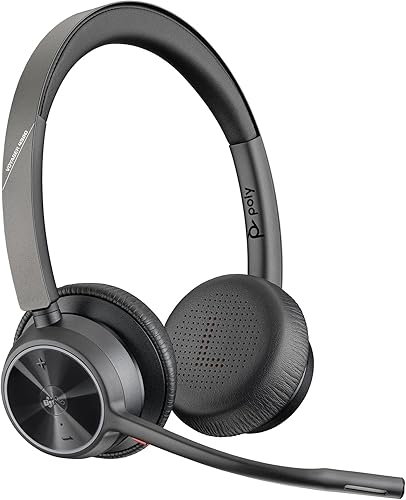
- Up to 24 hours talk time
- Up to 50 m Bluetooth range
- USB audio mode
- Charging stand
Bluetooth, USB audio mode and an included charging stand offer options for a home or office desk. Poly says the dual microphone uses Acoustic Fence to filter distractions.
Pros
- Up to 24 hours talk time
- Bluetooth 5.2
- USB-C to USB-A adapter included
Cons
- USB-C to USB-A adapter may not match every computer port
- Wireless range can vary by environment and device
The Poly Voyager 4320 UC suits people who want wireless movement with a USB audio option. It supports Bluetooth and USB audio mode, and includes a USB-C to USB-A adapter and a charging stand.
Poly says its dual microphone uses Acoustic Fence to filter distractions. It is Microsoft Teams certified and includes an on-call indicator.
Its stated talk time is up to 24 hours, and its Bluetooth range is up to 50 m. Actual range can vary with the room and connected device.
Pick it if you want to move around during calls and return the headset to a stand between meetings. For a single-ear fit, the Poly Voyager Legend 50 UC is another option.
Poly Voyager Legend 50 UC: Best for one-ear calls on the go
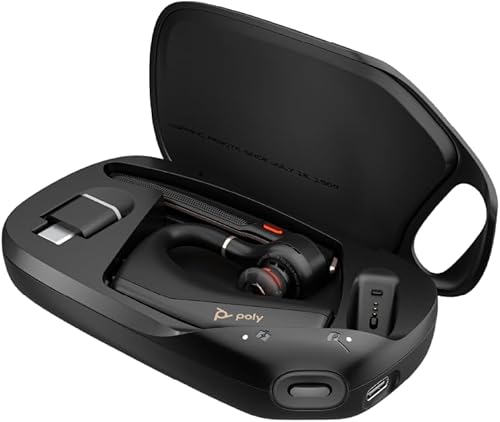
- Single-ear in-ear fit
- Four noise-canceling microphones
- 10-hour average battery life
- Charging case
This single-ear Bluetooth headset leaves one ear open. Poly says its charging case can extend talk time from 10 to up to 30 hours.
Pros
- Compact single-ear design
- Charging case
- WindSmart and NoiseBlockAI features
Cons
- Not a dual-ear stereo headset
- Bluetooth-only connection
The Poly Voyager Legend 50 UC has a single-ear in-ear fit for mobile calls and hands-free use. Poly describes four noise-canceling microphones, NoiseBlockAI and WindSmart features.
Its average battery life is 10 hours, and Poly says the wireless charging case can extend talk time from 10 to up to 30 hours. It connects over Bluetooth to Bluetooth-enabled devices.
A single-ear design won't provide stereo audio over both ears for computer meetings. It can suit you when you want one ear open to nearby sounds.
Choose it for calls on the move or when you prefer a small headset. For a dual-ear wireless option with a charging stand, compare the Poly Voyager 4320 UC.
Logitech Zone Wireless: Best for Teams controls
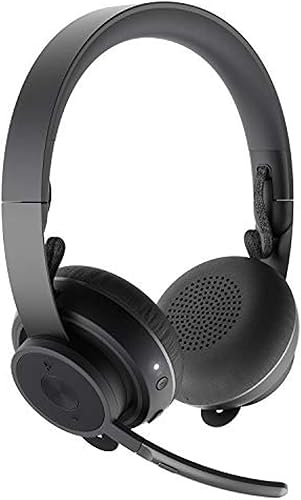
- Active noise cancellation
- Microsoft Teams certification
- Flip-to-mute microphone
- Simultaneous computer and phone connection
The Teams button and active noise cancellation suit workers who want meeting controls on their headset. Logitech says it can connect to a computer and smartphone at the same time.
Pros
- Microsoft Teams certified
- Active noise cancellation
- Flip-to-mute microphone
Cons
- Bluetooth version 4
- No battery-life figure is given
The Logitech Zone Wireless suits Microsoft Teams users who want headset controls. It is certified for Teams, with a button for Teams actions and a flip-to-mute microphone.
Logitech describes active noise cancellation to reduce unwanted ambient sound. The headset can connect to a computer and smartphone simultaneously, so you can switch between work calls and phone audio.
No battery-life figure is available in the product details, so consider how often you can charge it if you take calls all day. It uses Bluetooth 4, while several other wireless picks list newer versions.
Pick it if Teams controls and simultaneous device connections fit your routine. For a wired headset with inline controls, the Logitech Zone 750 keeps call actions on its cable.
Poly Blackwire 5220: Best for wired device variety

- USB-C with USB-A adapter
- 3.5 mm connection
- Wired connection
- Inline call controls
USB-C, a USB-C to USB-A adapter and a 3.5 mm connection suit a desk shared across computers, tablets or phones. Inline controls handle calls, mute and volume.
Pros
- USB-C and USB-A adapter
- 3.5 mm connection
- Inline call controls
Cons
- Wired design
- No Bluetooth
The Poly Blackwire 5220 offers several wired connection choices: USB-C, an included USB-C to USB-A adapter and a 3.5 mm connection. These options suit people using computers, tablets or smartphones.
Its on-ear stereo design has inline controls for answering and ending calls, mute and volume. The product describes a noise-canceling microphone and leatherette ear cushions.
This wired headset works best when you can stay near your computer or device. It doesn't require wireless pairing or a battery charge.
Choose it if port options and inline call controls are more useful than wireless movement. For a USB connection, the Logitech Zone 750 is another wired option.
Logitech Zone 750: Best for USB-C call controls
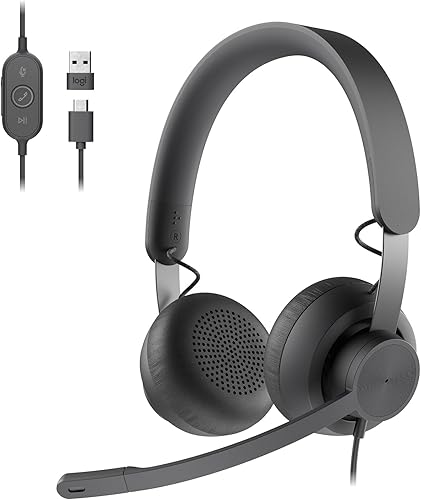
- USB-C with USB-A adapter
- Noise-canceling microphone
- Inline call controls
- 40 mm drivers
USB-C and the included USB-A adapter provide wired connections to compatible computers. Inline controls keep mute and call actions within reach.
Pros
- USB-C and USB-A adapter
- Noise-canceling microphone
- Inline controls
Cons
- Wired design
- No Bluetooth
The Logitech Zone 750 is a wired USB headset with inline controls. It includes USB-C and a USB-A adapter for compatible computers.
Logitech describes a noise-canceling microphone and inline controls for volume, mute and call actions. Its 40 mm drivers support music listening between meetings.
The fixed cable keeps the headset near your desk and removes the need for Bluetooth pairing or battery charging. The on-ear fit may suit you if you prefer smaller earcups than an over-ear headset.
Pick it if a wired connection and inline controls fit your routine. For Bluetooth and active noise cancellation, compare the Logitech Zone Wireless.
How we chose headsets for video calls
We compared each headset's connection type, microphone features, stated battery life, fit and meeting platform details. Our score weighs specs and features against what you're shopping for.
For video calls, the microphone and device connection matter. Compare the headset design with your room and call habits.
We gave higher scores to headsets with useful call features and clear connection details. We also included wired models for people who want to avoid charging or Bluetooth pairing.
What should you check before buying a video call headset?
Check your device ports first, then decide whether you need wireless movement. A headset may need an adapter your computer doesn't have.
Does the best headset for video calls need Bluetooth?
No, the best headset for video calls can be wired or wireless. Bluetooth suits people who move during calls or use the headset with a phone, while wired USB can simplify a fixed desk setup.
The Jabra Evolve2 30 SE has USB-A and USB-C cabling, while the Logitech Zone Vibe 100 is Bluetooth-only. Match the connection to your computer and how much movement you need.
Should you choose a boom mic or a single-ear headset?
A dual-ear headset with a microphone suits longer computer meetings when you want call audio in both ears. The Poly Voyager Legend 50 UC keeps one ear open and is compact for mobile calls.
The right fit depends on your setting. Keeping one ear open may help you stay aware of nearby sounds, while dual-ear coverage may suit you when you want call audio over both ears.
How can you reduce background noise on calls?
A headset microphone with noise reduction features can help, but it does not replace a quiet room or good microphone placement. Mute when you aren't speaking, and keep the microphone close enough to capture your voice.
If callers hear their own voices or room echo, check your meeting app's speaker and microphone selection. Our guide to stopping echo on Zoom and Teams covers common settings.
Do you also need a webcam microphone?
A headset microphone provides a separate input for your voice, so you don't have to rely on a webcam microphone. Check your meeting app's audio settings after connecting the headset.
For a camera with an onboard microphone, compare webcams with built-in microphones. A headset can put the microphone closer to your mouth.
Which headset should you choose for video calls?
Choose the Jabra Evolve2 65 for long battery life and wireless movement through a workday. Pick the Jabra Evolve2 30 SE for wired USB or the Poly Voyager Legend 50 UC for compact, single-ear calls on the go.
For a broader home-office equipment plan, start with video conferencing equipment for home offices. If camera placement is your next priority, see our video interview setup guide.
Our top 3 picks at a glance
-
1
-
2
-
3
Frequently asked questions
What type of headset is best for video calls?
For most desk workers, a dual-ear headset with a microphone and a connection that matches the computer is a practical starting point. Choose wireless for freedom to move or wired USB for a direct connection without pairing.
A single-ear headset can suit calls on the go when you want one ear open.
Is a wired or wireless headset better for video calls?
A wired headset avoids Bluetooth pairing and battery charging, which can simplify a fixed desk setup. A wireless model lets you move away from the computer during a call.
Check your computer's ports and the headset's included adapter before deciding.
Do you need noise cancellation for video calls?
Noise cancellation can reduce sound you hear or help reduce background noise picked up by the microphone. Those are different features, so check whether a headset describes active noise cancellation, passive noise isolation or microphone noise reduction.
A quiet room and a well-positioned microphone still matter.
Can a headset work with Zoom and Microsoft Teams?
Many headsets work with common calling platforms, but certification and controls vary. Jabra describes the Evolve2 50 as certified for Zoom and Google Meet, while the Evolve2 65 is optimized for Microsoft Teams.
Check platform details if a dedicated button or certification matters to you.
How do you stop echo during a headset call?
Use a headset microphone and lower speaker volume if callers hear room echo. Also check that the meeting app is using the headset for both input and output, since it may keep using the computer's built-in microphone or speakers.
Our guide to stopping echo on Zoom and Teams calls covers more checks.


