9 Best Webcams With a Built-In Microphone (October 2026)
The best webcams with built-in microphones include the Logitech MX Brio 4K for detailed video and desk sharing, the Anker PowerConf C200 for adjustable framing, and the Insta360 Link 2C for auto framing.
On this page (4 sections)
The Logitech MX Brio 4K is the best webcam with a built-in microphone for detailed video and noise-reducing audio. Anker's PowerConf C200 is a good fit if adjustable framing matters, while the Logitech Brio 505 covers everyday work calls with 1080p video and dual noise-reduction microphones.
A webcam microphone keeps your desk simple: one camera handles video and voice. The right choice depends on your room, how far you sit from the camera, and whether you need features such as adjustable framing or a privacy cover.
If your main need is conference calls, compare these picks with our webcams for video conferencing at home. You can also read how built-in webcam microphones work before deciding whether a separate headset makes sense.
Our picks at a glance
-
1

-
2

-
3

Which webcams with microphones suit different setups?
The Logitech MX Brio 4K leads for its combination of 4K video and dual beamforming noise-reducing microphones. The picks below cover different priorities, from flexible framing to moving presentations and simpler work calls.
Logitech MX Brio 4K: Best for detailed video and desk sharing
- 4K at 30 fps or 1080p at 60 fps
- Dual beamforming noise-reducing microphones
- Show Mode tilts camera toward desk
- Built-in rotating privacy cover
A strong fit when both sharp video and background noise reduction matter. Show Mode also lets you tilt the camera down to share notes or sketches.
Pros
- 4K and 1080p at 60 fps options
- Dual noise-reducing microphones
- Show Mode and rotating privacy cover
Cons
- 4K output is limited to 30 fps
- Fine Controls require Logitech software
The MX Brio supports 4K at 30 fps or 1080p at 60 fps, so you can choose a higher resolution or a smoother frame rate. Its dual beamforming microphones use noise reduction to minimize background sound.
Show Mode lets you tilt the camera down to share notes or sketches. The built-in cover rotates to block the camera, and Logitech Fine Controls lets you adjust settings such as ISO, shutter speed, tint and vibrance.
Anker PowerConf C200: Best for adjustable framing
- 2K video
- 65°, 78° or 95° viewing angles via software
- Dual microphones with AI noise cancellation
- Sliding privacy cover
Choose the C200 if you want to change how much of your room appears in frame. Its software offers three viewing angles, and the dual microphones include AI noise cancellation.
Pros
- Three software-selected viewing angles
- 2K video
- Built-in sliding privacy cover
Cons
- Viewing angle changes use software
- Compatibility details differ by operating system
The PowerConf C200 suits a desk where the camera needs to show either your face or more of the room. Its software lets you choose among 65°, 78° and 95° viewing angles, and its dual microphones include AI noise cancellation.
It records video in 2K and has a sliding privacy cover. Software control over framing is useful if you switch between a close view and a wider group view.
Insta360 Link 2C: Best for auto framing
- 4K video with a 1/2-inch sensor
- AI noise-canceling microphone
- Auto framing
- Privacy switch
Auto framing can keep one person or a group in view as the scene changes. Its AI noise-canceling microphone suits busy rooms, and the camera includes a privacy switch.
Pros
- 4K video with HDR
- Auto framing for one person or a group
- DeskView and Whiteboard modes
Cons
- Not compatible with ARM-based Windows
- Advanced features use Link Controller software
The Link 2C suits video calls or streams where the frame needs to adjust as people move. Its auto framing can keep one person or a group in view, while the AI noise-canceling microphone targets unwanted background noise.
It supports 4K video with HDR, autofocus and a privacy switch. The dedicated Link Controller software provides access to advanced features, and the camera is not compatible with ARM-based Windows systems.
Acer 4K Webcam: Best for a compact 4K setup

- 4K video
- Dual noise-reduction microphones
- Magnetic privacy cover
- USB-C to A connection
The Acer combines 4K video and two microphones in a compact webcam. It connects through USB-C to A and includes an adapter for wider compatibility.
Pros
- 4K video and PDAF autofocus
- Dual microphones with noise reduction
- Magnetic privacy cover
Cons
- No wireless connection
- USB-C to A cable connection may need an adapter for some devices
The Acer 4K Webcam pairs 4K video with dual digital microphones in a compact webcam. Acer says the microphones capture voices clearly from up to 2.5 m while filtering sounds such as keyboard clicks.
A magnetic privacy cover snaps over the lens, and the camera connects through USB-C to A with an adapter included. Its plug-and-play setup requires no drivers or apps.
Logitech Brio 505: Best for everyday work calls

- 1080p video
- Dual noise-reduction microphones
- Auto light correction
- Show Mode and privacy shutter
The Brio 505 keeps the setup focused on work calls, with 1080p video, auto light correction and dual noise-reduction microphones. Show Mode helps you present physical items.
Pros
- Dual noise-reduction microphones
- Auto light correction
- Show Mode and integrated privacy shutter
Cons
- 1080p maximum video resolution
- Auto-framing depends on software
The Brio 505 fits routine work calls where 1080p video is enough and automatic light correction is useful. Its dual microphones reduce noise, while Show Mode lets you tilt the camera to share physical items.
The integrated privacy shutter blocks the camera when you're off-call. Logitech says auto-framing keeps the camera centered as you stand and move.
Microsoft Modern Webcam: Best for Microsoft Teams

- Up to 1080p video
- HDR and auto light adjustment
- 78° field of view
- Integrated privacy shutter
This webcam is certified for Microsoft Teams and offers HDR, auto light adjustment and autofocus. Its privacy shutter and status light make camera use easier to check.
Pros
- Certified for Microsoft Teams
- HDR and auto light adjustment
- Privacy shutter with LED status light
Cons
- Requires a host PC with USB-A
- Microphone features aren't specified
The Microsoft Modern Webcam is a straightforward choice for Teams users. It supports up to 1080p video, has a 78° field of view, and includes HDR, autofocus and auto light adjustment.
Its integrated privacy shutter slides over the lens, and an LED status light shows when the camera is on. Microphone features aren't specified, so consider another pick if audio features are a deciding factor.
NexiGo N680E Pro: Best for built-in lighting
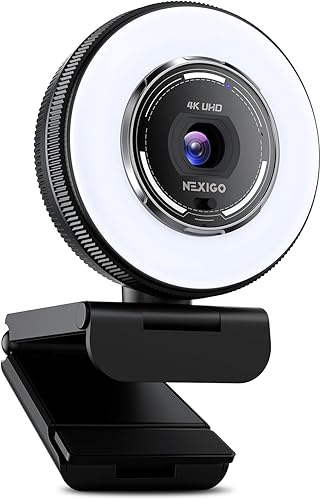
- 4K video and 1080p at 60 fps
- Dual noise-reducing microphones
- Tri-tone adjustable ring light
- Built-in privacy shutter
The N680E Pro combines dual noise-reducing microphones with a built-in ring light. Its light has three color temperature modes and stepless brightness control.
Pros
- Built-in adjustable ring light
- Dual noise-reducing microphones
- PDAF autofocus
Cons
- Output resolution depends on camera software
- Ring light adds another control to manage
The N680E Pro suits a desk that needs its own light source. It pairs dual noise-reducing microphones with a built-in ring light offering three color temperatures and stepless brightness control.
It supports 4K video and 1080p at 60 fps, though output resolution depends on the camera software. Its built-in privacy shutter blocks the lens, and the camera connects through USB-A.
EMEET PIXY: Best for moving presenters

- 4K main camera with PDAF
- Three-microphone array
- AI tracking with pan and tilt
- Multiple audio modes
The PIXY is built for a presenter who moves around the frame, with AI tracking and a three-microphone array. EMEET Studio offers separate modes for live streaming, noise cancellation and original sound.
Pros
- AI tracking with pan and tilt
- Three audio modes
- 4K main camera with PDAF
Cons
- Advanced controls use EMEET Studio
- Tracking works best with one main subject
The EMEET PIXY is designed for a presenter who moves while speaking. Its AI tracking uses pan and tilt to follow a person, and its three-microphone array offers Live, Noise Canceling and Original Sound modes through EMEET Studio.
The 4K main camera uses PDAF autofocus. EMEET says tracking works best with one main subject and moderate movement, so a fixed camera may suit a seated meeting better.
Lenovo Performance FHD: Best for wide-angle calls

- 1080p video
- Dual microphones with a 2 m pickup range
- 95° lens and 4x digital zoom
- Sliding privacy shutter
The Lenovo pairs a wide 95° lens with dual microphones that pick up voices within a stated 2 m range. It also includes 4x digital zoom and a sliding privacy shutter.
Pros
- 95° lens for a wider view
- Dual microphones with stated 2 m pickup range
- Windows Hello support
Cons
- 1080p video at 30 fps
- Windows Hello requires compatible Windows hardware
The Lenovo Performance FHD suits a desk where you want a wide view and a stated microphone pickup range. It has a 95° lens, 4x digital zoom and dual microphones that pick up voices within 2 m.
The camera records 1080p video at 30 fps and includes a sliding privacy shutter. It supports Windows Hello, which can be useful if you want face recognition on compatible Windows hardware.
How we compared webcams with built-in microphones
We compared video modes, microphone features, framing controls, privacy options and compatibility details against the needs of someone choosing one webcam for calls or streaming. We gave more weight to clearly described microphone features and practical controls than to resolution alone.
| Product | Best for | Video | Microphones | Connection | Our score |
|---|---|---|---|---|---|
| Logitech MX Brio 4K | detailed video and desk sharing | 4K at 30 fps; 1080p at 60 fps | Integrated dual beamforming noise-reducing | USB-C | 9.1 |
| Anker PowerConf C200 | adjustable framing | 2K | Dual microphones with AI noise cancellation | USB | 8.8 |
| Insta360 Link 2C | auto framing | 4K | USB | 8.4 | |
| Acer 4K Webcam | a compact 4K setup | 4K | Dual digital microphones | USB-C to USB-A | 8.0 |
| Logitech Brio 505 | everyday work calls | 1080p | Dual noise-reduction | USB-C | 7.9 |
| Microsoft Modern Webcam | Microsoft Teams | Up to 1080p | USB-A | 7.8 | |
| NexiGo N680E Pro | built-in lighting | 4K; 1080p at 60 fps | Dual noise-reducing | USB-A | 7.7 |
| EMEET PIXY | moving presenters | 4K main camera | Three-microphone array | USB-C with USB-A adapter | 7.6 |
| Lenovo Performance FHD | wide-angle calls | 1080p at 30 fps | Dual microphones, up to 2 m pickup range | USB-C cable with USB-A adapter | 7.2 |
A built-in microphone is most useful when it fits your seating distance and room. Dual microphones, arrays and noise reduction can help, but they don't make every room quiet or remove the need to check your audio before an important meeting.
For more camera-focused choices, see our guides to webcams for low light and dim rooms and webcams with privacy shutters. If you need audio control close to your mouth, our headset guide for video calls covers that alternative.
What should you check before choosing a webcam microphone?
Match the microphone setup to where you sit and how noisy your room is. A camera-mounted microphone is convenient, but distance and room noise still affect how clearly people hear you.
Is the webcam microphone close enough for your desk?
A webcam mounted on top of a monitor may sit farther from you than a headset microphone. Lenovo specifies microphone pickup within 2 m, and Acer gives a range up to 2.5 m, but your room and speaking volume can affect how well either works in practice.
If you move around, the EMEET PIXY's tracking and microphone array may suit a presentation better than a fixed frame. For a seated call, the Brio 505 or PowerConf C200 keeps the setup simpler.
Does noise reduction match your room?
Noise reduction is described for the MX Brio, PowerConf C200, Link 2C, Acer, Brio 505, N680E Pro and PIXY. These features can help with background sounds, but their presence alone doesn't tell you how each performs in every room.
For frequent calls in a shared space, check your voice with a short recording before the meeting. If room noise remains a problem, a headset may give you more control over microphone placement.
Do you need special software to adjust the camera?
Some features rely on desktop software. The PowerConf C200 uses software to select its viewing angle, while the MX Brio's Fine Controls and the Link 2C's advanced settings also use their respective software.
If you prefer fewer setup steps, consider whether the camera's automatic features cover your needs. The Brio 505 offers auto light correction, and Acer describes a plug-and-play connection without drivers or apps.
Which connection and operating system should you confirm?
Check your computer's ports before choosing a webcam. The MX Brio and Brio 505 connect by USB-C, while the Microsoft Modern Webcam requires a host PC with USB-A.
Compatibility can also matter beyond the connector. The Link 2C does not support ARM-based Windows, while the PowerConf C200 supports Windows 7 or later and macOS 10.11 or later.
What is the best webcam with a microphone for your needs?
Choose the Logitech MX Brio 4K if you want 4K video, dual beamforming noise-reducing microphones and Show Mode. Pick the Anker PowerConf C200 if changing between three viewing angles matters more, or the Logitech Brio 505 for everyday work calls with 1080p video and automatic light correction.
For a moving presenter, consider the EMEET PIXY, while the Acer 4K Webcam adds a magnetic privacy cover and compact design. If your camera needs to cover a wider space, compare our webcams for video conferencing at home before you choose.
Our score weighs specs, features and buyer feedback against what you're shopping for.
Our top 3 picks at a glance
-
1
-
2
-
3
Frequently asked questions
Do webcams with built-in microphones work for meetings?
Yes, a webcam microphone can handle everyday calls when you sit near the camera and the room is fairly quiet. Models here include noise reduction or noise cancellation, which can help limit some background sound.
For a shared or noisy room, a headset can give you more control over what your microphone picks up.
Is a webcam microphone good enough for streaming?
A built-in microphone can work for casual streams, especially if the webcam offers noise reduction and you sit close to it. For voice-focused streams, a separate microphone or headset gives you more options for placement and sound control.
Check that the camera's microphone mode fits your room before you rely on it.
Does a 4K webcam have a better microphone?
No. Video resolution and microphone quality are separate features, so 4K does not guarantee clearer audio.
Compare the microphone details directly, such as whether a webcam has dual microphones, a microphone array or noise reduction.
The Logitech MX Brio, for example, pairs 4K video with dual beamforming noise-reducing microphones.
Should I use a headset with my webcam?
A headset is useful if you take calls in a noisy room, need privacy, or want the microphone close to your mouth. A webcam microphone keeps your desk simpler and can work well for routine calls in a quiet space.
See our headsets for video calls guide if you want to compare that option.
How can I test a webcam microphone before a call?
Record a short sample in your computer's sound settings or meeting app, then listen for your voice level, room echo and background noise. Make sure the webcam is selected as the input device.
Our webcam test guide walks through checking the camera and microphone before a meeting.