9 Best Webcams With a Built-In Privacy Shutter (October 2026)
The best webcams with privacy shutters include the Logitech C920e for straightforward calls, the Acer 4K Webcam for a magnetic cover, and the NexiGo HelloCam Ultra for automatic privacy.
On this page (6 sections)
The Logitech C920e is the best webcam with a privacy shutter for most everyday calls, with a flip-up lens cover, autofocus and two built-in microphones. Pick the Acer for its magnetic cover and 4K video, or a NexiGo HelloCam model if you want the shutter to close automatically.
A privacy cover gives you a physical way to block the camera when a call ends. The best fit depends on whether you prefer to move the cover yourself, want it to close automatically, or need an indicator that shows the camera is active.
For a broader view of camera and audio choices, start with our guide to video conferencing equipment for home offices. You can also compare these picks with our guides to webcams for video conferencing at home and webcams with built-in microphones.
Our picks at a glance
-
1

-
2

-
3

How we chose webcams with privacy shutters
The best webcam with a privacy shutter makes it easy to tell whether the lens is covered. We compared cover styles and considered each camera's stated video, connection and meeting features.
The picks include manual covers that slide, flip or rotate, plus electronic shutters that open and close automatically. We also included a magnetic cover for people who want to remove it when the camera is in use.
Our score weighs specs, features and buyer feedback against what you're shopping for.
Compare the best webcams with privacy covers
The table below highlights differences that affect everyday use: cover style, video format and connection. Check your computer's ports and operating system before choosing.
| Product | Best for | Video | Privacy | Connection | Our score |
|---|---|---|---|---|---|
| Logitech C920e | straightforward calls | 1080p | Attachable flip-up screen | USB | 8.6 |
| Acer 4K Webcam | a magnetic cover | 4K | Magnetic lens cover | USB-C to A cable | 8.0 |
| NexiGo HelloCam Ultra | automatic privacy | 4K | Automatic shutter with manual lock | Plug and play | 7.9 |
| Logitech Brio 505 | business meetings | 1080p | Integrated shutter | USB-C | 7.9 |
| Microsoft Modern Webcam | Teams calls | Up to 1080p | Sliding lens shutter | USB-A host connection | 7.8 |
| NexiGo N680E Pro | a built-in ring light | 4K sensor; 1080p at 60 fps | Built-in shutter | USB-A | 7.7 |
| NexiGo HelloCam Pro | automatic 1080p privacy | 1080p at 60 fps | Automatic shutter | USB | 7.5 |
| Logitech Brio 305 | a rotating cover | 1080p | Rotating shutter | USB-C | 7.2 |
| Lenovo Performance FHD | wide framing | 1080p | Sliding shutter | USB-C cable | 7.2 |
The best privacy shutter webcams for different setups
The Logitech C920e is the highest scoring pick for routine calls, while the other cameras suit preferences such as automatic closure, wide framing or integrated lighting. Choose the cover style first, then decide which extra features matter to you.
Logitech C920e: Best for straightforward calls
- Flip-up privacy screen
- 78° field of view
- Autofocus
- Two omnidirectional microphones
A 1080p webcam with a visible cover, autofocus and two microphones for everyday calls.
Pros
- Cover visibly flips over the lens
- Autofocus and automatic light correction
- Two built-in microphones
Cons
- Privacy screen is attachable rather than built into the camera
- Fixed 78° field of view
The Logitech C920e suits video calls where a simple, visible cover matters more than an automatic mechanism. Its attachable screen flips up and down, so you can check at a glance whether it covers the lens.
Autofocus and automatic light correction help keep the image clear as lighting changes. The fixed 78° view frames one person while leaving room to show a project or another object.
Two omnidirectional microphones capture audio from up to 1 m away. That can be convenient for a direct call, though a dedicated headset may be a better fit if you need to manage room noise or keep audio private.
Choose the C920e for a manual cover and USB connection. If you want an integrated shutter that blocks the lens, compare it with the Logitech Brio 505.
Acer 4K Webcam: Best for a magnetic cover
- 4K video
- Magnetic privacy cover
- PDAF autofocus
- USB-C to A connection
A compact 4K webcam with a magnetic lens cover and an included USB-A adapter.
Pros
- Cover snaps over the lens with magnets
- 4K video and PDAF autofocus
- USB-A adapter included
Cons
- Cover is separate from the camera body
- Check your port and cable setup before choosing
Acer's 4K Webcam uses a magnetic cover that snaps over the lens. Its removable design may appeal if you prefer a separate cap over a sliding or rotating mechanism.
The camera pairs that cover with a 4K sensor and PDAF autofocus. Acer includes a USB-C to A cable and USB-A adapter, which gives you a USB-A connection option on a compatible computer.
Its microphones are described for voice pickup from up to 2.5 m away, and the camera works with Windows, Mac and ChromeOS. It can suit calls and recording, though the magnetic cover needs a place to go when removed.
Pick Acer if you want a magnetic cap and 4K video. For more USB-C options, see our USB-C webcam guide.
NexiGo HelloCam Ultra: Best for automatic privacy
- Automatic electronic shutter
- Manual lock
- Windows Hello support
- 4K video
The electronic shutter opens when the camera is in use and closes when the call ends, with a manual lock.
Pros
- Automatic close after calls
- Manual privacy lock
- Windows Hello support on Windows 10 and 11
Cons
- Windows Hello is limited to Windows 10 and 11
- Confirm software behavior for your call setup
NexiGo HelloCam Ultra suits people who want the camera cover to respond to camera use. Its electronic shutter opens when the camera is in use and closes when the call ends, and a manual lock lets you secure the cover at other times.
This model supports Windows Hello facial recognition on Windows 10 and 11. It offers 4K video and 1080p at 60 fps, which may suit people who move between work calls and streaming.
The automatic behavior depends on how the camera is used, so check that it works as expected with your call software. The manual lock adds a way to cover the lens when you want privacy outside a call.
Choose the Ultra if automatic closure and a manual lock are priorities. If 1080p is enough, the HelloCam Pro offers automatic shutter operation in a simpler video format.
Logitech Brio 505: Best for business meetings

- Integrated privacy shutter
- 1080p video
- Auto-framing
- USB-C
A 1080p meeting webcam with an integrated shutter, automatic light correction and auto-framing.
Pros
- Integrated shutter fully blocks the camera
- Certified for Teams, Zoom and Google Meet
- Auto-framing and Show Mode
Cons
- USB-C connection
- Auto-framing is a software feature
The Logitech Brio 505 has an integrated shutter that blocks the camera when closed. That built-in design is convenient if you want the cover attached to the webcam rather than kept separately.
Its 1080p video, automatic light correction and dual noise-reduction microphones are aimed at video meetings. Auto-framing keeps the camera centered as you stand and move, while Show Mode tilts the camera to share physical items.
The Brio 505 connects over USB-C and is certified for Microsoft Teams, Zoom and Google Meet. It fits a work desk where meeting features matter alongside lens privacy.
Choose it for a built-in cover and meeting features. Our Brio 505 vs Brio 500 comparison covers the related model distinction.
Microsoft Modern Webcam: Best for Teams calls

- Sliding privacy shutter
- 1080p video
- 78° field of view
- LED status light
A 1080p webcam for Teams calls with a sliding shutter and a light that shows when the camera is on.
Pros
- Easy-to-slide lens cover
- LED camera status light
- Mounts on monitor, laptop, desk or tripod
Cons
- Requires a host PC with USB-A
- Certified for Microsoft Teams
Microsoft Modern Webcam is a straightforward option for Teams calls with a sliding shutter. Its LED status light gives you a visual cue when the camera is on.
The webcam supports up to 1080p video and has a 78° field of view. Its mounting system can attach to a monitor, laptop, desk or tripod.
It needs a host PC with a USB-A connection. Choose it if you want a physical slider and active-camera light for a Teams-centered setup.
NexiGo N680E Pro: Best for a built-in ring light
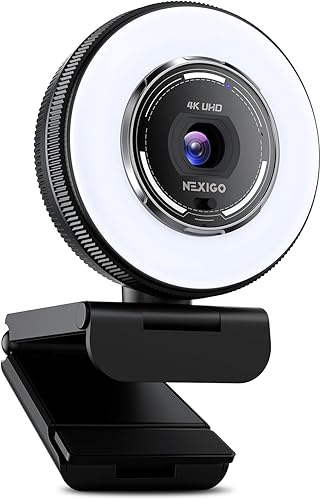
- Built-in privacy shutter
- Adjustable ring light
- 4K sensor
- PDAF autofocus
A webcam with a privacy shutter and a three-tone ring light with dial-based brightness control.
Pros
- Built-in cover blocks the lens
- Three light color modes and adjustable brightness
- PDAF autofocus
Cons
- USB-A connection
- Output resolution depends on camera software
NexiGo N680E Pro combines a built-in privacy shutter with a ring light. The light offers three color temperature modes and brightness control through an outer dial, so it may suit a desk where lighting needs adjustment.
The camera has a 4K sensor and PDAF autofocus, with 1080p at 60 fps streaming also described. It connects over USB-A and works with common meeting and streaming platforms.
Its 80° field of view and flexible clip allow angle adjustments, while a 1/4 in tripod mount supports another mounting option. Output resolution depends on the camera software you use.
Pick this model if adjustable built-in lighting is useful along with lens coverage. For a wider camera comparison, our video conferencing equipment guide covers the rest of a home call setup.
NexiGo HelloCam Pro: Best for automatic 1080p privacy
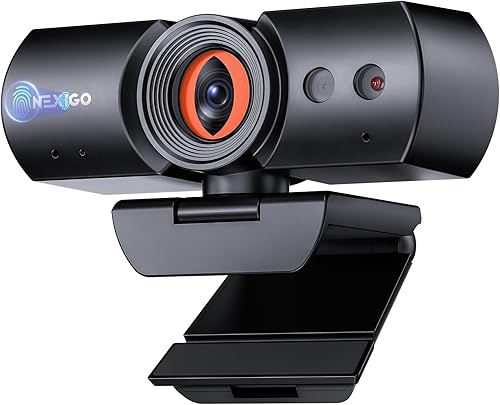
- Automatic electronic shutter
- 1080p at 60 fps
- Autofocus
- Windows Hello support
A 1080p webcam with an automatic cover that opens during calls and closes when they end.
Pros
- Automatic cover operation
- 1080p at 60 fps
- Windows Hello support for Windows 10 and 11
Cons
- Windows Hello is limited to Windows 10 and 11
- No manual lock is specified
NexiGo HelloCam Pro uses an automatic privacy cover that opens during calls and closes when they end. It offers 1080p video at 60 fps instead of 4K.
The Pro also includes autofocus and automatic exposure. Windows Hello is supported on Windows 10 and 11, and its noise-canceling microphones are designed to reduce ambient noise.
Choose it if you want automatic cover movement and do not need 4K. The manual lock feature is specified for the HelloCam Ultra, so the Pro suits people comfortable with automatic operation.
Logitech Brio 305: Best for a rotating cover

- Privacy shutter rotates over lens
- 1080p video
- USB-C
- Visible active-camera light
A 1080p business webcam with a rotating cover and an indicator light when active.
Pros
- Easy-to-use rotating privacy cover
- Visible active-camera indicator
- Certified for Zoom, Teams and Google Meet
Cons
- Fixed focus
- USB-C connection
Logitech Brio 305 has a rotating cover that spins to open or block the lens. An indicator light shows when the camera is active, giving you a status cue during calls.
It records up to 1080p and uses a USB-C connection. The webcam is certified for Zoom, Microsoft Teams and Google Meet, and works with Windows, macOS and ChromeOS.
Its focus is fixed, so it suits a stable desk position. Choose it if you want a twist cover and an active-camera indicator.
Lenovo Performance FHD: Best for wide framing

- Sliding privacy shutter
- 95° lens
- 4x digital zoom
- Windows Hello support
A 1080p webcam with a 95° lens, sliding cover, digital zoom and Windows Hello support.
Pros
- 95° lens with 4x digital zoom
- Sliding privacy cover
- Dual microphones
Cons
- Windows Hello support is described for Lenovo devices
- Wide view may include more of your room
Lenovo Performance FHD is the wide-view choice in this group, with a 95° lens and 4x digital zoom. The sliding privacy shutter gives you a manual way to block the camera when you're not on a call.
The webcam supports 1080p video and Windows Hello facial recognition. Its dual microphones capture voices from up to 2 m away, and it supports monitor or tripod mounting.
A wide lens can include more of your room, so use the digital zoom or adjust placement if you want a tighter frame. Pick it if you need a broad view and manual cover in one webcam.
Which privacy shutter style should you choose?
Choose a manual cover if you want direct control and a visible lens check. Sliding, rotating, flip-up and magnetic covers block the camera, but their motion and whether the cover stays attached differ.
An automatic shutter suits people who want the cover to respond to camera use. The HelloCam Ultra and Pro are described as opening during calls and closing when a call ends, while the Ultra also has a manual lock.
If you need a quick visual cue that the camera is active, Microsoft Modern Webcam and Logitech Brio 305 include indicator lights. An indicator helps you see camera status, while a closed shutter physically covers the lens.
What should you check before buying a webcam with a shutter?
Check the webcam's connection type and make sure your computer has a matching port or adapter. The Acer includes a USB-A adapter, while the Brio 505 and Brio 305 use USB-C.
Confirm the operating system requirements for features you plan to use. Windows Hello is limited to Windows 10 and 11 on the NexiGo HelloCam models, and the Lenovo's facial recognition is described for Lenovo devices.
Think about where the cover will go when open. Attached sliders and rotating covers stay with the camera, while the Acer's magnetic cap is removable.
Which webcam with a privacy shutter fits your setup?
Choose the Logitech C920e for a straightforward manual cover, autofocus and built-in microphones. Pick the NexiGo HelloCam Ultra if you want automatic closure plus a manual lock, or the Acer 4K Webcam for a magnetic cover and 4K video.
If your calls are mostly with Teams, compare the Microsoft Modern Webcam's sliding shutter and status light. For a broader setup, browse our everyday webcam guide and webcam privacy cover guide.
Our top 3 picks at a glance
-
1
-
2
-
3
Frequently asked questions
What is the best webcam with a privacy shutter?
The Logitech C920e is a strong everyday choice if you want a visible cover, autofocus and built-in microphones. For a cover that closes automatically after calls, compare the NexiGo HelloCam Ultra and HelloCam Pro.
Check the connection and operating system requirements before you choose.
Are automatic webcam shutters better than sliding covers?
Automatic shutters close when a call ends, which reduces the chance of forgetting to cover the camera. Sliding or flip-up covers give you direct control and make the lens position easy to see.
Pick the style you will remember to use, and confirm how it behaves with your meeting apps.
Do webcams with privacy shutters also have microphone privacy?
No. A camera shutter covers the lens, but it does not mute or disconnect the microphone.
If you need to stop audio capture, mute the mic in your meeting app or disconnect the webcam.
A separate headset can give you another way to manage call audio.
Can I use a webcam privacy cover with a laptop?
Yes, if the webcam is mounted on the laptop and the cover can move without hitting the screen or lid. Some cameras have an attached shutter, while others use an attachable or magnetic cover.
For a built-in laptop camera, see our guide to webcam privacy covers.


