9 Best Webcams for Low Light (October 2026)
The best webcams for low light and dim rooms include the OBSBOT Meet 2 for a compact camera with a larger sensor, the Logitech Brio 4K for backlit rooms, and the Insta360 Link 2 Pro for dim rooms and movement.
On this page (4 sections)
The best webcam for low light for most people is the Insta360 Link 2 Pro, which has a 1/1.3-inch sensor and a stated low-light feature. We compared sensor and lighting features to help match a camera to your room and call setup.
A webcam can improve how it handles dim scenes, but it can't make a dark room bright on its own. If you can add a lamp near your screen, do that before expecting a camera upgrade to fix severe darkness.
Our picks at a glance
-
1

-
2

-
3
Which webcams work best in low light?
The OBSBOT Meet 2 ranks first for its 1/2-inch sensor, 4K video, AI framing and autofocus. The models below cover other needs, including light correction, built-in illumination and tracking.
OBSBOT Meet 2: Best for a compact camera with a larger sensor
- 1/2-inch CMOS sensor
- 4K video
- AI framing
- Autofocus
The 1/2-inch sensor is designed to capture more light, and the compact camera adds AI framing and autofocus.
Pros
- 1/2-inch sensor
- Compact 40.5 g design
- AI framing and autofocus
Cons
- Can get hot during use
- No built-in light
The OBSBOT Meet 2 combines a 1/2-inch CMOS sensor with 4K video, AI framing and autofocus. OBSBOT describes the sensor as having more light-sensitive area to support brighter, clearer images.
Its compact design weighs 40.5 g, which can suit a mobile setup. OBSBOT says the camera may get hot during use and that this is normal.
Logitech Brio 4K: Best for backlit rooms
- RightLight 3 with HDR
- 4K video
- Automatic light adjustment
- Three field of view presets
RightLight 3 with HDR is designed to adjust the image in low-light and backlit situations. The three view presets let you set how much of the room appears.
Pros
- Automatic light adjustment with HDR
- Three field of view presets
- Privacy shade
Cons
- Model is marked discontinued
- No sensor size is specified
The Logitech Brio 4K uses RightLight 3 with HDR to adjust lighting in low-light and backlit situations. Its 4K video and three field-of-view presets let you choose how much of your room appears.
The model is discontinued, so check availability and support before deciding. Its sensor size isn't specified here, which makes direct sensor comparisons with the Insta360 and Acer options difficult.
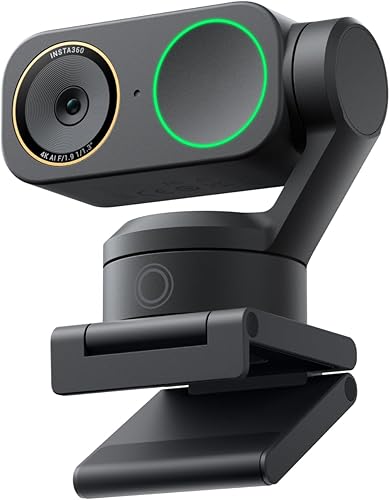
Insta360 Link 2 Pro: Best for dim rooms and movement
- 1/1.3-inch sensor
- 4K video
- Low-light performance
- AI tracking
The large sensor and stated low-light performance make this a strong fit for dim rooms. AI tracking follows movement around the room.
Pros
- Large 1/1.3-inch sensor
- Low-light performance is a stated feature
- AI tracking follows movement
Cons
- Not compatible with ARM-based Windows systems
- Higher-end camera features may be more than a fixed desk needs
The Insta360 Link 2 Pro pairs a 1/1.3-inch sensor with 4K video and a stated low-light feature. Its physical pan-and-tilt tracking follows movement around the room.
Directional microphones and HDR are additional features. The large sensor and low-light feature make it a fit for a dim room where you move during calls or streams.
This webcam supports Windows, macOS, Chrome OS and Linux, with an exception for ARM-based Windows systems. Check your computer platform before choosing it.
Acer 4K Webcam: Best for a larger sensor on a fixed desk

- Sony 1/2-inch sensor
- 4K video
- Low-light performance
- PDAF autofocus
A Sony 1/2-inch sensor, 4K video and PDAF autofocus suit a fixed setup where a compact USB webcam is preferred.
Pros
- Large 1/2-inch sensor
- Low-light performance is a stated feature
- USB-C to USB-A connection
Cons
- No built-in light
- No listed AI framing
Acer's 4K Webcam uses a Sony 1/2-inch CMOS sensor and is described as delivering low-light performance. It has PDAF autofocus and connects over USB-C with a USB-A adapter.
This is a fixed-desk option if you want a compact webcam with a 1/2-inch sensor. It has no built-in light, so a desk lamp may still help in a particularly dark room.
Insta360 Link 2C Pro: Best for stationary framing

- 1/1.3-inch sensor
- 4K video
- Low-light performance
- Auto framing
This fixed-camera option shares the 1/1.3-inch sensor and low-light feature with auto framing for one person or a group.
Pros
- Large 1/1.3-inch sensor
- Auto framing
- 4K video
Cons
- Not compatible with ARM-based Windows systems
- No physical pan and tilt tracking
The Insta360 Link 2C Pro uses the same 1/1.3-inch sensor as the Link 2 Pro and has a stated low-light feature. It uses auto framing rather than physical pan and tilt, which suits a mostly fixed camera position.
It records 4K video and includes HDR, directional microphones and software controls. Compatibility excludes ARM-based Windows systems and Windows Hello Face Recognition.
NexiGo N680E Pro: Best for adding light at the camera
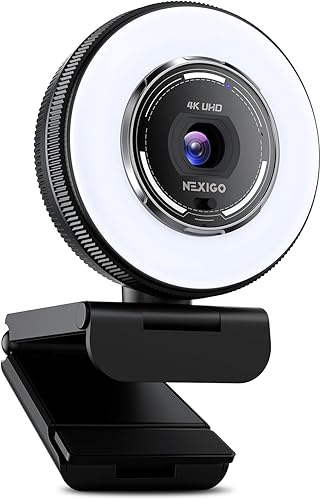
- Built-in adjustable ring light
- Three color temperature modes
- 4K sensor
- PDAF autofocus
The adjustable ring light provides a direct way to add illumination at the camera, with three color modes and stepless brightness control.
Pros
- Built-in light with adjustable brightness
- Three color temperature modes
- PDAF autofocus
Cons
- Ring light adds a visible light source to the setup
- Output resolution depends on camera software
The NexiGo N680E Pro adds light at the camera with a built-in ring light. You can select from three color temperature modes and adjust the brightness with the outer dial.
It also has a Sony 1/2.5-inch 4K sensor and PDAF autofocus. Its stated 1080p 60 fps output depends on the camera software, so check that your software supports the mode you need.
Dell WB7022 4K Webcam: Best for changing room light

- 4K Sony STARVIS CMOS sensor
- HDR
- Image signal processing
- AI auto framing
The 4K Sony STARVIS sensor captures more light, while image processing is designed for extreme lighting conditions. Dell Peripheral Manager offers image adjustments.
Pros
- Sony STARVIS sensor
- HDR and image signal processing
- Adjustable brightness, sharpness, contrast and saturation
Cons
- Separate mount
- No specific sensor size is given
The Dell WB7022 pairs a 4K Sony STARVIS CMOS sensor with HDR and image processing designed for extreme lighting conditions. AI auto framing keeps you centered, and Dell's software can adjust brightness, sharpness, contrast and saturation.
The sensor's size isn't specified, so it's difficult to compare its light capture area directly. It may suit a video-call desk where image controls and framing matter alongside dim-room handling.
EMEET PIXY: Best for moving subjects with extra setup

- 4K main camera
- 1/2.55-inch sensor
- AI exposure adjustment
- PTZ tracking
An auxiliary AI camera helps adjust autofocus and exposure, while the PTZ design tracks movement. EMEET notes that low light can still produce a grainy or dark image.
Pros
- AI camera adjusts exposure
- Pan and tilt tracking
- PDAF focus
Cons
- Maker notes that image quality depends on lighting
- Tracking works best for a single person or moderate movement
The EMEET PIXY combines a 4K main camera with a 1/2.55-inch sensor and an auxiliary AI camera that helps adjust focus and exposure. Its PTZ tracking can follow movement, which is useful for presentations or other scenes where you move.
EMEET says image quality depends on lighting, and low light can make the image grainy or dark. For a stationary call in a very dim room, a lamp or the NexiGo's built-in ring light may be a more direct way to add light.
Logitech Brio 501: Best for Full HD calls

- Full HD 1080p
- RightLight 4
- Auto framing
- Privacy shutter
RightLight 4 adjusts to the lighting in your environment, including low-light conditions. Its 1080p resolution suits calls where Full HD is enough.
Pros
- RightLight 4 auto light correction
- Integrated privacy shutter
- Auto framing
Cons
- Full HD rather than 4K
- No sensor size is specified
The Logitech Brio 501 is a Full HD option with RightLight 4 auto light correction for low-light scenes. Its 1080p resolution suits calls where Full HD is enough.
It also includes auto framing, dual noise-reduction microphones and an integrated privacy shutter. The sensor size isn't specified, so consider it for its light correction feature rather than a sensor-size comparison.
What should you compare before choosing a low-light webcam?
Compare sensor size, light correction and built-in illumination before focusing on resolution alone. Those features show how a camera is intended to handle a dim scene.
Does a larger sensor help a webcam in low light?
A larger sensor can capture more light, so it is a useful point of comparison when two webcams have similar setups. The Insta360 Link 2 Pro and Link 2C Pro state a 1/1.3-inch sensor, while the Acer and OBSBOT options state 1/2-inch sensors.
Sensor size is only one part of image quality. Room lighting, camera settings and software also affect what appears on screen.
Is light correction useful in a dim room?
Light correction can adjust the image for low-light or backlit conditions without adding another lamp. Logitech describes RightLight 3 with HDR on the Brio 4K for those situations and RightLight 4 on the Brio 501 for automatic adjustment.
Dell also describes image processing for extreme lighting conditions. These features can help manage changing light, but adding light to your face can still make a practical difference.
When is a ring light the better choice?
A built-in ring light is a practical option when the area around your face is underlit and you want illumination attached to the webcam. The NexiGo N680E Pro lets you adjust brightness and select among three color temperature modes.
A small camera light may not brighten the whole room. If your background is also dark, use a separate room or desk light.
How can you improve webcam video in a dim room?
Adding light near your face is often the simplest improvement, even with a webcam that includes low-light features. Place a lamp near the monitor and avoid relying on a bright window or screen behind you as the main light source.
Check your camera app for exposure, brightness and HDR controls. Change one setting at a time so you can see whether it improves the image without making your face washed out.
If the image looks grainy, our webcam grain troubleshooting guide walks through lighting and settings checks. For a wider setup plan, see video conferencing equipment for a home office.
Which low-light webcam should you choose?
Choose the OBSBOT Meet 2 for a compact camera with a 1/2-inch sensor, or the Logitech Brio 4K for RightLight 3 with HDR and stated low-light adjustment. Pick the Insta360 Link 2 Pro for its larger 1/1.3-inch sensor and tracking, or the NexiGo N680E Pro if a built-in light matters most.
If your laptop camera is also part of the problem, compare these picks with our guide to webcams for laptops with a weak camera. You can also review webcams for video conferencing at home to weigh call features beyond low-light handling.
Our top 3 picks at a glance
-
1
-
2
-
3
Frequently asked questions
What makes a webcam better in low light?
A larger image sensor can capture more light, and light correction can adjust how the camera handles a dim or backlit scene. Some webcams add a built-in light.
Check the specific features and sensor size when available, and remember that a camera's low-light label does not mean it can replace room lighting.
Is a 4K webcam always better in a dark room?
No. Resolution describes image detail, while low-light performance also depends on the sensor and image processing.
The Insta360 Link 2 Pro pairs 4K video with a 1/1.3-inch sensor and a stated low-light feature.
A 4K label alone doesn't tell you how bright the image will look.
Should I choose a webcam with a built-in light?
A built-in light can add illumination close to the camera, which may help when your desk area is dim. The NexiGo N680E Pro has a ring light with three color temperature modes and adjustable brightness.
If you need broader room lighting, consider whether a small camera light will be enough for your setup.
Why does my webcam look grainy in a dim room?
Low light can leave a webcam with too little image information, which may appear grainy or dark. Adding light near your face is a useful first step, then check camera exposure and resolution settings.
Our guide to why a webcam looks grainy covers more troubleshooting steps.


