Lenovo 300 FHD Webcam vs Logitech Brio 100: Which Is Better? (November 2026)
Pick the Lenovo 300 FHD if you move between rooms and want a wide shot with strong audio; pick the Logitech Brio 100 if you sit in one dim spot and want balanced light. The Lenovo 300 FHD webcam vs Logitech Brio 100 choice comes down to framing and light more than raw resolution.
On this page (8 sections)
Pick the Lenovo 300 FHD for most desks: its 95-degree lens, 360-degree rotation and dual mics handle meetings, streaming and recordings without much fiddling. The Logitech Brio 100 is the better fit when your workspace is short on light and you want a face that looks evenly lit without extra lamps.
Both shoot full HD 1080p at 30fps, so the resolution is not what separates them. The Lenovo 300 FHD webcam vs Logitech Brio 100 comparison comes down to lens width, mounting flexibility, light handling and audio.
The Lenovo scores 9.3 and the Brio 100 scores 9.1 here. That gap is small, and one clear need flips the choice.
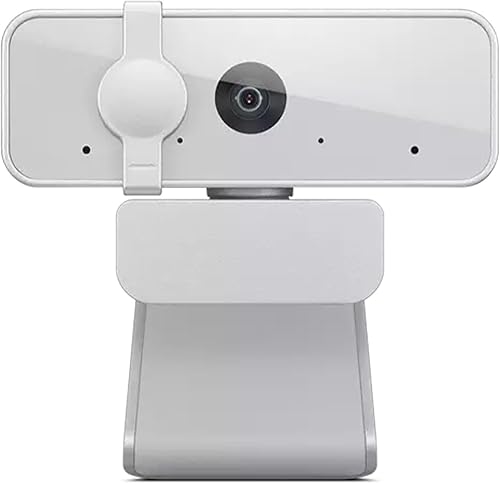

How do the two webcams compare at a glance?
The Lenovo 300 FHD wins on flexibility and audio; the Brio 100 wins on light balance and a tidy footprint. Each is a simple USB webcam you plug into a laptop or monitor and use.
| Feature | Lenovo HD 1080p Webcam | Logitech Brio 100 |
|---|---|---|
| Resolution | 1080p at 30fps | Full HD 1080p |
| Lens | 95-degree wide angle | Wide angle |
| Mount | Monitor clip, tilt, 360-degree rotation, tripod support | Compact clip |
| Microphones | Two stereo mics | One built-in mic |
| Privacy | Physical shutter | Slide cover |
| Light handling | Automatic exposure control | RightLight boost |
Neither cam asks much of you at setup. The Lenovo works over USB 2.0 on Windows and Mac and uses UVC encoding, so conferencing software recognizes it without a driver hunt.
The Brio 100 is plug-and-play with Teams, Zoom and Google Meet. The bigger decision is how you sit and where your camera points.
Read the sections below against your own desk.
Which webcam frames you better?
The Lenovo 300 FHD frames more of the room; the Brio 100 gives a tighter, more standard shot. Framing decides how much background your call sees.
The Lenovo's 95-degree wide-angle lens pulls in more of the scene. That helps when you share a desk, present at a whiteboard or stream with a guest beside you.
It also shows more of your room, so a cluttered corner becomes part of the picture. Logitech gives the Brio 100 a wide-angle lens too, but the body is compact and the framing stays more conventional.
A solo video call rarely needs a wide field.
Both cams shoot in a 16:9 aspect ratio, which matches the widescreen window most meeting apps use. So neither gives you letterboxing or a cropped edge in Zoom or Teams.
The difference is how much of the scene sits inside that 16:9 frame, not the shape of the frame itself.
When the wide lens helps and when it hurts
Choose the Lenovo if you move between a desk, a standing spot and a table where another person joins you. The 360-degree rotation lets you swing the camera without unclipping it.
Tilt controls set the vertical angle, and tripod support lets you lift it off the monitor entirely. Skip the wide lens if your room is busy or your desk sits near a doorway.
A narrower field keeps the background calm and puts more pixels on your face.
Reframing without moving the mount
The Lenovo's rotation is the practical feature here. Point it at the door when someone walks in, or angle it toward your keyboard when you show work on a call.
Its 2x digital zoom crops the frame rather than moving closer, so use it only when you cannot reposition the camera. That crop matters for the wide lens.
Zooming in on a 95-degree shot trims the edges, but it also trades away detail, so it is a fallback rather than a replacement for turning the camera or stepping closer. The Brio 100 stays put once you clip it.
That simplicity suits a fixed desk setup where the camera should not wander.
Which webcam handles dim rooms better?
The Logitech Brio 100 is the low-light pick because RightLight lifts brightness and cuts shadows; the Lenovo relies on automatic exposure. Choose by the light you actually work in.
Logitech says RightLight boosts brightness by up to 50%, reducing shadows so you look your best compared with previous-generation Logitech webcams. That matters in a spare room with one lamp, an early call before sunrise or a desk that faces away from the window.
The Lenovo 300 FHD uses automatic exposure control. In a bright office or a room with a window in front of you, that is enough.
In a dark corner, the picture gets noisier unless you add light.
Add light rather than fight it
A cheap desk lamp aimed at your face fixes most dim-room problems for either cam. If you would rather not buy a lamp, the Brio 100's brightness boost is the easier route.
The Lenovo's wide lens also pulls in more of the room, including its dimmer corners. A wide shot in a dark room looks darker overall than a tight shot in the same spot.
What each light system does on its own
Automatic exposure on the Lenovo adjusts the whole picture to the room's average light. That keeps a bright window from blowing out the shot, but it cannot invent detail in a face lit from behind.
The Brio 100's RightLight works on the face itself, lifting brightness and easing shadows, which is why it suits a backlit desk where your window sits behind you. If your light is even and plentiful, the Lenovo's exposure control needs no help.
If your light is uneven, RightLight does the repair work without a lamp.
Which webcam sounds better on calls?
The Lenovo 300 FHD wins on audio with two stereo microphones; the Brio 100 uses one built-in mic. For long meetings, recordings and streaming, the Lenovo has the edge.
Lenovo fits full-stereo dual mics, and the company says they deliver clear, crisp sound for meetings, video recordings and long-distance calls. Stereo audio also suits a stream or a recorded presentation where sound needs some width.
The Brio 100's single built-in microphone does the everyday job. Teammates hear you in a Zoom or Teams call, but you should not expect the same presence or stereo field as the Lenovo.
The Brio 100 lists AAC and PCM as its supported audio formats, so it sends a clean signal to the apps that matter for calls.
When audio decides it
If you host calls, record tutorials or stream, the Lenovo's dual mics save you buying a separate microphone at the start. If you mostly listen and talk briefly in meetings, the Brio 100's mic is enough.
Neither cam replaces a dedicated microphone for podcasting. Treat the built-in audio as good enough for meetings, not studio work.
Mics at a shared desk and in recordings
A stereo pair on the Lenovo picks up sound across a wider arc, which helps when a second person sits beside you at the table. One mic on the Brio 100 works best when you sit close and face the camera.
For a recorded walkthrough where you narrate while pointing the Lenovo at a whiteboard, the dual mics keep your voice steady as the camera turns. The Brio 100 stays aimed at you, so its single mic is matched to its fixed frame.
Which webcam fits your desk and setup better?
The Brio 100 takes less room and blends into a tidy desk; the Lenovo gives you more ways to place it. Think about the space around your monitor.
Logitech keeps the Brio 100 compact. It clips to a laptop or monitor, comes in colors that suit a home office, and its slide cover closes with one finger.
The body is made with at least 34% post-consumer recycled plastic, which matters if you care about materials.
Lenovo's cam is a little larger and weighs 130 g. Its monitor clip works the same way, but the tilt and rotation add bulk and adjustability in equal measure.
It also supports a tripod, so it can leave the monitor for a shelf or a stand.
Cables and ports
Both are wired USB webcams. The Lenovo uses a USB 2.0 cable and works on Windows and Mac.
The Brio 100 uses USB-A and lists laptops and personal computers as its compatible devices. If your laptop has only USB-C ports, plan for an adapter with either cam.
A short USB extension cable also helps when your monitor's ports sit awkwardly.
Privacy cover style
The Lenovo has a physical privacy shutter, and the Brio 100 has a slide cover. Both hide the lens when you are off camera.
The slide is quicker to check by feel, while the Lenovo's shutter is easy to see from across the desk.
Placing the Lenovo when the clip will not reach
The Lenovo's tripod support is the reason it leaves the monitor more easily than the Brio 100. A short tripod puts the camera at eye level on a bookshelf or beside a second screen, which fixes the low-angle look you get when a cam sits under a monitor.
The 360-degree rotation then lets you aim it back at your chair without moving the stand. The Brio 100 stays clipped, so its placement is decided by your monitor's edge.
Which webcam should you buy?
Buy the Lenovo HD 1080p Webcam for most people: the wide lens, rotating mount, dual mics and tripod support cover more situations. It is the higher-scored pick here and the better default for a desk that changes through the week.
Buy the Logitech Brio 100 if your workspace is dim and you want RightLight to handle the shadows without buying a lamp. It is also the neater choice for a small, fixed desk where a compact clip and slide cover matter more than a wide frame.
Pick the Lenovo 300 FHD if you...
- Move between a desk, a standing spot and a shared table
- Want stereo audio for meetings, recordings or streaming
- Might use a tripod or point the camera at a whiteboard
- Have decent light in the room already
Pick the Logitech Brio 100 if you...
- Work in a room with weak or uneven light
- Want a small camera that disappears beside your monitor
- Prefer a slide cover you can close without looking
- Use Teams, Zoom or Google Meet and want simple plug-and-play
How we scored these webcams
Our score weighs specs, features and buyer feedback against what you are shopping for in an everyday webcam. The Lenovo 300 FHD earns 9.3 for its wide lens, rotation and dual mics.
The Brio 100 earns 9.1 for RightLight and its compact build, with a single mic holding it just behind.
We did not test either camera. We compared the published specs and features, then weighed them against what most people want from a webcam for work calls, streaming and family video chats.
That is also how we approach every comparison on the site.
If you are weighing resolution upgrades, our 1080p vs 4K webcam guide explains when the extra pixels help and when they do not. For buyers looking one tier up, the Logitech Brio 505 vs Brio 500 comparison covers what changed in that pair.
And if you are deciding between a budget Logitech cam and a step-up model, the Logitech C920e vs C920x breakdown helps.
If you want a camera with more control over background blur and framing, the Anker PowerConf C200 vs Logitech C920 comparison is the next place to look.
The verdict: which webcam fits most desks?
The Lenovo HD 1080p Webcam is the better everyday webcam for most buyers. Its 95-degree lens frames a room or a shared desk, the 360-degree rotation and tilt let you reframe without moving the clip, and the dual stereo mics cover calls, recordings and streaming.
The tripod support adds a placement option the Brio 100 does not offer. The Logitech Brio 100 is the right camera for a dim, fixed desk.
RightLight lifts brightness and softens shadows, and the compact body and slide cover keep the setup tidy. Pick it when light is your main problem and you do not need stereo audio or a rotating mount.
So the decision rule is simple. Take the Lenovo for flexibility and sound.
Take the Brio 100 for a small, dim workspace where light balance matters more than a wide frame.
Frequently asked questions
Is the Lenovo 300 FHD webcam better than the Logitech Brio 100?
The Lenovo 300 FHD scores higher overall for most buyers because of its wide lens, 360-degree rotation and dual mics. The Brio 100 is the better pick when your desk sits in dim light and you want RightLight to lift the shadows on your face.
Does the Lenovo 300 FHD webcam have stereo audio?
Yes. Lenovo fits two full-stereo microphones, so callers hear you in stereo and the sound works well for recordings.
The Brio 100 uses a single built-in mic.
Which webcam is easier to mount on a monitor?
Both clip onto a monitor. The Lenovo adds 360-degree rotation, tilt controls and tripod support, so you can point it at a whiteboard or set it on a stand.
The Brio 100 keeps a compact clip.
Do both webcams have a privacy shutter?
Yes. The Lenovo has a physical privacy shutter that covers the lens when it is not in use.
The Brio 100 has a slide cover for the same job.
Which webcam handles low light better?
Logitech says RightLight on the Brio 100 boosts brightness by up to 50% and reduces shadows compared with earlier Logitech webcams. The Lenovo 300 FHD uses automatic exposure control, so bright rooms suit it fine.


