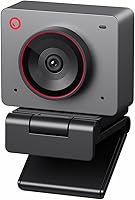
Insta360 Link 2 vs Link 2 Pro: Which to Choose? (November 2026)
Pick the Insta360 Link 2 for most desks, and the Link 2 Pro for the largest sensor and directional mics. The Link 2 wins on score and price tier, while the Pro is the better fit for dim rooms and solo streamers.
On this page (7 sections)
Pick the Insta360 Link 2 for most desks, and the Insta360 Link 2 Pro when light is poor or you stream alone. The Link 2 scores 9.3 here against 9.2 for the Pro, and its 1/2-inch sensor, HDR video and AI noise-canceling mic handle video calls and streaming well.
The Pro answers with a larger 1/1.3-inch sensor and a dual directional mic system. Those two changes matter more than any other difference between these webcams.
Both are 4K PTZ models with AI tracking, gesture control and the same Link Controller software. This comparison sorts out which one earns a place on your monitor.


Insta360 Link 2 vs Link 2 Pro: what actually differs?
The sensor and the microphone system are the real differences; everything else is shared or close. The Pro's 1/1.3-inch sensor is bigger than the Link 2's 1/2-inch sensor, and its dual mics use beamforming directional pickup.
Both cameras pan and tilt to follow you, both offer Whiteboard Mode and DeskView, and both tilt down for privacy after 10 seconds of inactivity. Neither works with ARM-based Windows or Windows Hello.
The Pro adds Stream Deck integration and a 4K Portrait Mode for vertical video. The Link 2 keeps the same core toolkit without those extras.
A larger sensor gathers more light per pixel, so the Pro's low-light advantage comes from hardware rather than software tricks. The rest of the gap comes down to audio and workflow.
Sensor size and low-light video
The 1/1.3-inch sensor in the Link 2 Pro is the headline change. Insta360 says it delivers cleaner video and excellent low-light performance, which is the claim to weigh if your desk sits away from a window.
The Link 2's 1/2-inch sensor still captures 4K with HDR and holds up in low light. In a bright office the two cameras land close together, because HDR does most of the work on harsh backlight.
Dim rooms and evening streams separate them. A bigger sensor means less grain and cleaner color when the lights are down, and that is where the Pro's extra cost buys something you can see.
The aperture numbers are close, with the Link 2 at f/1.8 and the Pro at f/1.9. The gap in image quality comes from sensor area, not lens speed, so don't read the smaller f-stop on the cheaper camera as a low-light win.
Audio: AI noise canceling vs directional pickup
The Link 2 uses AI noise-canceling algorithms to filter background sound. That helps in a busy room, a shared office or a home with a dishwasher running nearby.
The Link 2 Pro uses a redesigned dual-mic system with beamforming directional pickup. It focuses on the voice in front of the lens and reduces noise from the sides, which suits a single presenter at a desk.
Neither mic replaces a dedicated microphone for podcast-grade sound. For calls, standups and Twitch chat, both are a step above a laptop mic.
Software, modes and the controls you get
Both cameras run on the free Link Controller software, where you tune framing, bokeh and tracking settings. Both support gesture control and the smartphone app for tracking, zoom and Whiteboard Mode.
The split is in workflow extras. The Pro lists Stream Deck integration and a 4K Portrait Mode for vertical video.
The Link 2 offers DeskView and Whiteboard Mode but not those two.
That matters if you repurpose clips for short-form social posts or want camera presets on a hardware deck. For a straight call or stream, the shared software layer is what you'll use most.
Where the Insta360 Link 2 wins
The Link 2 wins on overall value and on everyday video calls. Our score puts it at 9.3, just above the Pro, because it covers the core 4K PTZ feature set without the Pro's larger sensor.
Its PDAF autofocus locks onto a subject quickly, so hands moving across a desk or you leaning in and out of frame stay sharp. HDR keeps a bright window from washing out your face.
The AI noise-canceling mic is enough for Zoom, Teams and Twitch without adding a separate microphone. Gesture control and the smartphone app handle tracking and zoom without a keyboard shortcut.
Natural bokeh from the Link Controller software gives a DSLR-like depth of field for calls where you want the background softened. Whiteboard Mode and DeskView cover teaching and product demos.
This is the camera to pick when your room has decent light and you want one device for meetings and streaming. Our Insta360 Link 2C review covers the cheaper sibling if you want to see how the line scales down.
Who the Link 2 suits
The Link 2 fits a home office with a window, a hybrid worker who joins calls from a desk and a streamer who wants tracking without a big spend. It also suits anyone who wants privacy mode without remembering to cover the lens.
It's the better first webcam upgrade from a laptop camera. You get 4K, HDR, autofocus and tracking in one unit that mounts on a monitor with the included magnetic mount.
Where the Insta360 Link 2 Pro wins
The Link 2 Pro wins in dim rooms, on solo streams and in creator workflows. Its 1/1.3-inch sensor produces cleaner video when light is low, and its directional mics isolate a single voice better than the Link 2's room-wide noise filtering.
Stream Deck integration is the practical extra for anyone who runs a stream. You can switch modes, trigger presets and control multiple cameras from the deck instead of reaching for the app or using gestures.
The Pro also adds 4K Portrait Mode for vertical video, which suits short-form clips and social posts. DeskView and Whiteboard Mode are still there for demos and teaching.
Its dual mics with beamforming are the stronger choice for a solo presenter in a noisy room. Directional pickup ignores chatter and clatter off to the side, so your voice stays clear.
If your setup is a single person at a desk, the Pro's advantages stack up. For a shared meeting room where several people speak, the case is weaker.
Who the Link 2 Pro suits
The Pro fits a streamer who already owns a Stream Deck and wants camera control on the same surface. It also suits a creator filming vertical video and a worker whose desk sits in a low-light corner.
It's the better choice when you present alone and want your voice isolated from background noise. A podcaster or solo YouTube host gets more from the directional mics than a family sharing one webcam.
Feature-by-feature comparison
Both webcams share the tracking, gesture and software layer; the Pro adds sensor size, directional audio and workflow controls. Use the table below to see where the money goes.
| Feature | Insta360 Link 2 | Insta360 Link 2 Pro |
|---|---|---|
| Sensor | 1/2 in | 1/1.3 in |
| Resolution | 4K UHD with HDR | 4K UHD with HDR |
| Microphone | AI noise-canceling | Dual mics with beamforming |
| AI tracking | Yes, pan and tilt | Yes, pan and tilt |
| Gesture control | Yes | Yes |
| Smartphone control | Yes | Yes |
| Stream Deck | No | Yes |
| Portrait Mode | No | 4K Portrait Mode |
| Privacy mode | Tilts down after 10 seconds | Tilts down after 10 seconds |
| ARM Windows | Not compatible | Not compatible |
| Windows Hello | Not compatible | Not compatible |
Mounting and setup for both
Both cameras ship with a magnetic mount, a USB-C cable and a USB-C to USB-A adapter, so they work with a USB-C laptop or an older USB-A port. A monitor-top mount keeps the lens at eye level.
Setup runs through the free Link Controller software, where you adjust framing, bokeh and tracking settings. Neither needs a driver disc or a separate power supply.
The shared mounting means the choice doesn't change your desk layout. Pick on video and audio, not on how the camera sits.
Tracking, gestures and privacy mode
AI tracking works the same way on both models. The camera physically pans and tilts to follow you or a group, so you can stand and gesture during a call without leaving the frame.
Hand gestures start tracking, zoom in and out and switch on Whiteboard Mode. The smartphone app does the same jobs remotely, which helps when the camera is mounted high or behind a monitor.
Privacy mode is identical too. The lens tilts down after 10 seconds of inactivity, or you can tilt it yourself, so the camera isn't pointed at your room when a call ends.
Resolution, zoom and the lens specs
Both cameras top out at 4K UHD, so resolution is not the deciding factor. The lens type differs in the product data, with the Link 2 listed as zoom and wide angle and the Pro as a zoom lens.
The Pro lists 4x digital zoom plus a focal range from 12 centimeters to a long end for close work. The Link 2 pairs its wide angle with zoom for framing wide or tight, which suits a desk that holds a whiteboard as well as a face.
Check what you need to frame. A wide starting view helps shared desks and demos, while a tighter zoom lens favors single presenters who sit in one spot.
Which webcam fits your desk?
Choose the Link 2 for a lit office and mixed meetings, and the Link 2 Pro for low light and a solo streaming setup. The split follows your room's lighting and how many people sit in front of the camera.
The Link 2 is the safer default. It has enough image quality and audio filtering for calls, teaching and casual streaming, and its score leads the pair.
The Pro earns its place when the sensor and mics solve a specific problem. If your desk sits in shadow or you talk over background noise alone, the upgrade is worth considering.
If you take calls in a bright room
A window behind you stresses HDR more than sensor size. The Link 2's HDR and 1/2-inch sensor keep your face readable against backlight, and its AI noise canceling handles shared-office sound.
Pick the Link 2 here. It leaves budget for a light or a monitor stand and still gives you tracking and gesture control.
If you stream in a dim room
Low light is the Pro's home ground. The 1/1.3-inch sensor produces cleaner video with less grain, and the directional mics keep your voice clear when a fan or a game soundtrack runs in the background.
Pick the Link 2 Pro if your streams happen after dark or your desk sits away from windows. The Stream Deck support is a bonus if you already run one.
If you switch modes and cameras often
Stream Deck integration changes the workflow for a creator running multiple cameras. Switching presets and modes from the deck beats reaching for the app mid-stream.
Pick the Link 2 Pro here. The 4K Portrait Mode also helps if you repurpose clips for vertical social posts.
If you use a Snapdragon laptop
Neither camera works with ARM-based Windows, so this check comes before the model choice. The Link 2 and the Link 2 Pro both say they don't support ARM-based Windows systems.
That rules out Windows Hello face login on both as well. If you rely on face open or run a Snapdragon PC, check that your hardware is supported before you order either webcam.
How we scored these webcams
Our score weighs specs, features and buyer feedback against what you're shopping for. The Link 2 takes 9.3 because its 1/2-inch sensor, HDR, PDAF autofocus, AI noise-canceling audio and tracking cover most desk setups at a lower price tier.
The Link 2 Pro takes 9.2. Its bigger 1/1.3-inch sensor and directional mics are genuine upgrades for low light and solo presenters, but the higher price tier narrows who benefits.
Neither score reflects first-hand use. We compared the published specs and features to see which webcam does more for a typical buyer.
Verdict: which Insta360 webcam should you buy?
Buy the Insta360 Link 2 for most people, and the Insta360 Link 2 Pro if you stream alone in low light or use Stream Deck. The Link 2's 9.3 score and its 1/2-inch sensor with HDR make it the better all-round webcam for calls, meetings and casual streaming.
The Pro's 1/1.3-inch sensor and directional mics are real advantages, just narrower ones. Choose it when dim light or a noisy room hurts your current picture and sound.
If you're still weighing the wider field, our comparison of the OBSBOT Meet 2 vs Insta360 Link 2C covers another compact 4K option. And if a budget webcam is the goal, see the Logitech C920e vs C920x for cheaper alternatives.
For most desks, the Link 2 is the webcam to order. The Pro is the specialist pick for the streamer in a dark room.
Frequently asked questions
Is the Insta360 Link 2 or Link 2 Pro better for most people?
The Insta360 Link 2 is the better buy for most desks. It has a 1/2-inch sensor, 4K HDR video, PDAF autofocus and AI noise-canceling audio for meetings and streaming, and our score puts it just ahead of the Pro.
The Pro is the stronger pick when light is poor.
What does the Link 2 Pro sensor size change?
The Link 2 Pro has a 1/1.3-inch sensor against the 1/2-inch sensor in the Link 2. A larger sensor gathers more light, so the Pro delivers cleaner video and better low-light performance.
For a well-lit office the gap in everyday picture quality is smaller.
Which webcam has better microphones, the Link 2 or the Link 2 Pro?
The Link 2 Pro has a redesigned dual-mic system with beamforming directional pickup. The Link 2 uses AI noise-canceling algorithms.
Both target clear voice in busy rooms, but the Pro's directional design focuses on the person in front of the lens rather than the whole room.
Do both webcams support AI tracking and gesture control?
Yes. Both physically pan and tilt to follow you around the room, and both accept hand gestures for AI Tracking, zoom and Whiteboard Mode.
You can also control either one from your smartphone through the Link Controller app, so tracking is not a reason to pick the Pro.
Can I use the Link 2 or Link 2 Pro with Stream Deck?
Only the Link 2 Pro lists Stream Deck integration. It lets you switch modes, trigger presets and control multiple cameras from the deck.
The Link 2 relies on gestures, the smartphone app and the Link Controller software for control instead.
Do these webcams work with Windows Hello or ARM-based Windows?
No. Both the Link 2 and the Link 2 Pro say they are not compatible with ARM-based Windows systems or Windows Hello face recognition.
Check your laptop's processor before buying if you rely on face login or use a Snapdragon-based PC.