Logitech Brio 500 vs C920: Which Webcam to Choose? (November 2026)
The Logitech C920S HD Pro Webcam wins for most people who want a dependable 1080p camera for calls and recordings. Pick the Logitech Brio 500 when you need auto-framing, Show Mode for presenting objects, or a USB-C cable on a newer laptop.
On this page (8 sections)
The Logitech C920S HD Pro Webcam wins for most people who want a dependable 1080p camera for calls and recordings. Pick the Logitech Brio 500 when you need auto-framing, Show Mode for presenting objects, or a USB-C cable on a newer laptop.
Both cameras shoot Full HD 1080p, so the logitech brio 500 vs c920 question is really about features and connection. The C920S brings a glass lens, autofocus, light correction and stereo mics in a well-established package.
The Brio 500 adds smarter framing and presentation tools on a USB-C cable.
We compared the specs and features of both models to see where each one earns its place. The sections below cover image quality, light handling, framing, audio, privacy, setup and value.

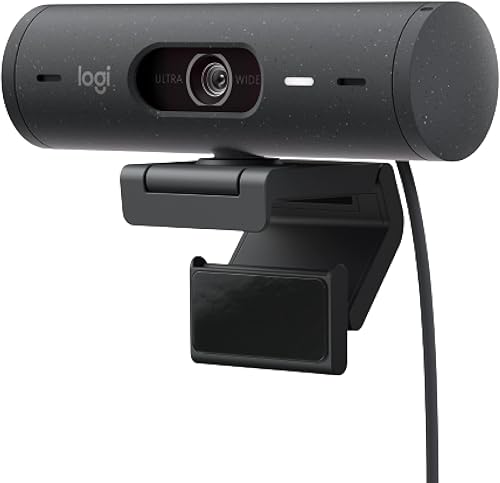
Logitech Brio 500 vs C920: which wins on image quality?
The C920S edges ahead on core image quality for most users, while the Brio 500 trades a little polish for smarter framing tools. Both produce Full HD 1080p video, so neither one has a resolution advantage.
The C920S pairs a glass lens with HD autofocus. The glass element and full HD capture give crisp, vibrant color in recorded video, and autofocus keeps the image sharp as you move closer or further from the desk.
The Brio 500 also offers 1080p resolution with autofocus and a 16:9 aspect ratio. Its sensor is rated for 4 MP effective still resolution.
On paper the two are close, but the C920S leans on its glass lens as the headline feature for everyday calls.
Glass lens vs feature set
A glass lens is a real optical advantage for clarity and color. The C920S puts that lens at the center of its pitch, and it works with autofocus to keep your face sharp without manual adjustment.
The Brio 500 doesn't lead with its lens. Instead it leans on software and mechanical tricks to improve how you look and what you can show.
Image quality is solid, but the glass lens on the C920S is the more direct promise.
If clean, natural-looking video of your face is the goal, the C920S is the stronger choice. If you want the camera to adapt to you as you move, the Brio 500's features matter more than the lens spec.
How do they handle low light?
Both cameras correct for dim rooms automatically, but the Brio 500's RightLight 4 is the newer light correction system. The C920S has automatic light correction and automatic exposure control.
Logitech says RightLight 4 on the Brio 500 adjusts to the lighting in your room so you stay visible in low light. That is a named, generation-specific system, and it is one of the features the Brio 500 is sold on.
The C920S also has light correction and automatic exposure, so it adapts to changing conditions on its own. That covers the same ground without a named generation.
For a dim home office or a room with a window behind you, the named RightLight 4 system gives the Brio 500 an edge on paper. For a normally lit desk, either camera's automatic correction does the job.
Neither camera replaces good lighting, though. A lamp facing you keeps the picture consistent across calls.
Which is better for framing and presenting?
The Brio 500 wins clearly here, with auto-framing and Show Mode that the C920S doesn't offer. This is the biggest functional gap between the two cameras.
Auto-framing on the Brio 500, which Logitech calls RightSight, centers the camera on you so you can stand and move during meetings without leaving the frame. That suits standing desks and presenters who pace while they talk.
Show Mode lets you tilt the webcam up or down with one hand to present work or objects on your desk. It is a mechanical tilt built for showing a document, a product or a sketch to the people on the call.
The C920S has neither feature. You get a fixed frame and a camera that stays where you point it.
For a seated call at a fixed desk, that is fine.
Auto-framing in practice
Auto-framing is useful when your position changes during a call. If you stand up to write on a whiteboard or move to grab something, the Brio 500 keeps you in view instead of letting you drift out of frame.
The Brio 500's 90-degree field of view also gives you extra room to move or fit a second person in the shot. Logi Tune lets you zoom in or out to adjust that width, so you can tighten the frame when you want a closer crop.
Show Mode for desk presentations
Show Mode is the feature that separates the Brio 500 for anyone who demonstrates things on camera. Tilting the lens down to your desk turns the webcam into a quick document camera.
Teachers, crafters, product reviewers and anyone who walks viewers through physical objects will get more use from this than from any resolution bump. The C920S can't do it without a separate mount or a second camera.
If your calls are almost always face-to-face conversation, Show Mode is a feature you'll rarely use. That's where the C920S's simpler, fixed approach holds up well.
How do the microphones compare?
Both cameras use dual microphones, but the Brio 500 adds noise reduction while the C920S focuses on natural stereo sound. Pick by whether background noise or audio warmth matters more to you.
The C920S captures stereo audio with dual mics. Logitech describes the sound as natural for calls and recorded video, which suits meetings, voiceovers and casual recording.
The Brio 500 uses dual noise reduction microphones. They filter out background sound so you're heard clearly in noisy environments.
That helps in shared rooms, cafés or homes with background activity.
Neither microphone replaces a dedicated mic for serious recording. But for everyday calls, the C920S's natural stereo and the Brio 500's noise filtering are both useful, just for different rooms.
The Brio 500's filtering is the better fit for unpredictable rooms, while the C920S's natural sound suits a quiet office.
Which webcam is easier to set up and use?
The C920S is the easier fit for older hardware, while the Brio 500 is aimed at newer laptops with USB-C. Connection is the deciding factor for many buyers.
The C920S uses a standard USB connection and works with USB 2.0 compatible devices. That covers older laptops, desktops and hubs without adapters.
The Brio 500 connects with its attached USB-C cable. It works with devices that have a USB-C port, which covers most recent laptops but not older machines without an adapter.
Both cameras mount on a monitor or stand. The Brio 500 includes a mount clip with a removable mount adapter, while the C920S is a compact pro webcam form factor.
Neither needs special software to start a call.
Software and privacy
The Brio 500 pairs with Logi Tune. That app lets you zoom in or out, mute the microphone, adjust color and image resolution, manage auto-frame and set automatic updates.
It is where the Brio 500's extra controls live.
The C920S relies on the app you're calling from for most adjustments. Its light correction and autofocus run automatically, so there's less to configure.
If you like tuning your image, the Brio 500 gives you more knobs; if you want to plug in and forget it, the C920S is simpler.
Both cameras include privacy covers. The C920S ships with a snugly fitting privacy shutter cover, and the Brio 500 has an integrated privacy shutter you rotate to block the lens.
Either way, you can close the lens between meetings without unplugging the camera.
Who should buy which?
Buy the C920S if you want a dependable 1080p camera for meetings, streaming and recording at a fixed desk. Buy the Brio 500 if you present objects, move around during calls or need USB-C.
The C920S suits the majority of desk setups. A glass lens, autofocus, light correction, stereo mics and a privacy shutter cover the core needs of remote work and content creation.
It handles USB 2.0 hardware without an adapter.
The Brio 500 suits presenters, teachers and anyone on camera who doesn't sit still. Auto-framing, Show Mode and noise-reduction mics are real advantages in those settings.
A USB-C port is required.
Pick the C920S for these setups
Choose the C920S for a fixed home office desk, a first webcam for remote work or a simple streaming setup. Its glass lens and stereo mics are a strong base, and the privacy shutter is included.
It's also the better fit for older laptops and desktops. The USB connection works with USB 2.0 compatible devices, so you won't need an adapter to get started.
Skip it if auto-framing or showing objects on your desk is central to your calls.
Pick the Brio 500 for these setups
Choose the Brio 500 if you stand and move during meetings, demonstrate products or documents, or take calls in noisy rooms. Auto-framing, Show Mode and noise-reduction mics all serve those needs.
It also fits a newer USB-C laptop where the cable matches the port. Skip it if your laptop lacks USB-C and you don't want an adapter, or if you only need basic 1080p calls.
In those cases the C920S does the job with less fuss.
If you want to see how the Brio 500 compares to its own siblings, our Logitech Brio 505 vs Brio 500 comparison shows what changed.
How do they compare on value?
The C920S offers more camera for the money on core video quality, while the Brio 500's extra features justify the step up only if you'll use them. Value depends on which features you actually need.
The C920S puts its effort into the essentials: glass lens, 1080p, autofocus, light correction, stereo mics and a privacy shutter. For most buyers, that set covers everything a webcam needs to do.
The Brio 500 adds auto-framing, Show Mode, noise-reduction mics and Logi Tune controls. Those are meaningful upgrades, but only for people who present, move or fight background noise.
If your calls are seated and face-to-face, the Brio 500's extras won't earn their keep.
For the majority of buyers, the C920S is the camera that covers the job without paying for features they won't touch. It's the safer spend.
Our Anker PowerConf C200 vs Logitech C920 piece helps if you're weighing other options. Our Logitech C920e vs C920x guide covers the variants in the C920 family.
Verdict: which webcam should you buy?
Buy the Logitech C920S HD Pro Webcam for most desks. It wins the logitech brio 500 vs c920 comparison on the essentials: a glass lens, full HD 1080p, autofocus, light correction, stereo mics and a privacy shutter, all on a standard USB connection that fits older hardware.
Buy the Logitech Brio 500 when your calls aren't static. Auto-framing follows you as you move, Show Mode tilts down to present objects, and noise-reduction mics keep you clear in busy rooms.
It needs a USB-C port and costs more.
The decision rule is simple. Sit still for calls and want a dependable 1080p camera?
The C920S is your pick. Present, pace or take calls in noisy rooms?
The Brio 500 earns its extra features.
Frequently asked questions
Is the Logitech Brio 500 better than the C920?
The Brio 500 adds auto-framing, Show Mode and noise-reduction mics, while the C920S keeps a dependable glass-lens 1080p image and stereo audio. The C920S wins for most desks; the Brio 500 is the better pick when you present objects or move around on calls.
Do the Brio 500 and C920 both record in 1080p?
Yes. Both shoot Full HD 1080p video, so the Brio 500's edge is in features like RightLight 4 light correction, auto-framing and Show Mode rather than raw resolution.
For plain calls and recording, the C920S glass lens with autofocus holds its own.
Which webcam has a privacy shutter?
Both do. The C920S includes a snugly fitting privacy shutter cover, and the Brio 500 has an integrated privacy shutter you rotate to block the lens between meetings.
You can close either camera without unplugging it.
Can I use the Brio 500 on a laptop without USB-C?
The Brio 500 connects with its attached USB-C cable, so a laptop without a USB-C port needs an adapter. The C920S uses a standard USB connection, which suits older laptops and USB 2.0 ports more directly.
Which webcam is better for streaming?
The C920S is the stronger streaming base for most people, thanks to its glass lens, autofocus, light correction and stereo mics. The Brio 500 suits streamers who want auto-framing and Show Mode, and its Logi Tune software adds zoom and color controls.


