Logitech C920 vs Brio 100: Which Fits? (November 2026)
Pick the Brio 100 for everyday calls and privacy; pick the C920 for autofocus and close-up detail. The Logitech C920 vs Brio 100 choice comes down to whether you need the C920's focus control or the Brio 100's built-in shutter.
On this page (8 sections)
Pick the Brio 100 for everyday calls and privacy; pick the C920 for autofocus and close-up detail. The Logitech C920 vs Brio 100 decision is less about resolution, since both shoot Full HD 1080p, and more about how you use the camera.
The Brio 100 scored 9.3 and the C920 scored 7.6 in our comparison. The Brio 100 wins overall for most people because it adds a built-in privacy shutter and RightLight brightness correction to the same 1080p resolution.
The C920 still has a real place. Its autofocus glass lens and dual microphones suit people who move around or want sharper close-up video.
Here's how the two stack up.
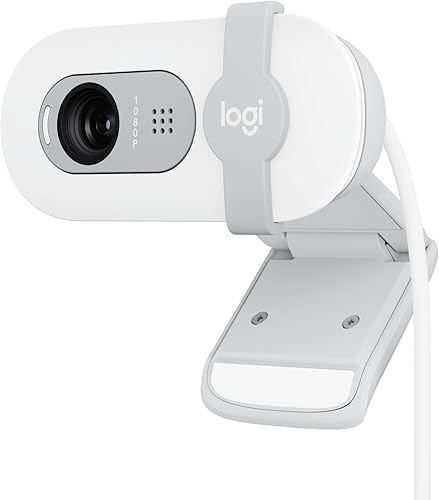

Logitech C920 vs Brio 100: which fits your desk?
The Brio 100 fits more desks and habits; the C920 fits close-up work. Both are compact USB webcams, but their bodies and features point at different users.
The Brio 100 measures 4.1 inches wide, 2.87 inches deep and 1.26 inches tall and weighs 2.65 ounces. Its white body and compact shape sit easily on a monitor.
The C920 is a black webcam in the classic Logitech barrel shape and is the older design of the two.
Neither model needs software to start. The Brio 100 is plug-and-play over USB-A and works with most calling platforms.
The C920 connects over USB and lists support for Skype, FaceTime on Mac and nearly all video calling clients.
If your setup changes often, the lighter Brio 100 is easier to move between laptops. If you park one camera on a desktop and leave it there, the C920's weight is less of an issue.
What the body and finish mean for your setup
The Brio 100's color choice is part of its pitch. Logitech lists refined colors meant to brighten a personal workspace, so the white version is a deliberate design piece rather than a plain black box.
The C920's black finish is the traditional webcam look that disappears against a dark monitor.
The Brio 100's form factor is a compact, lightweight design with a fixed position, a built-in lens and a built-in microphone. The C920's form factor is a webcam body, so expect a set-it-and-forget-it camera rather than a portable one.
That matters if you plan to move the camera. A lighter body with a fixed position is easy to lift and reset.
A heavier barrel camera tends to stay put once you set it, which suits a dedicated desk more than a bag.
How much does resolution matter here?
Not much: both webcams top out at Full HD 1080p. The comparison is closer on resolution than the age gap suggests.
The Brio 100 records at 1080p in a 16:9 frame. The C920 also does 1080p video calling at up to 1920 x 1080 pixels.
The bigger difference is the lens and focus system. The C920 uses a five-element glass lens with autofocus.
The Brio 100 uses a fixed-focus lens.
That means the Brio 100 is sharp at a set distance from the camera. The C920 refocuses as you lean in or move back, so close-up shots stay crisp.
For meetings from a fixed seat, fixed focus is fine. For product shots or moving around, the C920's autofocus does more for you.
Still photos and video clips
The Brio 100 has an effective still resolution of 2 megapixels and saves photos as JPEG. The C920's effective still resolution is 15 megapixels, which matters if you grab frames or snap reference shots.
The C920 also records video clips at 30 frames per second. The Brio 100's data focuses on live calls and meetings rather than clip recording.
The C920's still figure deserves a caveat. Webcams often reach high still numbers through interpolation, so a 15 megapixel still from a 1080p sensor won't match a real 15 megapixel camera.
The spec is still a useful signal that the C920 is built to capture images as well as stream them. For a buyer who only takes calls, neither number changes much.
Which handles lighting better?
The Brio 100 corrects for poor light automatically; the C920 relies on automatic exposure without a named light feature. This is the biggest gap between the two for home offices.
Logitech says RightLight on the Brio 100 boosts brightness by up to 50% and reduces shadows compared with previous-generation Logitech webcams. That helps in dim rooms or when a window sits behind you.
The C920 also has automatic exposure control, and its five-element glass lens helps with clarity and detail, but the data doesn't name a light-balancing feature.
If your desk sits away from a window or you call at night, the Brio 100 does more of the work for you. If you already have good lighting or a key light, the C920's glass lens holds up well.
A simple desk lamp still beats software correction. Point one at your face rather than behind you, and either camera looks better.
Is the Brio 100's privacy cover a real advantage?
Yes, for anyone who works in a shared space or worries about the camera staying on. The Brio 100 has an integrated slide cover built into its body.
It's a physical shutter, so it doesn't depend on software settings or a meeting app behaving correctly.
The C920's product data does not include a privacy cover. You'd need to add a clip-on cover or trust software to switch the camera off.
For a home office, a bedroom desk or a shared workspace, that slide cover is a small feature with real peace of mind.
A physical cover also changes behavior. With the Brio 100, covering the lens is one slide before you walk away.
There's no menu to open and no app to trust. If you share a room or work where desks are close together, the built-in cover is the easier habit to keep.
If your camera lives in a locked home office, the C920's lack of a shutter is a smaller gap. If you want to compare other webcams with shutters, our Anker PowerConf C200 vs Logitech C920 comparison covers another option.
How do the microphones compare?
The C920 offers dual mics with noise reduction; the Brio 100 offers one built-in mic. Both are enough for calls, but they suit different rooms.
The Brio 100's single built-in microphone lets others hear you during video calls. The C920 uses dual microphones with automatic noise reduction and captures stereo sound, which helps in a room with background noise or when you record clips.
Neither replaces a dedicated headset for serious recording. If your calls happen in a noisy home, a headset with a boom mic will beat either webcam's built-in audio.
The C920's audio is part of a bigger recording package. Its description lists H.264 advanced compression technology, which handles video compression on the camera so your computer has less to do.
That matters for older laptops that struggle to encode 1080p video in software.
The Brio 100's data doesn't mention hardware encoding. Its mic is built for clear speech in meetings, which is exactly what most callers need.
If you plan to record and share video, the C920's encoding and stereo mics make it the more capable recorder. If you mainly join calls and talk, the Brio 100's single mic covers it with less to manage.
Which webcam is easier to set up and use?
Both are easy to set up; the Brio 100 asks less of you over time. Neither needs a driver install to start, and both connect over USB.
The Brio 100 works with most video calling platforms, including Microsoft Teams, Zoom and Google Meet. It's plug-and-play over USB-A and needs only a computer with a USB port running Windows, macOS or ChromeOS.
The C920 lists support for Skype and FaceTime on Mac at 720p, plus 1080p video recording with QuickTime Player. It also works with Google Hangouts and most other calling clients.
The Brio 100's fixed focus means you set it once and leave it. The C920's autofocus can hunt slightly in low light or when something crosses the lens, though it settles quickly.
If you switch between apps a lot, the Brio 100's broad platform support keeps setup simple. If you record clips and want focus control, the C920 gives you more to work with.
Compatibility details worth checking before you buy
The Brio 100's compatibility list is broad and specific. Logitech lists computers with a USB port running Windows, macOS or ChromeOS, plus support for Microsoft Teams, Zoom and Google Meet.
It also notes compatibility with Nintendo Switch 2's GameChat mode, which is unusual for a webcam.
The C920's requirements are more detailed. Its description lists Mac OS 10.10 or later, with 720p HD on FaceTime for Mac and 1080p video recording through QuickTime Player.
On Windows it lists Windows 7, Windows 8 and Windows 10 or later. It also lists Android 5.0 or above and Chrome OS, plus an available USB port and an internet connection.
That means the C920 supports Android devices that the Brio 100's data doesn't mention. If you want to use a webcam with an Android tablet or TV box, the C920's listed support gives you a path.
The Brio 100's list is simpler and more current.
One practical note: the Brio 100 connects over USB-A. If your laptop only has USB-C ports, you'll need an adapter.
The C920's connectivity is USB, so check the cable end on the model you buy.
Which should you buy?
Buy the Brio 100 for meetings, privacy and simple setup. Buy the C920 for autofocus and close-up detail.
Pick by the work you do in front of the camera, not by the model year.
Choose the Brio 100 if your camera sits on a monitor for Teams, Zoom or Google Meet calls. Its privacy shutter, RightLight correction and plug-and-play setup make it the easier everyday webcam.
It's also the better pick in a dim room or a shared space. It's made with at least 34% post-consumer recycled plastic, a small bonus if sustainability guides your buying.
Choose the C920 if you move around during calls, show objects close to the lens or record video clips. Its autofocus glass lens, dual mics and 3x digital zoom give you more control over how you look and sound.
If you sit between the two, decide by the single feature you'd miss most. A missing privacy cover is easy to fix with a clip-on shutter.
A missing autofocus is not something you can add later.
If neither quite fits, our Logitech Brio 505 vs 500 comparison looks at a step up in the Logitech range. And if you need a webcam without a built-in shutter, our C920e vs C920x comparison covers the differences between the two C920 variants.
The buyer each camera fits
Picture the Brio 100 buyer. They work from home or in a hybrid office, join Teams or Zoom meetings most days and leave the camera on a monitor.
They might share a room with family or sit in an open office. They want the camera to look decent without tweaking settings, and they want to cover the lens when the call ends.
The Brio 100's shutter, RightLight and 1080p video fit that picture without extras.
Picture the C920 buyer. They stream, record clips or present products close to the lens.
They may move in and out of frame during a demo. They might work on an older laptop that benefits from H.264 compression.
They care more about focus and stereo audio than about a built-in shutter. The C920's autofocus, dual mics and 3x digital zoom fit that picture.
The verdict
The Brio 100 wins for most people because it combines 1080p video with a privacy shutter and automatic light correction. It's the webcam we'd pick for a typical home office.
The C920 remains the better tool for close-up detail and stereo audio. Its autofocus glass lens and dual mics suit people who move around or record clips.
Pick the Brio 100 for everyday calls. Pick the C920 when focus and audio matter more than convenience.
If you're weighing a similar budget webcam from another brand, our Lenovo 300 FHD webcam vs Logitech Brio 100 comparison shows how that one stacks up.
Frequently asked questions
Is the Logitech C920 better than the Brio 100?
The C920 is better for close-up detail because it has autofocus and a glass lens. The Brio 100 is the better everyday pick because it adds a built-in privacy shutter and RightLight brightness correction.
Choose by whether you want sharper focus or easier privacy.
Does the Brio 100 have autofocus?
No, the Brio 100 uses fixed focus. It stays sharp at a set distance, so you don't get the C920's autofocus as you move closer or farther from the lens.
Which webcam has a privacy cover?
The Brio 100 has an integrated slide cover that blocks the lens when you're not on a call. The C920's product data does not include a privacy cover, so you'd need to add one or rely on software.
Do both webcams work with Zoom and Teams?
The Brio 100 works with Microsoft Teams, Zoom and Google Meet. The C920 lists support for Skype, FaceTime on Mac and most other video calling clients.
Both are Full HD 1080p models.
Is the Brio 100 good enough for streaming?
Yes, the Brio 100 delivers 1080p video and a built-in mic, which covers everyday streaming. If you want autofocus for moving closer to the lens or tighter zoom, the C920 gives you more control.


