Logitech C920 vs Brio 101: Which Webcam Fits? (November 2026)
The Logitech C920S wins for most people because autofocus and stereo mics suit calls and recording. Pick the Brio 101 for a fixed-focus camera with stronger light balancing and a sliding privacy cover.
On this page (6 sections)
The Logitech C920S wins for most people because autofocus and stereo mics suit calls and recording. Pick the Brio 101 for a fixed-focus camera with stronger light balancing and a sliding privacy cover.
Both shoot full HD 1080p video over USB. The logitech c920 vs brio 101 decision really comes down to focus, light handling and audio, not resolution.
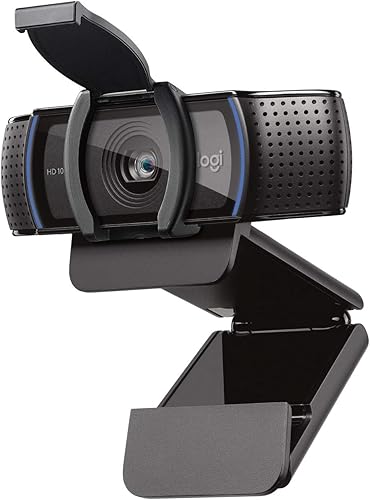 Best for calls and recording
Logitech C920S HD Pro Webcam Full 1080p/30fps

Logitech C920 vs Brio 101: what actually separates them?
Autofocus and stereo audio separate the C920S from the Brio 101's fixed focus and light balancing. Resolution and frame rate are close enough that neither wins on paper.
The C920S pairs a glass lens with autofocus and automatic light correction. It also carries dual mics that capture stereo sound.
The Brio 101 relies on RightLight, which boosts brightness by up to 50% and reduces shadows compared with previous-generation Logitech webcams. Its focus is fixed, and a single built-in mic handles audio.
Autofocus vs fixed focus
The C920S refocuses as you move; the Brio 101 stays locked to one distance. That difference decides a lot for people who lean in, shift in their chair or hold objects up to the camera.
Autofocus on the C920S works with its glass lens to keep you sharp in changing positions. A fixed-focus camera is set to one distance and stays there, so a close-up or a lean back can soften the picture.
For a desk setup where you sit in the same spot, fixed focus is fine. For demos, family calls or recording where you move, autofocus is the safer choice.
One practical detail from the data: the C920S lists a 2073600-pixel effective still resolution, so the same camera can grab a full HD still as well as video. A fixed-focus lens still limits how sharp that still looks if you are closer or farther than its set distance.
Light correction in dim rooms
The Brio 101 leans on RightLight to brighten a dim room; the C920S uses automatic light correction. Both adapt to changing light, but they approach it differently.
Logitech says RightLight boosts brightness by up to 50% and reduces shadows compared with earlier Logitech webcams. The C920S uses its own automatic exposure control to handle low light.
If your desk sits away from a window or you call in the evening, light handling matters more than focus. Try either camera in your actual room before you commit.
The C920S pairs its exposure control with autofocus. In a dim room that means it may hunt for focus, which is why its cons list warns about very low light.
The Brio 101 does not hunt, but it also cannot adjust sharpness when you move.
Privacy covers and mics
Both webcams let you block the lens, but only the C920S records stereo audio. Privacy is a tie, while audio favors the C920S.
The C920S includes a privacy shutter that fits snugly over the lens. The Brio 101 uses an integrated slide cover you push across when you are off a call.
On sound, the C920S has dual mics for stereo audio on calls and recordings. The Brio 101 has one built-in mic that keeps your voice clear for meetings.
Logitech C920S: best for calls and recording
The C920S is the better all-rounder for video calls and recording because it keeps you in focus and captures stereo sound. It earns our top score of 9.7 for most readers.
Its glass lens and full HD sensor produce crisp, vibrant video. Autofocus and automatic light correction handle a face that moves and a room that changes through the day.
The dual mics capture natural sound on calls and in recorded video. That means fewer add-on mics for everyday meetings and simple recordings.
The privacy shutter is a practical touch for a shared desk or a home office. Slide it over the lens and you stop broadcasting without unplugging anything.
The shutter is a separate piece that ships in the box, so you fit it on once and leave it there.
The C920S also records full HD video, so the same camera works for a quick demo, a class recording or a video message. The glass lens is the reason footage stays sharp and colorful, and the 16:9 aspect ratio matches what most calls and video apps expect.
Its main trade-off is size. The C920S body is larger than the Brio 101's rectangular shell, so it takes more room on top of a monitor.
On a crowded desk that can matter.
Autofocus can also hunt in very low light. In a dim room it may search for focus more than a fixed-focus camera would.
Add a lamp and it settles.
The larger body has a practical side for some desks. A bigger camera is easier to grab and adjust when you set your framing before a call, and the extra weight keeps it steadier on a monitor top.
Buy the C920S if you move during calls, record video, or want stereo audio without a separate mic. It covers the widest range of everyday webcam jobs.
If you also weigh it against a rival brand, our Anker PowerConf C200 vs Logitech C920 comparison covers how the two stack up.
Logitech Brio 101: best for dim rooms and privacy
The Brio 101 suits a dim room and a desk where you sit still, thanks to RightLight and a slide privacy cover. It scores 9.6 and wins on light balancing and a compact body.
RightLight boosts brightness by up to 50% and cuts shadows compared with previous-generation Logitech webcams. In a room with weak light, that can make your face clearer without extra lamps.
The integrated slide cover is quick to use. Push it across the lens when you are not on a call and slide it back when you are.
Because it is built into the body, there is no separate piece to lose.
Setup is simple: it connects over USB-A and works with most video calling platforms, including Microsoft Teams, Zoom and Google Meet. Plug it in and the app finds it.
The Logi Options+ app lets you adjust zoom, framing and camera settings. That gives you some control over the picture beyond what the app's defaults do.
Even with fixed focus, you can fine-tune how much of your desk the frame shows.
Its trade-off is fixed focus. The lens stays set to one distance, so if you move closer or farther away the image can lose sharpness.
Sitting still solves that.
Audio is a single built-in mic rather than stereo. It keeps your voice clear for meetings, but the C920S does more for recording sound.
The compact rectangular body sits low on a monitor. On a small desk or a laptop screen, that leaves more of the display visible than the C920S's larger shell would.
Logitech also lists the Brio 101 as compatible with Nintendo Switch 2's GameChat mode. That is an extra use beyond meetings, though its core job is still calls and streaming.
The Brio 101 lists Windows 7 and up, macOS 10.10 and up and Chrome OS among its compatible systems. Check that against your machine before you buy, since the C920S only names USB 2.0 compatible devices as its requirement.
Buy the Brio 101 if your desk sits in a dim corner and you mostly sit in one spot for meetings. The light correction and slide cover are its strengths.
If a brighter, more affordable Logitech model is also on your list, our Logitech C920 vs Brio 100 comparison breaks down that pair.
Which Logitech webcam fits your setup?
Pick the C920S for movement and recording; pick the Brio 101 for a dim room and quick privacy. Your desk habits decide more than the spec sheet.
Choose the C920S if you move during calls, present to camera, record video or want stereo sound. Autofocus and dual mics handle those jobs without extra gear.
Choose the Brio 101 if you sit still for meetings and your room light is weak. RightLight and the slide cover do the work you need, and the compact body leaves room on the monitor.
Check what your monitor can hold. The C920S is the larger camera, while the Brio 101's rectangular shape sits lower on the screen.
A monitor with a thin bezel may grip one better than the other.
If you use a laptop, both are external cameras that connect over USB. The Brio 101 uses USB-A, and the C920S works with USB 2.0 compatible devices.
A hub or adapter may help if your laptop lacks a full-size port.
Who should skip both?
Skip both if you need a camera that tracks you around a room or a wide field of view. These are fixed-position webcams for a desk.
The C920S and Brio 101 both sit on or near your monitor and shoot forward. Neither includes a remote or a pan-and-tilt base for framing a whole room.
If you move around while presenting, a camera with a wider view or a tracking feature fits better. For a standard desk call, either Logitech model is enough.
How do the two webcams compare side by side?
The C920S leads on focus and audio, while the Brio 101 leads on light correction and size. The table below puts the deciding features next to each other.
| Product | Best for | Resolution | Focus | Connection | Our score |
|---|---|---|---|---|---|
| Logitech C920S HD Pro Webcam Full 1080p/30fps | calls and recording | 1080p | Autofocus | USB | 9.7 |
| Logitech Brio 101 Full HD 1080p Webcam | dim rooms and privacy | 1080p Full HD | Fixed Focus | USB-A | 9.6 |
Both cameras shoot 1080p and both include a way to cover the lens. The gap sits in how each handles focus, sound and a dim room.
Resolution and frame rate
Both record full HD 1080p video, so resolution is not the deciding factor. The C920S lists 1080p at 30fps, and the Brio 101 lists 1080p full HD.
The C920S also lists a 16:9 aspect ratio and a 2073600-pixel still resolution. That makes it useful for a quick photo as well as video.
The Brio 101 lists a 16:9 ratio too, but a much lower 0.9-megapixel still figure, so stills are not its strong point.
For meetings and streaming, the shared 1080p output looks similar on most calls. Pick on focus and audio instead.
Focus and light handling
Autofocus versus fixed focus is the bigger split; light correction is the second. The C920S adapts focus to your position, and the Brio 101 adapts brightness to the room.
If you move a lot, autofocus keeps you sharp. If your room is dim, RightLight brightens the shot.
Neither feature cancels the other. A bright room with a moving subject still favors the C920S's focus, and a dim room with a still subject favors the Brio 101's light boost.
Audio and privacy
The C920S wins on audio with stereo mics; the two tie on privacy. The Brio 101's single mic is fine for meetings but not for richer sound.
The C920S's dual mics capture natural stereo sound on calls and recordings. The Brio 101's built-in mic keeps your voice clear during video calls.
Privacy is close. The C920S ships with a shutter that fits over the lens, and the Brio 101 has an integrated slide cover.
Both let you block the camera quickly.
Logitech C920 vs Brio 101 verdict
For most people, the Logitech C920S is the webcam to buy because autofocus and stereo mics cover calls and recording alike. The Brio 101 is the better fit for a dim room and a still desk.
The C920S's glass lens, autofocus and dual mics make it the stronger everyday camera. It handles movement and sound without add-ons, which is why it takes the higher score of 9.7.
The Brio 101 counters with RightLight brightness correction and a slide cover in a compact body. At 9.6 it is a close second and the right pick when light is the problem.
If you sit in one spot for meetings in a dim corner, take the Brio 101. If you move, record video or want better audio, take the C920S.
Either way, set the camera in your video app and check your framing before the first call. Our Logitech C920e vs C920x comparison helps if you are still choosing between Logitech models.
Frequently asked questions
Is the Logitech Brio 101 better than the C920?
It depends on the room. The Brio 101 brings RightLight brightness correction up to 50% and a slide privacy cover.
The C920S adds autofocus, a glass lens and dual stereo mics.
For most people the C920S does more across calls and recording, so it edges the Brio 101.
Does the Logitech C920 have autofocus?
Yes. The C920S uses autofocus with a glass lens and automatic light correction.
The camera refocuses as you move closer or farther from the desk, which keeps your face sharp during a call without a manual adjustment.
Which webcam has a privacy shutter, the C920 or the Brio 101?
Both include one. The C920S ships with a privacy shutter that fits over the lens, and the Brio 101 has an integrated slide cover.
Either way you can block the camera when you are not on a call.
Do both webcams work with Zoom and Teams?
The Brio 101 works with most video calling platforms, including Microsoft Teams, Zoom and Google Meet. The C920S is built for video calls and recording over USB.
Check the app's camera settings after plugging either one in.
Which webcam is better for recording video?
The C920S is the stronger pick for recording because autofocus and a glass lens keep footage crisp and vibrant. The Brio 101 records in full HD too, but its fixed focus holds one distance, so moving toward the lens can soften the shot.


