Logitech C920 vs C920e: What Is Different? (November 2026)
The C920e is the better buy for most people because it adds a flip privacy cover, a fixed 78 degree view and a tripod thread. Pick the C920S instead when you want the same 1080p image with a snap-on shutter and stereo mics for recording.
On this page (8 sections)
- Logitech C920 vs C920e: what actually changes?
- Which webcam has the better privacy cover?
- Which mounts more easily, the C920S or the C920e?
- How do the mics and apps compare?
- Which Logitech webcam is sharper in low light?
- C920S vs C920e for streaming and recording
- Which one fits your desk and habits?
- Verdict: which Logitech webcam should you buy?
The C920e is the better buy for most people because it adds a flip privacy cover, a fixed 78 degree view and a tripod thread. The Logitech C920 vs C920e choice really comes down to how you use the camera, not to the image quality, which stays at 1080p across the versions.
Logitech has sold the C920 name in several forms. Two of them are easy to mix up: the C920S HD Pro and the C920e.
The compact C920 version sits between them with stereo mics and a simpler cover.
This comparison looks at the specs that change your daily experience: privacy cover design, field of view, mounting and app support. You'll also see which one to buy for calls, streaming and office work.
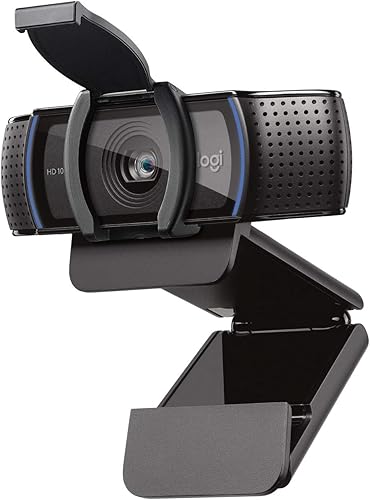 Best for recording and streaming
Logitech C920S HD Pro Webcam Full 1080p/30fps

Logitech C920 vs C920e: what actually changes?
The video resolution stays the same; the privacy cover, field of view and mounting are what differ. All three cameras deliver full HD 1080p, so don't expect a sharper picture from the newer name.
The C920S uses a snap-on privacy shutter that fits over the lens. It has a glass lens, autofocus, light correction and dual mics for stereo audio.
The compact C920 version in this group also shoots 1080p and uses two mics to cut background noise. It ships with a privacy cover, though it sits loose rather than flipping.
The C920e goes further for meeting use. Its privacy screen flips up and down, its field of view is fixed at 78 degrees, and it carries a 1/4 inch tripod thread.
The privacy cover is the first real difference
The C920e's flip screen is the most practical change. You glance at the camera and know whether the lens is covered, with no separate cap to lose.
The C920S shutter is a snug cover you place over the lens. It protects the glass well, but it is a separate piece rather than part of the camera body.
The compact C920 version includes a privacy cover too. Its main appeal is the lower price tier and the smaller, more eco-friendly package.
The field of view changes how you frame yourself
The C920e's 78 degree diagonal view is tuned for a balanced frame. Logitech says it shows an individual user well while leaving room to share a project on camera.
The C920S and the compact C920 version adjust their lens across a wider range. That flexibility helps when you move the camera or change desks.
For a fixed desk and a single seat, the C920e frame is set and forget. For a shared room or a changing setup, a wider adjustable lens gives you more control.
The size and weight differ more than the photos suggest
The C920e is the smallest of the three in its own way. Its dimensions are 2.8 inches deep by 3.7 inches wide by 1.7 inches high, and it weighs 5.71 ounces.
The C920S measures 5.4 inches deep, 3.1 inches wide and 5.4 inches high at 5.76 ounces. Those figures read larger, so check the space above your monitor before you buy.
The compact C920 version measures 2.83 inches deep, 7.52 inches wide and 8.94 inches high at 8.48 ounces. Those figures cover the retail package, not just the camera body.
None of these numbers changes the 1080p picture. They do change how the camera sits on a slim laptop lid or a crowded monitor top.
Which webcam has the better privacy cover?
The C920e wins on privacy because its screen flips up and down and stays attached to the camera. A cover you can't lose is easier to use every day.
With the C920e, the privacy screen is part of the hardware. Flip it down before a call and back up when you finish, with no hunting for a cap.
The C920S takes the opposite approach. Its shutter is a separate cover that fits snugly over the lens, which works well but needs a place to sit when the camera is in use.
The compact C920 version includes a cover as well. It does the job, though the flip design on the C920e is quicker to check at a glance.
If you join calls all day and want a clear visual confirmation, the C920e screen is the better fit. If you only cover the lens now and then, the C920S shutter is fine.
Which mounts more easily, the C920S or the C920e?
The C920e mounts more ways because it adds a 1/4 inch tripod thread to its adjustable clip. The C920S and the compact C920 version rely on their clip alone.
The C920e clip fits a laptop lid or an external monitor. The tripod thread lets you lift the camera off the desk for a straighter, eye-level angle.
That matters for home offices where the monitor sits low. A tripod mount also helps when you want the camera above a shared table or whiteboard.
The C920S uses the classic clip that hangs over a screen. It's simple and stable, but a tripod needs a separate adapter.
The compact C920 version follows the same clip design. Its smaller form factor helps when desk space is tight.
Our Logitech C920e review covers the clip and thread in more detail if mounting is your deciding factor.
How do the mics and apps compare?
The C920S favors natural stereo sound for recordings; the C920e favors clear voice pickup for meetings. App support is broad on all three.
The C920S uses dual mics to capture natural stereo audio on calls and in recorded video. That suits creators who want sound that matches the picture.
The compact C920 version also uses two mics, one on each side. Logitech says the pair filters background noise while keeping stereo audio.
The C920e mics are omnidirectional and tuned to pick up your voice from up to one meter away. The aim is a natural, clear sound in a meeting rather than a rich recording mix.
On software, the compact C920 version works with Windows 7 and later, Mac OS 10.10 and later, Android and Chrome OS. It also lists Xbox One support and works with Skype, Google Hangouts, FaceTime, OBS and XSplit.
The C920e is certified for Zoom and works with Microsoft Teams, Google Meet and Cisco Webex. It is also TAA compliant and fully compatible with Windows 11, which matters for workplace buying.
The C920S is built around video calling and recording. Its glass lens and light correction keep the image clean in mixed room light.
The file formats reveal who each camera is for
The C920S records video as MP4. That format plays almost anywhere and uploads without conversion, which suits a creator dropping clips onto YouTube or a shared drive.
The compact C920 version lists H.264 as its file format. H.264 is the common video codec behind most web video, so the footage is easy to edit and share.
The C920e lists JPEG for its file format. That points to its role as a stills and meeting camera rather than a video production tool.
The C920S also lists an effective still resolution of 2073600 pixels. The compact C920 version lists 2.07 megapixels and the C920e lists 3 megapixels, so its stills have the largest pixel count on paper.
None of these differences changes the 1080p video. They do hint at where each camera is meant to work.
The C920e adds device management for offices
The C920e supports Sync device management software. IT teams can keep company webcams connected and up to date without visiting every desk.
That feature won't matter at home. It is a real advantage for a business that deploys webcams across offices and remote workers.
The C920S and the compact C920 version focus on the camera itself. They are simpler picks for a single desk.
Which Logitech webcam is sharper in low light?
The C920S and the C920e both lean on autofocus and automatic light correction, so the gap is smaller than the names suggest. Each adjusts exposure on its own.
The C920S pairs a glass lens with autofocus and light correction. Logitech says the combination keeps the image sharp in every environment.
The C920e uses built-in HD autofocus and automatic light correction too. Its aim is to keep you looking good across different meeting rooms.
The compact C920 version uses autofocus and automatic exposure as well. None of the three needs a manual lighting setup for a normal room.
The bigger factor is where you sit. A window behind you will challenge any webcam, so face the light when you can.
If your desk sits in a dim corner, a small desk lamp helps more than switching between these three. The C920e vs C920x comparison looks at how the x version handles the same lighting.
C920S vs C920e for streaming and recording
The C920S is the stronger pick for streaming and recording because it pairs stereo mics with a glass lens built for crisp video. The C920e is tuned for meetings first.
The C920S records full HD 1080p video through its glass lens. Colors come out vivid, which helps when you upload demos or showcase work on YouTube.
Its dual mics capture natural stereo audio for calls and recordings. That saves you from adding a separate microphone at the start.
The compact C920 version also records 1080p and lists OBS and XSplit among its apps. It is a sensible budget option for a first streaming setup.
The C920e records 1080p as well, but its fixed 78 degree view and meeting-first tuning suit a presenter more than a game streamer. The flip privacy screen is still handy between sessions.
If streaming is your main use, start with the C920S. If you stream only occasionally and mostly take calls, the C920e covers both without fuss.
Which one fits your desk and habits?
Pick the C920e for a work desk, the C920S for a creator desk and the compact C920 version for a tight budget. Each has a clear job.
The C920e suits hybrid workers and small offices. The flip screen, 78 degree frame and Zoom certification line up with a day of back-to-back meetings.
The C920S suits streamers, YouTubers and anyone who records video. The glass lens and stereo mics give you a better starting point for content.
The compact C920 version suits a first webcam or a spare desk. It covers 1080p calls and recording without the extras you may not use.
Consider the Anker alternative too. Our Anker PowerConf C200 vs Logitech C920 comparison shows where the C200 pulls ahead and where the C920 family holds its own.
Buy the C920e if you take meetings all day
The C920e is the safest choice for a home office. Its privacy screen flips in a second, and the fixed view keeps your frame steady without adjustment.
It is also the better buy for a company. Zoom certification, TAA compliance and Sync management make it easier to standardize across a team.
Skip it if you need a wide, adjustable lens for group shots. The fixed view is the trade-off for the tidy frame.
Buy the C920S if you record and stream
The C920S earns its keep when video quality and audio matter for content. The glass lens and dual stereo mics are built for that job.
It is also a good pick for a shared family desk. The snap-on shutter protects the lens when the camera sits idle.
Skip it if you want a built-in privacy flap. The separate shutter is the one weak spot for daily meeting use.
Buy the compact C920 version for a simple setup
The compact C920 version covers the basics. It records and calls in 1080p and works across the main operating systems and apps.
Its eco-friendly package is a small plus if you care about waste. It costs less than the C920S in most listings.
Skip it if you want a flip privacy screen or a tripod thread. Those extras belong to the C920e.
Verdict: which Logitech webcam should you buy?
Buy the C920e for most people, because its flip privacy screen, balanced 78 degree view and tripod thread make daily calls easier. That combination is why it wins this comparison.
Buy the C920S if you record video or stream and want a glass lens with dual stereo mics. Its snap-on shutter is the price you pay for the better recording setup.
Buy the compact C920 version if you want a basic 1080p webcam at the lowest price tier. It handles calls and light recording without the meeting extras.
Whichever you choose, match it to your desk first. A camera that mounts the way you need and frames you well beats one extra feature you'll never use.
If you're still weighing Logitech models, our MX Brio vs Brio 4K comparison covers the step up to 4K for buyers who want more than 1080p.
Frequently asked questions
Is the Logitech C920e the same as the C920?
The C920e shares the C920's 1080p video and dual mics but changes the field of view and the privacy cover. It uses a fixed 78 degree view and a flip screen, while the original C920 lens adjusts across a wider range.
Does the C920e have a privacy shutter?
Yes. The C920e has an attachable privacy screen that flips up and down, so one glance tells you whether the lens can see into your space.
The C920S uses a separate snap-on cover instead.
Can I mount the C920e on a tripod?
Yes. The C920e has a 1/4 inch thread for tripod mounting, alongside its adjustable clip for laptops and monitors.
The C920S and the compact C920 version rely on their clip alone.
Which webcam is better for Zoom and Teams?
The C920e is the stronger pick for Zoom and Teams because Logitech certifies it for Zoom and it works with Microsoft Teams. The C920S and the compact C920 version handle the same apps, but the C920e is tuned for workplace meetings.
Do all three webcams record in 1080p?
All three deliver full HD 1080p video. The C920S and the compact C920 version record at 30 frames per second, and the C920e uses built-in autofocus and light correction to keep you sharp in different rooms.
Which Logitech webcam should I buy for streaming?
Pick the C920S if streaming and recording are your main uses, since it pairs a glass lens with dual stereo mics. Pick the C920e if your day is mostly meetings and you want the flip privacy screen and tripod thread.