Logitech MX Brio vs StreamCam: Which to Choose? (November 2026)
Pick the StreamCam for smooth 1080p 60 fps streaming and flexible landscape or portrait mounting. Pick the MX Brio for sharper 4K calls and fine lighting control when you also need 1080p 60 fps.
On this page (9 sections)
- Which webcam gives the sharper picture?
- Which is better for live streaming and content creation?
- How much image control do you get?
- Which webcam frames and mounts more easily?
- Which has better microphones and privacy?
- Which webcam fits your desk and software?
- Who should buy the StreamCam?
- Who should buy the MX Brio?
- Which should you choose?
Pick the StreamCam for smooth 1080p 60 fps streaming and flexible portrait or landscape mounting. Pick the MX Brio for sharper 4K calls and fine lighting control when you also need 1080p 60 fps.
The Logitech MX Brio vs StreamCam decision comes down to what you do on camera. The StreamCam is built for live streaming, and the MX Brio is built for meetings and high-detail video.
Both connect over USB-C and both work with Microsoft Teams, Google Meet and Zoom. The gaps are in resolution, frame rate, image control and how each one mounts.
This comparison walks through the points that decide the choice: image quality, frame rates, framing, audio, mounting, privacy and software.
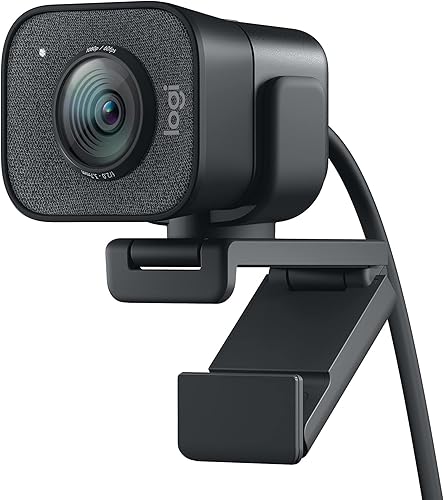 Best for live streaming and content creation
Logitech StreamCam Premium Webcam for Streaming

Which webcam gives the sharper picture?
The MX Brio wins on resolution and the StreamCam wins on smooth motion. The MX Brio reaches 4K at 30 fps and 1080p at 60 fps, while the StreamCam stays at 1080p but runs at 60 fps.
The MX Brio uses what Logitech calls its most advanced webcam sensor yet, with 70% larger pixels for sharp image quality. It also offers 2x better face visibility with finer image details in difficult light.
The StreamCam relies on a premium glass lens and smart autofocus. Logitech says the combination captures vibrant, true-to-life image quality with crisp details.
Resolution matters when you present slides, show products on camera or join large meetings where your face fills a tile. Frame rate matters more when you move a lot on screen.
The lens designs differ in more than resolution. The StreamCam pairs its glass lens with smart autofocus, so it adjusts focus as you move closer to or further from the desk.
The MX Brio uses a prime lens, a fixed design that keeps framing consistent without zooming in and out.
That makes the StreamCam the more adaptable option for creators who shift position during a shoot. The MX Brio's prime lens suits a locked-down desk setup where the camera stays put.
For most people, the practical difference is this: the MX Brio gives you a sharper still image at 4K, and the StreamCam gives you smoother motion at 1080p. Pick the resolution you will actually use.
What do the resolutions mean for your recordings?
The StreamCam's effective still resolution is 2.07 megapixels and its effective video resolution is 1080 pixels. That is enough for a clean 1080p feed, and it is why the camera is tuned around motion rather than still detail.
The MX Brio's effective video resolution is 3840 pixels, which is the horizontal count behind its 4K label. That extra detail shows up in text on a whiteboard, a product close-up or a slide deck shared on a call.
Keep the trade-off in mind. The MX Brio's 4K picture is sharper per frame, but it runs at 30 fps.
The StreamCam's 1080p picture is less detailed per frame, but it runs at 60 fps.
If you record once and watch later, sharper frames help. If you broadcast live and move around, smoother frames help.
That single distinction drives most of the choice between these two cameras.
Which is better for live streaming and content creation?
The StreamCam is the better streaming webcam, thanks to 1080p 60 fps and auto-framing. It is optimized for OBS, XSplit and Streamlabs OBS, so you can go live on Twitch and YouTube without extra setup.
Full HD at 60 fps gives sharp video with smooth motion. That matters for fast gameplay, movement-heavy content and anything where a 30 fps feed would look choppy.
Auto-framing keeps you in the center of the shot even as you move left or right. Intelligent exposure adjusts so you look right in changing lighting conditions.
The MX Brio also handles streaming, and its 4K mode is useful for detail work and static shots. But 4K runs at 30 fps, which trades smoothness for sharpness.
The StreamCam's format support is worth noting for creators. It records to the M-JPEG file format, which streaming software handles without conversion, so clips drop straight into OBS or Streamlabs OBS.
The MX Brio records to MP4 and AVI, formats that suit recorded video and editing work more than a live feed.
If your priority is a fluid stream at 1080p, the StreamCam is the clear pick. If you stream mostly static content and want 4K detail, the MX Brio makes sense.
Our Logitech MX Brio vs Brio 500 comparison covers another 4K option if you are still weighing models.
How much image control do you get?
The MX Brio gives you manual controls the StreamCam doesn't offer. You can adjust ISO, shutter speed, tint and vibrance, or leave Auto mode in charge.
Those controls help when your room lighting is uneven. A backlit window or a dim corner can be corrected without changing your lamps or moving your desk.
White balance and temperature adjustments keep your skin tone consistent from call to call.
The StreamCam takes a simpler route. Intelligent exposure manages changing light automatically, and its exposure control type is automatic.
Logitech Capture software adds automated focus and exposure features.
That automation is handy for creators who want to hit record and go. It is less useful if you want a consistent look across every recording.
The MX Brio pairs with Logitech software to open a custom streaming experience, including control through an MX keyboard and mouse. If you already use Logitech peripherals, the workflow feels connected.
The StreamCam also works with the free Logitech Capture software, which opens automated focus and exposure features.
The difference is the depth of control. Capture software on the StreamCam automates settings for you.
The MX Brio's software puts the settings in your hands, so you can save a look and reuse it.
Pick the MX Brio if you like tuning your image. Pick the StreamCam if you would rather let the camera handle it.
Our Logitech Brio 505 vs Brio 500 comparison shows how controls differ further down the lineup.
Which webcam frames and mounts more easily?
The StreamCam wins on mounting flexibility. It supports landscape or portrait modes, and you can mount it on a monitor, a laptop or a standard tripod.
Portrait mode matters for social clips and vertical video. Instead of cropping a wide shot later, you can record in the orientation your platform uses.
The MX Brio includes a mount clip with a removable adapter. Its body tilts down in Show Mode, which lets you share notes and sketches on your desk with the people on your call.
That tilt is a real convenience for collaboration. It is not the same as portrait mounting, so creators who shoot vertical video should lean toward the StreamCam.
Both webcams sit on top of a monitor without much fuss. The StreamCam weighs 10.23 ounces and the MX Brio weighs 13.12 ounces, so the MX Brio is the heavier of the two.
A heavier webcam can pull at a thin laptop lid. On a desktop monitor, either one is stable.
If you move between setups, the StreamCam's tripod option helps.
How do the mounts differ on a desk?
The StreamCam ships with a camera, a monitor mount and a universal mount. The universal mount is what lets you switch between a monitor, a laptop and a tripod without buying extra hardware.
The MX Brio ships with its own mount clip and a removable adapter. The adapter is the part that lets the camera sit on different surfaces, and the clip is built for quick removal when you need to move it.
The StreamCam's two-mount kit is the more flexible package out of the box. You get the monitor mount for everyday desk use and the universal mount for tripod work or portrait orientation.
The MX Brio's kit is simpler. It covers desk mounting and the tilt for Show Mode, but it does not offer the same orientation flexibility.
Neither mount needs tools. Both cameras clip on and come off with a press, so switching between a monitor and a tripod is quick on the StreamCam and quick on the MX Brio for desk use.
Which has better microphones and privacy?
The MX Brio wins on audio and privacy. It has integrated dual beamforming noise-reducing microphones that use AI to minimize background noise and keep your voice clear.
The StreamCam's audio setup is simpler. Its strength is video quality, so a separate microphone makes sense if clear voice capture matters for your streams.
The MX Brio also has a built-in privacy cover. Rotate it to block the camera completely between meetings, so nobody sees your desk or your room.
The StreamCam has no privacy shutter. You can unplug it or point it away, but there is no built-in cover.
If you take calls in a shared space or a home office with family around, the MX Brio's mics and cover are practical advantages. For a dedicated streaming room with an external mic, the StreamCam's video features matter more.
Is the MX Brio's audio good enough to skip a separate mic?
The MX Brio's dual beamforming mics are built to reduce background noise with AI, so your voice comes through over a fan, a keyboard or street noise. For meetings and calls, that is often enough to skip a headset.
The StreamCam's focus is video quality, so a separate microphone or a headset is the safer pairing for streams where your voice carries the content.
The privacy side is clear-cut. The MX Brio's rotating cover blocks the lens with a twist.
The StreamCam offers no built-in cover, so you would rely on software settings or unplugging the cable.
If you want one device to handle calls and protect your privacy between them, the MX Brio is the more complete package. If you already own a mic and a dedicated streaming room, the StreamCam's video strengths carry more weight.
Which webcam fits your desk and software?
Both webcams connect over USB-C, so check that your computer or dock has a free port. The StreamCam uses a high-bandwidth USB-C connection for stable HD video.
The StreamCam's fast USB-C link supports gaming streams, YouTube videos, Zoom conferencing, Skype meetings and podcasting. It works with PC and Mac.
The MX Brio works with Windows, macOS, Chrome OS or Linux. It is certified for Zoom, Microsoft Teams, Chromebook, Google Meet and Streamlabs.
If you work across several apps and platforms, the MX Brio's certification list is broader. If you stream on Twitch or YouTube through OBS, the StreamCam's listed support covers that path.
Check the physical fit too. The StreamCam measures 1.89 by 2.28 by 3.35 inches, and the MX Brio measures 5.5 by 5.5 by 2.63 inches in depth, width and height.
The MX Brio's larger body needs more clearance on a crowded desk.
The form factors tell the story as well. The StreamCam is a webcam bar, a long, low shape that sits along the top edge of a monitor.
The MX Brio is built as an ultra compact body around the tilt mechanism for Show Mode.
That shape affects how each one sits in a multi-monitor setup. A bar-style camera spreads its weight across the monitor's top edge.
A compact camera with a tilt body needs room to angle down without hitting the screen bezel.
Our Anker PowerConf C200 vs Logitech C920 comparison covers two budget-friendly alternatives if neither of these fits your budget. And our Logitech C920e vs C920x comparison helps if you want a simpler 1080p webcam for meetings only.
Who should buy the StreamCam?
Buy the StreamCam if you stream live and want smooth 1080p 60 fps video. It suits Twitch and YouTube creators who record fast-moving content and need consistent motion.
Its auto-framing keeps you centered when you move, and intelligent exposure handles changing light. Portrait mounting helps if you also make vertical clips for social platforms.
The StreamCam's glass lens and smart autofocus deliver crisp detail. The USB-C connection keeps the video feed stable during long streams.
Skip it if you need 4K resolution or a built-in privacy cover. Those buyers should look at the MX Brio instead.
Who should buy the MX Brio?
Buy the MX Brio if you join a lot of video calls and want 4K sharpness and manual image control. It suits remote workers, presenters and anyone who wants to look polished in meetings.
The 4K sensor gives finer detail for slides, whiteboards and product demos. Fine controls let you fix lighting and color without changing your room.
Dual noise-reducing mics keep your voice clear when the room is noisy. The privacy cover blocks the lens between calls, and Show Mode tilts down to share notes on your desk.
Skip it if your main use is fast-motion streaming at 60 fps. Its 4K mode runs at 30 fps, so the StreamCam is the better fit there.
Which should you choose?
For most people who stream, the StreamCam is the better buy. It scored higher in our comparison because 1080p 60 fps, auto-framing and portrait mounting match what live streaming actually needs.
Choose the MX Brio if 4K calls and manual lighting control matter more to you. Its 4K resolution, fine controls, dual noise-reducing mics and privacy cover make it the stronger meeting webcam.
A simple rule: pick the StreamCam for a fluid stream and vertical video, and pick the MX Brio for sharp calls and control over how you look. Both are USB-C webcams, so your port setup works either way.
Frequently asked questions
Is the Logitech MX Brio better than the StreamCam?
The MX Brio is better for 4K video calls and manual image control, while the StreamCam is better for smooth 1080p 60 fps streaming. Pick by the resolution and frame rate you actually broadcast in.
Can the Logitech StreamCam record in 4K?
No. The StreamCam tops out at 1080p, though it reaches 60 fps for smooth motion.
The MX Brio goes up to 4K at 30 fps and also offers 1080p at 60 fps.
Which webcam is better for Twitch and YouTube?
The StreamCam suits live streaming because it offers 1080p at 60 fps, auto-framing and portrait mounting. The MX Brio's 4K mode runs at 30 fps, which is fine for meetings and detail shots but less smooth for fast gameplay.
Does the MX Brio work with OBS and streaming software?
The MX Brio is certified for Zoom, Microsoft Teams, Google Meet and Streamlabs. The StreamCam lists support for OBS, XSplit and Streamlabs OBS, so check your streaming app's device support before buying either one.
Do both webcams mount on a tripod?
The StreamCam supports landscape or portrait mounting on a monitor, laptop or standard tripod. The MX Brio includes a mount clip with a removable adapter, and its body tilts down for Show Mode.


