Logitech MX Brio vs Brio 500: Which to Choose? (November 2026)
The Logitech MX Brio 4K wins for most people because it records 4K at 30fps or 1080p at 60fps with a larger sensor and finer manual controls. Pick the Brio 500 instead if you only need clean 1080p calls and want auto-framing to keep you in shot.
On this page (6 sections)
The Logitech MX Brio 4K wins for most people because it records 4K at 30fps or 1080p at 60fps with a larger sensor and finer manual controls. Pick the Brio 500 instead if you only need clean 1080p calls and want auto-framing to keep you in shot.
The MX Brio 4K is the more advanced webcam in this pair. The Brio 500 is the simpler Full HD model built around automatic correction.
In the logitech mx brio vs brio 500 comparison, resolution and how much control you want decide the buy.
Both are USB-C webcams with dual noise-reducing mics, Show Mode and a rotating privacy cover. That shared base means the choice comes down to image quality and automation, not basic features.

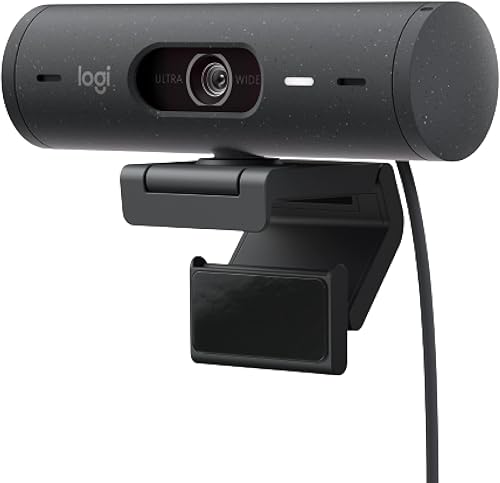
How do the MX Brio and Brio 500 differ in video quality?
The MX Brio 4K is sharper because it records 4K at 30fps or 1080p at 60fps, while the Brio 500 stops at 1080p. That gap is the biggest reason to pay more for the MX Brio.
The MX Brio uses Logitech's most advanced webcam sensor, with 70% larger pixels. Larger pixels gather more light, which helps when your room is dim or your face sits in shadow.
Logitech also claims 2x better face visibility and finer image details in difficult light.
The Brio 500 relies on RightLight 4 auto light correction. It adjusts to your room's lighting automatically so you stay visible in low light.
The result is a clean 1080p picture without you touching a setting.
For a meeting where you mostly talk, both look good. The MX Brio pulls ahead when you present detail, record video or stream to an audience that watches closely.
What does 4K at 30fps mean in practice?
The MX Brio records 4K at 30fps, which suits seated calls and streams where motion is modest. At 1080p it reaches 60fps, so fast movement looks smoother at the lower resolution.
The Brio 500 records 1080p only. That's enough for Zoom, Teams and Meet, where the video often gets compressed anyway.
If your platform caps streams at 1080p, the MX Brio's 4K won't show up in the call itself.
Which handles bad lighting better?
The MX Brio handles difficult light better on paper. Its larger sensor and 70% larger pixels combine with auto-exposure, auto white balance, noise reduction and autofocus.
Logitech claims 2x better face visibility in tough light.
The Brio 500 counters with RightLight 4, which adjusts to low-light conditions automatically. For a backlit window or a dim desk lamp, it keeps your face readable without fuss.
For a room you can't control, the MX Brio's sensor headroom helps more.
Which webcam gives you more control over how you look?
The MX Brio 4K gives you manual control over lighting and color; the Brio 500 leaves those decisions to its automatic mode. That control is the second reason the MX Brio costs more.
On the MX Brio you can adjust ISO, shutter speed, tint and vibrance through Logitech's software. ISO and shutter speed set how much light the camera takes in.
Tint and vibrance let you correct color cast and make your image warmer or cooler. An Auto mode handles all of it if you'd rather not tune.
The Brio 500 keeps things automatic. Exposure control is automatic, and Logi Tune lets you zoom, mute the mic, adjust color and image resolution and manage auto-frame.
You get useful tweaks, but not the manual exposure levers.
If you present products or record content where color matters, the MX Brio's fine controls are the practical difference. For everyday calls, the Brio 500's automatic approach saves time.
What does Logi Tune add to each camera?
Logi Tune customizes both webcams. On the Brio 500 it handles zoom from the full 90-degree width, mic mute, color and resolution, auto-framing and automatic updates.
On the MX Brio, Logitech's software adds the fine controls plus a way to run your stream through an MX keyboard and mouse. If you already use that desk setup, the integration can keep your hands on the keys during a call.
The Brio 500's simpler software layer matches its simpler hardware. Neither app is complicated, but the MX Brio asks more of you if you want to use its full range.
Does auto-framing make the Brio 500 the better call camera?
The Brio 500 is the easier camera for calls where you move around, because RightSight auto-framing keeps you centered without manual adjustment. The MX Brio 4K doesn't list auto-framing in its feature set.
Auto-framing matters if you stand during meetings, step away from the desk or share the camera with a second person. RightSight recenters the video on you, so you stay in the frame without reaching for a tripod.
The Brio 500 also offers a 90-degree field of view. A wider-than-normal view gives you room to move or fit a colleague beside you.
Logi Tune lets you zoom in or out to that full 90-degree width.
The MX Brio takes a different route. It gives you manual controls and a large sensor rather than automatic framing.
If you sit still for calls, auto-framing matters less, and the sharper image wins.
Which field of view suits your desk?
The Brio 500's 90-degree field of view is the wider of the two on paper. That helps in a small room where you can't back the camera away from your face.
A wider view also shows more of your room, which some people don't want. The MX Brio's 16:9 image aspect ratio keeps a standard widescreen frame.
Its manual controls let you tighten the look without moving the camera.
If you often share your desk with a co-worker on camera, the Brio 500's wide view and auto-framing do the work for you. If you present alone and want a polished frame, the MX Brio gives you the levers.
How do the microphones and privacy covers compare?
Both webcams use dual noise-reducing microphones and a rotating privacy cover, so audio and privacy don't decide the buy. The MX Brio adds beamforming and AI to its mic processing.
The MX Brio's dual beamforming mics use AI to minimize background noise. Beamforming points the mic at your voice and reduces sound from the sides.
That helps in an open office or a room with a fan running.
The Brio 500's dual noise-reducing mics filter background sound during calls. The goal is the same, though the Brio 500 doesn't list beamforming or AI processing.
For a quiet home office, either mic setup is fine.
Privacy works the same way on both. A built-in cover rotates to block the lens completely between meetings.
Neither needs a separate clip-on shutter.
Which mic suits a noisy room?
The MX Brio's beamforming mics are the better fit for a noisy room on paper. AI noise reduction that targets your voice helps when a colleague talks nearby or a fan hums.
The Brio 500 still filters background sound, which covers most home and small-office setups. If your calls happen in a quiet room, the difference won't show.
Neither mic replaces a dedicated microphone for podcasting or music. For meetings, both keep you audible without extra gear.
How do the mounts and setup compare?
Both webcams mount with a clip and connect over USB-C, so setup is similar; the MX Brio adds a removable adapter. Either camera works with Windows, macOS and the meeting apps most people use.
The MX Brio ships with the camera, a mount clip with removable adapter and a USB-C to C 3.0 cable. It's certified for Zoom, Microsoft Teams, Google Meet and Streamlabs, and works with Windows, macOS, Chrome OS or Linux.
Its compact form factor and 16:9 image suit a monitor top or a tripod via the adapter.
The Brio 500 comes with the camera and its attached USB-C cable, plus a mount clip with removable mount adapter. It works with devices that have a USB-C port.
Logitech positions it for Google, Teams and Zoom meetings.
If your laptop only has USB-A, you'll need an adapter for either camera. Check your port before you order so the cable works on arrival.
Show Mode on both cameras
Both webcams include Show Mode. You tilt the camera down to show notes, sketches or a product on your desk during a call.
The MX Brio tilts down to share notes and sketches for collaboration. The Brio 500 lets you tilt up or down with one hand.
Show Mode is handy for design reviews, tutoring or explaining a document. Neither camera needs a separate document camera for a quick desk shot.
MX Brio vs Brio 500: which should you buy?
Buy the Logitech MX Brio 4K for most people, because 4K video, a larger sensor and manual controls make it the stronger camera for meetings and streaming. Buy the Logitech Brio 500 if 1080p is enough and auto-framing matters more than resolution.
The MX Brio 4K earns the higher score, 9.1 against 7.4. It covers more ground: sharper video at two resolutions, fine controls for color and light, beamforming mics and the same privacy cover and Show Mode as its cheaper sibling.
For a streamer, a presenter or anyone who wants their webcam image to look deliberate, it's the pick.
The Brio 500 is the right camera when your needs are simple. RightLight 4 and RightSight auto-framing handle light and framing so you can join a call and talk.
Its 90-degree field of view helps when you move or share the frame. If your platform compresses video to 1080p anyway, you won't miss the 4K.
Who should choose the MX Brio 4K?
Choose the MX Brio 4K if you stream, record video or present products and want control over ISO, shutter speed, tint and vibrance. It also suits anyone whose room lighting is hard to fix, since the larger sensor and 70% larger pixels help in difficult light.
The MX Brio also fits a Logitech desk setup. Pairing it with an MX keyboard and mouse lets you control your stream from the desk.
If you already own that gear, the integration is a real convenience.
Skip it if your calls stay at 1080p and you never touch manual settings. You'd be paying for resolution and controls you won't use.
Who should choose the Brio 500?
Choose the Brio 500 if you want a webcam that sets itself up. Auto light correction and auto-framing mean fewer adjustments before each call.
It's a sensible fit for a home office, a shared desk or a classroom where you move around.
The 90-degree field of view and one-hand Show Mode tilt also help teachers and presenters. If you show objects or notes often, the wide view and quick tilt keep the workflow simple.
Skip it if you need 4K for streaming or color-accurate recording. Its 1080p ceiling is the limit that matters most.
How the two compare at a glance
The MX Brio 4K leads on resolution, sensor size and manual control. The Brio 500 leads on automation, with auto-framing and a 90-degree field of view.
Both match on privacy cover, Show Mode and dual noise-reducing mics.
For a buyer weighing the logitech mx brio vs brio 500 choice, ask two questions. Do you need 4K or 60fps?
Do you want to tune the image or let the camera do it? Two yes answers point to the MX Brio.
If you're still comparing Logitech models, our Logitech Brio 505 vs Brio 500 comparison shows what changed in the newer Brio line. For budget-focused buyers, the Logitech C920e vs C920x breakdown covers two cheaper classics.
And if you're open to another brand, the Anker PowerConf C200 vs Logitech C920 face-off puts a 2K option against a 1080p staple. Streamers weighing 4K cameras can also read the Insta360 Link 2C vs Logitech Brio 4K comparison.
Our verdict is simple. The MX Brio 4K is the better webcam for most people and the one to buy if image quality and control matter.
The Brio 500 is the smarter buy for straightforward 1080p calls where auto-framing does the work.
Frequently asked questions
Is the Logitech MX Brio better than the Brio 500?
The MX Brio 4K is the better camera overall because it records 4K at 30fps or 1080p at 60fps and offers manual control over lighting and color. The Brio 500 is the better value if 1080p calls are all you need and you want auto-framing to follow you.
What is the main difference between the MX Brio and the Brio 500?
Resolution and control separate them. The MX Brio 4K shoots 4K video and gives you ISO, shutter speed, tint and vibrance adjustments.
The Brio 500 stays at 1080p and leans on auto light correction and auto-framing instead of manual settings.
Does the Brio 500 record in 4K?
No. The Brio 500 tops out at 1080p Full HD.
If you want 4K video for streaming or recording, the MX Brio 4K is the model in this pair that offers it, at 30fps.
Which webcam is better for streaming?
The MX Brio 4K suits streaming better because 4K resolution and 1080p at 60fps give you sharper motion and more control over exposure and color. The Brio 500 is fine for casual streams but its 1080p ceiling limits detail.
Do both webcams have noise-reducing microphones?
Yes. Both use dual noise-reducing microphones.
The MX Brio uses dual beamforming mics with AI to cut background sound, while the Brio 500 uses noise-cancelling mics that filter background noise during calls.
Which webcam is easier to set up?
The Brio 500 is easier to set up because auto light correction and auto-framing handle lighting and framing for you. The MX Brio 4K needs more tuning if you use its manual controls, though its Auto mode also works without adjustments.


