Logitech C920 vs Brio 300: Which to Choose? (November 2026)
The Logitech C920S wins for most people because autofocus and stereo mics handle real rooms better than fixed focus. Pick the Brio 301 for its rotating privacy shutter and compact body.
On this page (7 sections)
The Logitech C920S HD Pro Webcam wins for most people, because its autofocus glass lens and stereo mics handle real rooms better than fixed focus and mono audio. The Logitech Brio 301 is the better fit when your desk is small and you want a light webcam with a spinning privacy shutter.
This logitech c920 vs brio 300 comparison looks at the two models' focus systems, light handling, audio, privacy covers and bodies. The winner changes with how close you sit to the camera and how much moving around you do on calls.
Both shoot full HD 1080p and both include a privacy cover. The gap sits in how each one keeps you looking and sounding good while the call runs.
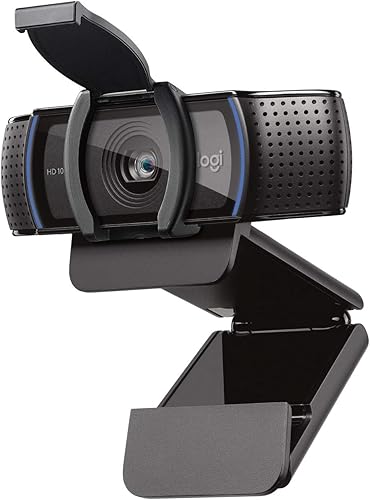
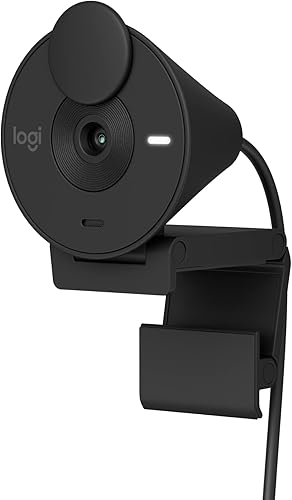
Logitech C920 vs Brio 300: which one should you buy?
Buy the C920S for autofocus and stereo audio; buy the Brio 301 for a smaller, lighter webcam with RightLight 2. Neither is the wrong webcam, but each suits a different desk and a different habit.
The C920S is the higher-scoring pick here because it adapts to movement and captures stereo sound. The Brio 301 counters with a compact body, newer light correction and a shutter you spin with one finger.
Who should choose the Logitech C920S?
The C920S suits people who take long video calls at a desk and want the camera to keep up as they shift in their chair. Its glass lens autofocuses, so you stay sharp whether you lean in to read a document or sit back to think.
The dual stereo mics capture natural sound on calls and recordings. If you record presentations, demos or short videos, that stereo pair gives the audio a little more room than a single mic.
The snap-on privacy shutter ships in the box, so you can cover the lens without buying an extra. It's a snug fitting cover that sits over the front of the lens between calls.
Logitech notes the C920S does not include the 3-month XSplit VCam license, so don't count on that bundle.
The C920S also weighs 5.76 oz and measures 5.4 inches deep, 3.1 inches wide and 5.4 inches high. That's a bulkier camera, so it's a better match for a monitor or a tripod than a thin laptop lid.
It connects over USB and works with USB 2.0 compatible devices.
The camera outputs video at a 16:9 image aspect ratio and records files as MP4. Exposure control is automatic, which keeps you from fiddling with settings before a meeting starts.
Its effective still resolution is 2073600 pixels, so the full HD frame holds detail when you grab a still from the feed.
Who should choose the Logitech Brio 301?
The Brio 301 suits laptop users and small desks. It weighs 2.63 oz and measures 2.09 inches deep, 1.78 inches wide and 2.58 inches high, so it takes up far less space above your screen.
RightLight 2 is its headline feature. Logitech says this automatic light correction compensates for poor lighting so you can be seen clearly, which helps in a spare room with one weak lamp or a window behind you.
The spinning privacy shutter covers the lens when you don't need to be on screen. A twist is quicker than fitting a separate cover, and you can't leave the shutter on a desk and lose it.
Logi Tune, Logitech's free app, lets you adjust color and image quality to taste. The Brio 301 is certified for Zoom, Microsoft Teams and Google Meet, which matters if your workplace checks that box.
It's also compatible with Nintendo Switch 2's new GameChat mode, a small extra if you also game at the same desk.
Its mono noise reduction mic suppresses background sound so others on the call hear you more easily. That's a real help in a shared room or a home with a noisy street outside.
The body is made with at least 48 percent post-consumer recycled plastic, though Logitech notes the figure varies by color.
The Brio 301 stills save as JPEG and its exposure control is automatic, so the workflow is simple. The display resolution tops out at 1920x1080 pixels.
Digital zoom stays at 1x and there's no image stabilization, so the fixed lens does all the framing work.
How do autofocus and fixed focus change your picture?
Autofocus adapts to your distance from the lens; fixed focus stays put. The C920S autofocuses, so it refocuses when you move closer to the screen or roll your chair back.
The Brio 301 keeps a fixed focus, so it's sharpest when you sit where you usually sit.
That difference matters most in smaller rooms. If you regularly lean toward the screen to read notes, autofocus holds your face sharp.
A fixed-focus webcam set for typical desk distance can soften when you get very close.
The C920S pairs autofocus with a glass lens. The Brio 301 uses a custom Logi 4-element lens with anti-reflective coating, which helps with glare but doesn't change the focus type.
The C920S wins this point for anyone who moves during calls; the Brio 301 is fine for a settled seat.
If you sit still and use the same chair and desk every day, the fixed focus of the Brio 301 won't get in your way. It's the more forgiving pick for a laptop that moves between rooms only when you do.
The autofocus advantage also shows up when you hold up a document or a product to the camera and the lens needs to hunt for the new distance.
Which handles a dim room better?
The Brio 301 handles poor light more directly, because RightLight 2 is built to compensate for weak lighting. The C920S relies on automatic light correction and its autofocus to keep a usable picture.
Logitech describes RightLight 2 as automatic compensation for poor video lighting conditions. That's the feature to weigh if your calls happen in a basement office, a room with a single lamp or against a bright window.
It's the newer of the two light systems, and Logitech leads with it in the Brio 301's own description.
The C920S has automatic exposure control and light correction too. Its advantage is that the autofocus and light handling work together, so a face that shifts into shadow stays reasonably clear.
The glass lens also gathers light well, which helps when the frame is only slightly dim.
If your space is bright and even, the light handling of either webcam is enough. The Brio 301's edge only shows up when the light is genuinely poor, which is when many home offices struggle.
A single desk lamp aimed at your face still does more for either camera than any software correction.
Is the C920S or Brio 301 better for a window behind you?
Neither webcam has a backlight mode you switch on. RightLight 2 is the more current light correction of the two, so the Brio 301 is the safer pick when a window sits behind your chair and you can't move the desk.
The C920S still manages with automatic exposure, but the simpler answer is to turn your desk or close the blinds. Light correction helps, and neither webcam replaces a decent lamp facing you.
How does the audio compare?
The C920S records stereo audio with dual mics; the Brio 301 uses a mono mic tuned to cut background noise. Which matters more depends on whether you talk on calls or record sound.
The C920S dual mics capture natural sound on calls and recorded videos. That stereo pair suits recording a demo or a short presentation where you want a little depth in the audio.
The C920S description calls the sound natural, and stereo gives a recorded clip more presence than a single channel.
The Brio 301 mono mic is built to suppress background sound. For meetings, that focus on cutting noise often beats stereo, since colleagues mostly want to hear your voice clearly.
A fan humming behind you or a kettle in the next room gets pushed down.
Pick the C920S if you record video and want richer sound. Pick the Brio 301 if your calls happen near a busy street, a shared kitchen or a fan, and clean voice is the goal.
Either way, a headset mic still beats both when the room is truly loud.
How do the privacy shutters and bodies differ?
Both protect the lens, but the C920S uses a snap-on cover and the Brio 301 uses a spinning shutter. The Brio 301 is also much smaller and lighter.
The C920S privacy shutter is a snug fitting cover that goes over the lens. It's simple and secure, though you handle a separate piece each time you uncover the camera.
Set it somewhere visible so you don't misplace it.
The Brio 301 shutter spins in place to block the lens. It stays attached to the webcam, so there's nothing to set down and forget.
That design also means you can flip it closed mid-call without reaching for a loose part.
On size, the Brio 301's 2.63 oz and compact body suit a laptop lid or a cramped monitor top. The C920S at 5.76 oz and 5.4 inches deep is happier on a monitor or tripod where it won't overbalance a thin screen.
Both are black, so neither stands out on a dark monitor bezel.
Which webcam is easier to mount above a laptop?
The Brio 301, because its smaller body and lighter weight put less strain on a laptop lid. The C920S can still clip on, but its deeper body hangs further forward and can tip a light screen.
If you move your laptop between rooms, the Brio 301 is easier to carry and less likely to snag. The C920S is better left in one place on a monitor or tripod.
Can the C920S or Brio 301 fit a desk setup?
Both fit a normal desk, but they suit different setups. The C920S pairs well with a monitor arm or tripod, while the Brio 301 suits a laptop or a compact desk where space above the screen is tight.
The C920S's bulk is the trade-off for its glass lens and dual mics. It's the camera to choose when your webcam has a permanent spot on the desk and you want the most adaptable picture.
Its wide USB device support also makes it easy to move between a work laptop and a home desktop.
The Brio 301 is the webcam to choose when your setup changes daily. Its small size and light weight make it easy to clip, carry and store.
Its Mac compatibility and platform certifications mean it slots into a mixed-device home without extra setup.
If you're weighing the C920S against another budget webcam with similar autofocus goals, our comparison of the Anker PowerConf C200 vs Logitech C920 covers how they line up. If the Brio line appeals but the 301 feels basic, the Logitech Brio 505 vs Brio 500 comparison shows what the step up adds.
If you're comparing the C920S against its own siblings rather than the Brio line, the Logitech C920e vs C920x guide explains which variant to order. And if you're still deciding between the Brio family and the C920 at a higher tier, the Logitech Brio 500 vs C920 comparison covers the next step up.
Which should you buy?
Pick the Logitech C920S for most desks, especially if you move during calls or record video and want stereo sound. Its autofocus glass lens adapts to you, and the dual mics capture richer audio.
Choose the Logitech Brio 301 when your webcam lives on a laptop lid, your room light is poor or you want a shutter you can't lose. Its compact 2.63 oz body and RightLight 2 suit small desks and dim rooms.
The simple rule: buy the C920S for picture and sound that keep up with movement, and buy the Brio 301 for a small, light camera with the more current light handling. Our score weighs specs, features and how each fits what you're shopping for, and the C920S leads on the points most desks care about.
If neither fits, the Brio 301 is still the better laptop webcam of the two. For a monitor setup where autofocus matters, the C920S is the one to order.
Check your desk, your light and whether you sit still before you decide, because those three things decide this matchup more than the resolution both share.
Frequently asked questions
Is the Logitech C920 better than the Brio 300?
The C920S is the better all-round webcam for most desks because its glass autofocus lens and stereo mics suit calls where you move and talk. The Brio 301 wins on size, weight and its spinning privacy shutter.
Does the Logitech C920S come with a privacy shutter?
Yes. The C920S ships with a snugly fitting privacy shutter cover, so you can block the lens when you step away from your desk.
It does not include the 3-month XSplit VCam license.
What is the difference between autofocus and fixed focus on a webcam?
Autofocus moves the lens to keep you sharp at different distances, while fixed focus stays set to one range. The C920S autofocuses; the Brio 301 stays fixed, so it holds sharpness best when you sit in the same spot.
Which webcam is better for low light?
The Brio 301 uses RightLight 2, which Logitech says compensates for poor lighting so you can be seen clearly. The C920S relies on automatic light correction and autofocus instead, so the Brio's newer light handling suits dim home offices.
Do both webcams work with Zoom, Teams and Google Meet?
Both connect over USB and work with common video apps. Logitech says the Brio 301 is certified for Zoom, Microsoft Teams and Google Meet, so it's the more explicit choice if certification matters for your workplace.


