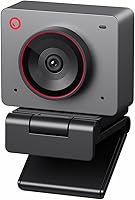
EMEET S800-4K vs Dell UltraSharp Webcam 4K: Which Is Better? (November 2026)
Pick the EMEET SmartCam S800 for most work calls. It brings a 1/2-inch Sony sensor, dual autofocus and built-in noise-canceling mics, while the Dell WB7022 4K wins for buyers who want aluminum build and certified Teams and Zoom support.
On this page (6 sections)
Pick the EMEET SmartCam S800 for most work calls. It pairs a 1/2-inch Sony sensor and dual autofocus with dual noise-canceling mics, so video and voice come from one device.
The Dell WB7022 4K wins when you want aluminum build and certified Teams and Zoom support.
Both are 4K webcams aimed at desk workers. This EMEET S800-4K vs Dell UltraSharp webcam 4K comparison focuses on the points that decide a work-call purchase: image hardware, focus, audio, mounting, software and price tier.


EMEET S800-4K vs Dell UltraSharp webcam 4K at a glance
The EMEET S800 leads on imaging hardware and built-in audio, while the Dell WB7022 leads on build material and certification. That split tells you most of what you need to know before reading the details.
The S800's sensor is the standout. It's a Sony sensor with a 1/2-inch capturing size, an F/1.8 aperture and an f=4.71mm focal length.
Those figures describe a camera built to gather light and keep noise down in dim rooms.
Dell's WB7022 uses a 4K Sony STARVIS CMOS sensor and adds an internal image signal processor. Dell says that combination optimizes the picture in extreme lighting, and AI Auto Framing keeps you centered.
If you're still deciding whether 4K is worth it at all, our 1080p vs 4k webcam breakdown covers when the jump pays off for calls.
Which webcam has the better sensor for video calls?
The EMEET S800's larger sensor and wider aperture give it the edge for image quality in ordinary rooms. A 1/2-inch sensor captures more light than a smaller one, and F/1.8 lets in more than a narrower aperture would.
The S800 records 4K at 30FPS and 1080P at 60FPS. That second mode matters if you move a lot on camera or stream, because the higher frame rate keeps motion smoother.
Dell's sensor is also Sony-made and built for light capture. Its advantage is the on-board image signal processing, which Dell says keeps quality up in extreme lighting.
Neither figure settles a room's lighting on its own. Read both as light-gathering hardware, then match them to how bright your desk area actually is.
For darker rooms, our webcam for low light guide goes deeper.
EMEET SmartCam S800 4K Webcam for Streaming
The S800 is the more complete webcam for a home office. Its imaging stack starts with the 1/2-inch Sony sensor, which gives it a real advantage in rooms where your desk sits away from a window.
HDR is a headline feature, but it isn't on by default. You switch it on in EMEETLINK, the same app where you adjust image settings, pick metering modes and update firmware.
Plan for one setup session to get the picture how you want it.
Focus is handled by PDAF and TOF dual autofocus. EMEET says the two mechanisms work together to cut focusing errors and keep images sharp more reliably than a single system.
In practice that means fewer soft moments when you lean in or move a prop across the desk.
The field of view runs from 40° to 73°, so you can frame a tight head-and-shoulders shot for a one-on-one or open it up for a small group. That flexibility is unusual in this class.
Audio is built in. Dual noise-canceling mics use noise suppression to keep your voice clear within a 10-foot range.
You don't need a separate microphone for ordinary meetings, though a dedicated mic still wins for recording.
Mounting is flexible too. The stand gives a 44.5° horizontal angle and a 45° vertical forward tilt, and there's a standard 1/4-inch nut for a tripod.
Plug and play over USB 3.0 or 2.0 means no driver install.
Privacy gets attention. There's a physical cover for the lens, and the camera runs with no WiFi, no Bluetooth, no drivers and no cloud storage.
Data stays local.
Compatibility covers the usual meeting stack: Zoom, Skype, Skype for Business, Microsoft Teams, Google Meet, Google Hangout, Cisco Webex, GoToMeeting, Bluejeans, BroadSoft, Lifesize, Slack, Line and TrueConf. It works with Windows 7, 10 and 11 and macOS 10.14 and above in UVC mode.
The cons are honest ones. HDR needs the app rather than a hardware switch, and the wide end of the lens can show more of your room than you want.
At 110 g it's light enough that a firm cable tug can shift it.
Dell WB7022 4K Webcam
The WB7022 is the webcam for someone who values how the device looks and how it behaves inside a corporate meeting stack. Dell builds it from premium aluminum with a smooth textured metallic finish and designs it to sit unobtrusively on a borderless monitor.
Its 4K Sony STARVIS CMOS sensor captures more light for clear video. The internal image signal processing is the real differentiator: Dell says it optimizes the visual experience for superior picture quality in extreme lighting conditions.
That's a maker claim, but it points to a camera tuned for rooms where light swings around during the day.
AI Auto Framing keeps you centered on screen. If you shift in your chair or stand up to sketch on a whiteboard, the framing follows you without you touching the app.
You get three fields of view: 65°, 78° and 90°. The first is tight and clean for solo calls; the third fits a couple of people at a desk.
You can also adjust brightness, sharpness, contrast and saturation, use digital zoom up to 5x and rely on autofocus.
The design detail that matters most for meetings is certification. Dell says the webcam is certified for Microsoft Teams and Zoom and compatible with other leading UC platforms.
In an office where IT standardizes on those tools, that's a simpler approval conversation.
The included accessories are practical: a privacy cover, a lens cap and a USB-C to USB-A cable. Dell Peripheral Manager handles settings on Windows, with Display for macOS.
The trade-offs are clear. You'll pair it with a headset or desk mic for calls, since the webcam's value sits in the picture and the build.
The Dell's 90° widest view is wider than the EMEET's 73° maximum, but the EMEET offers a tighter 40° minimum. The software path is also more involved than pure plug and play.
Our webcam with microphone roundup covers alternatives if audio is a must.
Head-to-head: which webcam wins each decision?
Each webcam wins a different set of calls. Use these H3s to match the decision to your desk and your meeting habits.
Autofocus and framing
The EMEET S800 wins on focus hardware. Its PDAF and TOF dual autofocus combine two mechanisms to reduce focusing errors and raise the hit rate on sharp frames.
The S800's dual system is designed for speed and stability across scenes. That helps when you move papers, hold up a product or lean toward the lens mid-sentence.
The Dell WB7022 uses autofocus plus AI Auto Framing. The framing is the standout here: it keeps you centered as you move, which is handy for whiteboard work or standing presentations.
If you want the camera to follow you around the frame, the Dell is the pick. If you want the sharper focus hardware on your face at your desk, the EMEET's dual autofocus is the stronger tool.
Built-in audio for meetings
The EMEET S800 is the only one of the two with built-in mics. Its dual noise-canceling mics use noise suppression to keep speech clear within a 10-foot range.
That makes the S800 a one-cable solution for a home desk. You plug in the webcam and you have video and voice, with no separate microphone to buy, position or troubleshoot.
For the Dell WB7022, plan on a headset or a desk mic for calls. That can sound better than any webcam mic but adds cost and setup.
If your meetings are mostly video calls from a shared room, the Dell plus a good mic can be the better long-term kit. For a simple desk setup, the EMEET removes a device from your life.
Field of view and framing flexibility
The EMEET S800 offers a wider range, from 40° to 73°, while the Dell WB7022 offers three wider presets from 65° to 90°. Pick by how many people sit in front of the camera.
The S800's 40° end crops tightly around one person, which suits focused one-on-ones and keeps background clutter out. Its 73° end opens up for small group calls.
The Dell's 65°, 78° and 90° steps are easier to reason about. The 90° view fits more people and more of the room, which helps in a meeting room but shows more background in a home office.
Neither range is wrong. A solo desk worker will likely live at the tight end, while a shared conference desk needs the wider end more.
Build, mounting and privacy
The Dell WB7022 wins on materials, and the EMEET S800 wins on mounting flexibility. Both ship with privacy protection.
Dell's aluminum body and textured metallic finish make it the more premium object on a monitor. It comes with a separate mount, a privacy cover and a lens cap.
The EMEET S800 uses a flexible stand with a 44.5° horizontal angle and 45° vertical tilt. It also has a standard 1/4-inch nut for a tripod, so it moves between a monitor and a tripod without extra parts.
The S800's privacy story is broader: a physical lens cover plus no WiFi, no Bluetooth, no drivers and no cloud storage. If your desk setup needs to clear a security review, those details are easy to state.
Software and platform support
The EMEET S800 is plug and play; the Dell WB7022 leans on Dell Peripheral Manager for settings. Both cover the major meeting platforms.
The S800 runs in USB Video Device Class mode with no drivers. EMEETLINK handles image settings and firmware updates.
Platform support spans Zoom, Teams, Google Meet, Webex and more, on Windows 7 through 11 and macOS 10.14 and up.
Dell's WB7022 pairs with Dell Peripheral Manager on Windows and Display on macOS. It's certified for Microsoft Teams and Zoom and works with other leading UC platforms.
If IT manages your laptop and you can't install extra software, the EMEET's driver-free approach is simpler. If your company already runs Dell tools, the WB7022 fits the stack.
Price tier and value
The EMEET S800 packs more hardware per dollar on paper; the Dell WB7022 charges for build and certification. Neither is a budget webcam.
The S800 combines the larger sensor, dual autofocus and built-in mics. For a buyer who wants one device for calls and light streaming, that's a lot of capability in a single purchase.
The Dell's premium aluminum body and Teams and Zoom certification justify its place for corporate buyers. If you already own a good mic, the webcam's audio gap costs you nothing.
A mid-range to premium budget is realistic for either. The hardware list is what separates them in a like-for-like comparison.
Which webcam should you buy?
Buy the EMEET SmartCam S800 if you want one webcam to handle both picture and voice on everyday calls. Its 1/2-inch Sony sensor, F/1.8 aperture, dual autofocus and noise-canceling mics cover the basics well, and the tripod nut and privacy cover add flexibility.
Pick it if your desk setup is simple and you'd rather not buy a separate microphone.
Buy the Dell WB7022 4K if aluminum build and certified Teams and Zoom support matter more than built-in audio. It suits an office that standardizes on Microsoft or Zoom tools, and its AI Auto Framing keeps you centered during presentations.
Plan for a separate mic or headset.
Skip both if you only make occasional calls in a bright room; a 1080p webcam costs less and covers that job. If you already have a favorite microphone and a metal-bodied camera appeals, the Dell is the sensible upgrade.
The verdict
The EMEET SmartCam S800 is the better 4K webcam for most people. Its larger sensor, dual autofocus and built-in mics make it a stronger all-in-one for work calls, and it's the higher-scoring product here for good reason.
The Dell WB7022 4K remains the right choice for a specific buyer: someone who wants a premium aluminum camera and certified Microsoft Teams and Zoom support and already has audio sorted.
For a closer look at the Dell against another 4K option, our dell ultrasharp webcam vs logitech brio 4k comparison covers the next decision. Either way, match the webcam to your meeting platform, your lighting and whether you want one cable or two.
Frequently asked questions
Which is better for work calls, the EMEET S800-4K or the Dell UltraSharp webcam 4K?
The EMEET SmartCam S800 suits most work calls thanks to its 1/2-inch Sony sensor, dual autofocus and dual noise-canceling mics. Pick the Dell WB7022 4K if you want a metal body and official Teams and Zoom certification.
Does the EMEET S800-4K have a built-in microphone?
Yes. The S800 has dual noise-canceling mics that EMEET says suppress background noise within a 10-foot range.
The EMEET gives you video and voice from one USB cable, so you can skip a separate mic for ordinary meetings.
Can I mount either webcam on a tripod?
The EMEET S800 includes a standard 1/4-inch nut for a tripod and a flexible stand. The Dell WB7022 comes with a separate mount, so plan your monitor or shelf placement around that mount.
Which webcam handles HDR and lighting better?
Both brands claim strong lighting handling. The EMEET S800 supports HDR, which you switch on in EMEETLINK, while the Dell uses an internal image signal processor to keep you framed in extreme lighting.
The EMEET's larger F/1.8 aperture gives it more light to work with.
Which 4K webcam is easier to set up?
The EMEET S800 is plug and play over USB 3.0 or 2.0, with no drivers needed. The Dell WB7022 works with Dell Peripheral Manager on Windows and uses a USB-C to USB-A cable, so expect slightly more software to install.