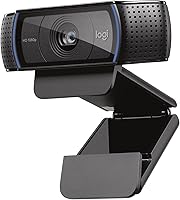
Logitech C920 vs Lenovo 510: Which to Choose? (November 2026)
Pick the Logitech C920S for the sharper everyday picture and glass lens; pick the Lenovo 510 for wide framing, pan and tilt control and Windows Hello sign-in. The Logitech C920 vs Lenovo 510 choice comes down to whether you want image polish or physical flexibility.
On this page (8 sections)
- Logitech C920 vs Lenovo 510: which picture looks better?
- Which webcam sounds better on calls?
- Can you adjust the framing?
- Which is easier to set up and sign in with?
- Logitech C920S vs Lenovo 510: specs side by side
- Who should buy the Logitech C920S?
- Who should buy the Lenovo 510?
- Verdict: which webcam should you choose?
Pick the Logitech C920S for the sharper everyday picture and glass lens; pick the Lenovo 510 for wide framing, pan and tilt control and Windows Hello sign-in. The Logitech C920 vs Lenovo 510 choice comes down to whether you want image polish or physical flexibility.
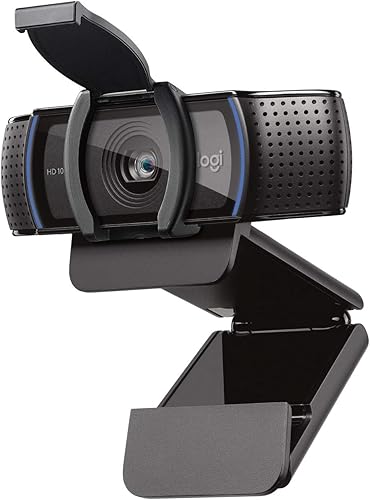
The C920S pairs a glass lens with autofocus and automatic light correction. The Lenovo 510 trades some of that polish for a 95-degree view, a rotating mount and facial recognition login.
Both shoot 1080p and both include a privacy shutter. The differences show up in framing, focus, mounting and how you sign in.
Each camera also captures stills as well as video, but in different file formats.

Logitech C920 vs Lenovo 510: which picture looks better?
The Logitech C920S wins on picture quality. A glass lens, autofocus and automatic light correction give it the edge for face-to-face calls and recorded video.
Logitech builds the C920S around a glass lens that it says produces crisp, vibrantly colored recordings. Autofocus keeps your face sharp if you lean in or out during a call.
Automatic light correction adjusts exposure as the room changes. That matters in a home office with a window behind you or a desk lamp to one side.
The Lenovo 510 uses a 1/2.9-inch RGB sensor and also offers autofocus. Lenovo says the sensor delivers sharp, detailed visuals in real time.
Its 1080p output and 16:9 aspect ratio match the Logitech.
Both cameras also save photos, and here the specs split. The C920S lists an effective still resolution of about 2.07 megapixels and writes video as MP4.
The Lenovo lists a still resolution of 2.8 megapixels and saves in JPEG. A still frame from either one is fine for a profile picture or a document shot, but neither is built as a photo camera.
Where the Lenovo 510 gains ground
The Lenovo's 95-degree wide angle fits more of the room into frame. That helps in group calls, classroom setups or when you want to show a whiteboard.
Its 4X digital zoom lets you crop in without moving the camera. Digital zoom works by cropping the sensor image, so the picture softens as you push in.
Use it for framing, not for close-up detail.
The C920S has no zoom control. It holds one fixed field of view, which keeps the picture consistent but gives you less say over framing.
Focus and low light
Both cameras autofocus. Logitech adds automatic light correction, which helps when lighting is uneven or dim.
The C920S's automatic exposure control keeps the frame visible in changing light. Its glass lens and light correction do more with dim rooms than the Lenovo's fixed setup.
If your desk sits in a dark corner, the C920S is the safer pick. If you need to show a whole meeting table, the Lenovo's wider view does more for you.
Readers weighing other options can see how the Anker PowerConf C200 vs Logitech C920 compare on similar ground.
Which webcam sounds better on calls?
Both use dual microphones, so audio quality is close on paper. Lenovo gives a specific pickup range; Logitech leans on stereo capture for calls and recordings.
Lenovo says its full-stereo dual mics pick up voices from up to 2 meters away. That's roughly the distance from a monitor to someone sitting back in a chair.
Logitech describes the C920S as having stereo audio with dual mics that capture natural sound on calls and recorded videos. It doesn't publish a pickup distance.
In practice, mic placement decides more than the spec sheet. A webcam clipped to the top of a monitor sits closer to your mouth than one placed on a shelf.
Either camera handles a solo call well. For a small group around one screen, the Lenovo's stated 2-meter range is the more useful figure to plan around.
If your room is bigger than that, the webcam mics will struggle on both and a separate microphone is the better answer.
What stereo mics actually mean for a call
Two mics capture sound from more than one spot and give the audio some left-to-right spread. On a solo call, the main benefit is that you can move a little without dropping off the mic.
The C920S records audio alongside its MP4 video, so a quick recorded update keeps sound and picture in one file. The Lenovo saves stills as JPEG and streams video for calls, so its mics matter most in live meetings.
If you take calls near a busy street or a shared kitchen, a headset will do more for clarity than either webcam's built-in mics.
Can you adjust the framing?
The Lenovo 510 is far more adjustable. It pans, tilts and rotates 360 degrees, while the C920S sits in a fixed clip.
Lenovo's mount rotates a full 360 degrees with pan and tilt controls. You can angle it down at a desk, up at a standing presenter or sideways to catch a whiteboard.
The camera also has a 4X digital zoom to narrow the shot. Between the rotation and the zoom, you can reframe without picking up the webcam.
Logitech's C920S uses a standard monitor clip. It holds the camera steady but doesn't swivel or tilt on its own.
You reposition the whole unit when you want a new angle. The fixed view has one quiet upside: the picture stays the same from call to call, so your framing never drifts.
Mounting on a monitor or tripod
Lenovo says the 510's universal clip fits laptops, desktops and other LCD monitors. It also describes the clip as tripod-ready, and the 1.8-meter cable gives you room to place it.
Logitech calls the C920S form factor a pro webcam and its clip suits monitors and laptops. Plan a separate stand if you want it raised or angled, since the clip holds one position.
The Lenovo's longer cable is a practical edge if your tower sits on the floor or your monitor arm sits far from the port. The C920S uses a standard USB 2.0 hookup, so plan your cable route around that.
The Lenovo is white and the Logitech is black. On a black monitor the Logitech blends in; the Lenovo stands out, which some people like for quick location.
The C920S is the lighter of the two at 5.76 ounces against the Lenovo's 9.6 ounces. The Lenovo's slimmer body takes up less desk depth.
Which is easier to set up and sign in with?
Both are plug-and-play over USB, but only the Lenovo 510 adds Windows Hello. That makes the Lenovo the faster option if you want to log in with your face.
Lenovo says setup takes seconds: plug the USB cable into a Windows or Mac device and the camera works. UVC encoding keeps it compatible with a wide range of conferencing software and operating systems.
Windows Hello 4.1 facial recognition is built in. On a compatible Windows machine you can open the device with a smile instead of typing a password.
That's a real convenience at the start of every meeting day. Lenovo's description mentions a USB-C cord, while the product title and specs list USB, so match the cable end to your machine.
The Logitech C920S connects over USB 2.0 and works with USB 2.0 compatible devices. It's a standard webcam with no login features.
Privacy shutters on both
Logitech includes a privacy shutter that fits snugly over the lens. Lenovo includes a sliding privacy shutter on the 510.
Both let you block the camera without unplugging it, which matters on a shared desk or in a home office.
Neither shutter is a substitute for checking which app is using the camera. Close the cover when the camera isn't in use and the question doesn't come up.
The C920S shutter is a separate cover that sits on the lens, while the Lenovo's slides in place, so each one has its own motion to get used to.
Logitech C920S vs Lenovo 510: specs side by side
The C920S leads on lens and light handling; the Lenovo leads on framing and login features. The table below lines up the facts that decide the choice.
| Feature | Logitech C920S | Lenovo 510 |
|---|---|---|
| Video | 1080p at 30fps | 1080p |
| Lens | Glass | Zoom lens |
| Focus | Autofocus | Autofocus |
| Light correction | Automatic | Not a listed feature |
| Field of view | Standard fixed view | 95° wide angle |
| Zoom | None | 4X digital |
| Pan and tilt | Fixed clip | 360° rotation with pan and tilt |
| Microphones | Dual stereo | Dual stereo, 2 m pickup |
| Windows Hello | No | Yes |
| Privacy shutter | Yes | Yes |
| Color | Black | White |
| Connection | USB 2.0 | USB |
The table makes the trade-off clear. You give up adjustability and sign-in convenience to get the C920S's glass lens and light correction.
The Lenovo asks you to accept digital zoom and no light correction to gain the wide view and facial login.
Who should buy the Logitech C920S?
Buy the Logitech C920S if your priority is a clean, well-exposed picture on everyday calls. It suits people who sit in one spot and want the camera to handle changing light for them.
The glass lens and autofocus keep your face sharp without fiddling. Automatic light correction covers the morning sun and the evening desk lamp.
Stereo mics handle voice for calls and recordings.
It's also the simpler camera. There's no zoom to adjust and no login setup, so it just works when you plug it in.
That suits a shared laptop or a desk where nobody wants to configure anything.
Skip it if you need to show a group, a whiteboard or a whole room. The fixed view won't fit them in.
Our Logitech C920e review covers a close relative if you're comparing the family.
Who should buy the Lenovo 510?
Buy the Lenovo 510 if you need a wide view, physical control over framing or Windows Hello sign-in. It's the better fit for meeting rooms, classrooms and Windows desks.
The 95-degree lens and 360-degree rotation let you point the camera where the action is. The 4X digital zoom narrows the shot when you want a tighter frame.
That flexibility is the reason to choose it over the C920S.
Windows Hello adds a practical daily benefit on compatible Windows machines. You sit down, look at the camera and you're logged in.
Mac users still get the camera over USB, but they lose the face login, so weigh that before buying.
Skip it if picture polish in poor light is your main concern. The C920S's light correction and glass lens are the stronger tools there.
If you're also weighing the C920S against another Logitech model, the Logitech C920e vs C920x breakdown helps.
Verdict: which webcam should you choose?
For most people, the Logitech C920S is the better buy. Its glass lens, autofocus and automatic light correction give the most reliable everyday picture, and the privacy shutter is included.
The C920S earns our top score of 9.7 because image quality is what most video calls live or die on. If your desk sits near a window or the room lighting shifts through the day, it keeps your face looking right without adjustments.
The 30fps video also keeps motion smooth during calls and recordings.
Choose the Lenovo 510, scored 9.3, when your needs are different. A wide 95-degree view, pan and tilt control, digital zoom and Windows Hello sign-in are real advantages for group calls and Windows users.
The 1.8-meter cable adds convenience when you move the camera between desks.
The decision rule is simple. Pick the C920S for a polished single-person picture; pick the Lenovo 510 for wide framing and facial login.
If neither fits, our Logitech C920 vs Brio 300 comparison covers a newer alternative.
Frequently asked questions
Is the Logitech C920 or the Lenovo 510 better for everyday video calls?
The Logitech C920S is the better all-round call camera thanks to its glass lens, autofocus and automatic light correction. Pick the Lenovo 510 instead if you need a wide view of a room or group, or you want Windows Hello sign-in.
Does the Lenovo 510 work on a Mac?
Yes, Lenovo says the 510 works with Windows and Mac devices over USB, and its UVC encoding supports a wide range of conferencing software. Windows Hello facial recognition only works on compatible Windows machines, so Mac users lose that feature.
What does the 4X digital zoom on the Lenovo 510 do?
Digital zoom crops into the sensor image rather than moving the lens, so the view narrows but sharpness drops as you zoom in. It's handy for framing a person or whiteboard without moving the camera, but it won't match a true optical zoom.
Which webcam has better audio?
Both pair two microphones for stereo sound. Lenovo says its dual mics pick up voices from up to 2 meters away, while Logitech describes the C920S mics as capturing natural sound on calls and recordings.
Placement near the speaker matters more than the spec sheet.
Can I mount either webcam on a tripod?
Lenovo says the 510 has a tripod-ready universal clip that fits laptops, desktops and monitors. Logitech describes the C920S mount as a pro webcam clip for monitors and laptops, so weigh a tripod setup around the Lenovo if that matters to you.