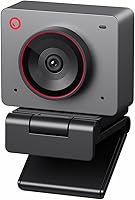
OBSBOT Meet 2 vs Meet SE: Which Webcam Fits? (November 2026)
Pick the OBSBOT Meet SE for most people because it hits 1080P at up to 100FPS and carries the higher score, while the Meet 2 is the better webcam when you want 4K detail. The Meet SE scores 9.4 and the Meet 2 scores 8.3 in this OBSBOT Meet 2 vs Meet SE comparison.
On this page (9 sections)
- OBSBOT Meet 2 vs Meet SE: which wins on picture quality?
- Which webcam handles low light better?
- How do the AI framing and gesture controls compare?
- Which has better audio for calls and streams?
- How do size, setup and software differ?
- Meet 2 vs Meet SE: how do the specs line up?
- Who should buy the OBSBOT Meet SE?
- Who should buy the OBSBOT Meet 2?
- Verdict: which webcam fits most people?
Pick the OBSBOT Meet SE for most people because it hits 1080P at up to 100FPS and carries the higher score, while the Meet 2 is the better webcam when you want 4K detail. The Meet SE scores 9.4 and the Meet 2 scores 8.3 in this OBSBOT Meet 2 vs Meet SE comparison.
The two cameras share OBSBOT's AI framing and gesture control, so the split comes down to resolution, frame rate, low-light hardware and audio. Your calls, streams and room lighting decide which one earns a spot on your monitor.


OBSBOT Meet 2 vs Meet SE: which wins on picture quality?
The Meet 2 wins on resolution with 4K, while the Meet SE wins on frame rate with 1080P at 100FPS. Pick by whether you value fine detail or smooth motion more.
The Meet 2 records in 4K and pairs that with a 1/2 inch CMOS sensor. The Meet SE stays at 1080P but pushes up to 100FPS at that resolution, plus 60FPS at 1080P and 150FPS at 720P.
For a face-to-face call on a laptop screen, 1080P is plenty and the higher frame rate keeps movement fluid. For recording, presenting or cropping into the frame later, 4K gives you more pixels to work with.
Our 1080p vs 4k webcam guide breaks down when the extra pixels pay off.
What do the frame rate modes mean in practice?
The Meet SE's mode ladder is the more flexible one for motion. You get 1080P at 100FPS for full-HD streaming and gameplay capture, 1080P at 60FPS for everyday calls and 720P at 150FPS when you want the highest frame rate the camera can produce.
Those numbers matter when the subject moves fast. A mouse sweep or a quick hand gesture looks cleaner at a higher frame rate, and 1080P at 60FPS is already a step above the 30FPS most laptop cameras settle for.
The Meet 2 lists a single resolution figure, 4K, so its value sits in detail per frame rather than frames per second.
The Meet SE's spec sheet also lists a 2MP effective still resolution, which confirms it is built around speed at lower resolutions. The Meet 2 lists a 48MP effective still and video resolution figure.
If you crop into footage in editing, the Meet 2 leaves more room. If you stream live and never crop, the Meet SE's frame rate ladder gives you more control over how smooth the picture looks.
Which webcam handles low light better?
The Meet 2 has the edge in dim rooms because its 1/2 inch sensor is larger than the Meet SE's 1/2.8 inch sensor. A bigger sensor captures more light, which matters most in the evening or a poorly lit office.
The Meet SE doesn't give up easily. It uses a 1/2.8 inch stacked CMOS sensor with Dual Native ISO, 2.9 μm pixel size, staggered HDR and a 12 bit dynamic color range.
The Meet 2's larger sensor expands its light-sensitive area for clearer, brighter images. Between the two, the Meet 2 is the safer pick for a backlit window or a lamp-lit desk.
Neither camera ships with a ring light. If your room is genuinely dark, plan on adding light rather than relying on sensor hardware alone.
How the sensor numbers differ and why they matter
The Meet SE's low-light story is told in a stack of named features. Dual Native ISO lets the sensor work at two sensitivity levels so it can hold detail in bright and dim scenes.
The 2.9 μm pixel size describes how much light each pixel can gather. Staggered HDR and the 12 bit dynamic color range hold detail in both highlights and shadows.
The Meet 2's story is simpler on paper: a bigger 1/2 inch CMOS sensor and a wider light-sensitive area. Size is the headline, since a larger sensor gathers more light per pixel at the same settings.
There is one more low-light lever on the Meet SE. It lists both automatic and manual exposure control, so you can lock brightness when a lamp or window keeps pushing the camera to overcorrect.
The Meet 2 lists automatic exposure only. The honest read is that the Meet 2 has the hardware edge and the Meet SE gives you more manual control to work around a tricky room.
How do the AI framing and gesture controls compare?
Both cameras offer the same AI framing and 2.0 gesture control, so this category is a draw. The difference is how each handles group shots and zoom.
Both use AI framing to recognize individuals or groups and adjust composition in real time. That helps in meetings where people move around or join a call from different spots.
Gesture control works the same way on both. Face the camera and hold up a hand gesture to open or close AI framing, or point to adjust zoom without touching software menus.
Both offer 4x digital zoom. The Meet SE adds beauty controls for facial and body contouring plus makeup adjustments.
If you present or stream solo, both keep you centered as you move. Our full OBSBOT Meet 2 review covers how its framing works.
The Meet SE's beauty controls in detail
The Meet SE's beauty tools are the one feature the Meet 2 does not match in its product data. OBSBOT lists adjustable beauty parameters for facial contouring, body contouring and makeup modifications, tuned through the OBSBOT Center software.
Framing decides where you sit in the frame. Beauty decides how your face and figure look once you are there.
For creators who want a polished look straight out of the camera without a separate filter layer in OBS, that is a real convenience.
The Meet SE's spec sheet also lists a maximum aperture of f/1.8 and a 26mm maximum focal length. A wide aperture lets in more light and helps separate you from the background.
A 26mm focal length suits a desk setup where the camera sits close to your face. The Meet 2 lists a prime lens without an aperture figure.
Both rely on digital zoom to frame tight, so neither gives you optical reach.
Which has better audio for calls and streams?
The Meet 2 wins on audio because it has dual omni-directional noise-canceling mics, and the Meet SE lists no built-in mics. If you take calls without a separate microphone, this is the biggest practical gap between them.
The Meet 2's mics adjust noise reduction to the scene. OBSBOT says they filter out wind noise, keyboard typing and other ambient sounds, which helps in a shared room or a busy café.
The Meet SE keeps its audio simple. Plan on a separate mic or your laptop's built-in mic, which is fine for casual calls but leaves you without a dedicated audio upgrade.
For podcasters and streamers who already own a microphone, the Meet SE's missing mics cost you nothing. For anyone who wants one cable and clean sound, the Meet 2 is the easier choice.
When built-in mics actually earn their place
Adjustable noise reduction is more useful than it sounds. OBSBOT says the Meet 2's mics let you set the noise reduction level to match the scene.
A quiet home office needs less of it, while a room with an air conditioner or a mechanical keyboard needs more. The mics feed audio straight into your call or stream software over the same USB connection.
The Meet SE's kit covers a USB-C to USB-A adapter, a USB-C cable, a privacy cover, a magnetic mount, a user manual and a warranty card. There is no microphone listed anywhere in its kit or features.
That makes the audio decision simple. If you want the camera to handle sound, the Meet 2 is the only one of the pair that does.
How do size, setup and software differ?
The Meet 2 is lighter and smaller, while both plug in over USB-C and share the OBSBOT Center software. Setup is quick on either one.
The Meet 2 weighs 40.5 grams and is about the size of earbuds. OBSBOT pitches it for mobile workers who carry a webcam to a café or a co-working desk.
It runs warm during use, which OBSBOT says is normal and won't affect any function. The Meet SE weighs 33.2 grams and ships with a USB-C to USB-A adapter, a privacy cover and a magnetic mount.
It comes in three colors, including Cloud White.
Both connect with a single USB-C cable and are ready as soon as they power on. Both support the OBSBOT Center software for brightness, hue and other video parameters.
The Meet SE lists SDK, OSC, Stream Deck and global hotkey support for advanced setups.
The mounts, the privacy cover and the warm-running note
The Meet SE's kit is the more complete one out of the box. The magnetic mount and privacy cover come in the box, so you can clip the camera to a monitor and slide a cover over the lens when the call ends.
The USB-C to USB-A adapter means it works with older laptops that lack a USB-C port.
The Meet 2's kit names only a USB cable. If you need a privacy cover or an adapter, plan on buying one separately.
The Meet 2's warm-running behavior is worth knowing about. OBSBOT states plainly that the camera may get hot during use and calls it normal.
That is a small camera pushing 4K video, and the heat is the cost of the resolution.
The software story is the same on both. OBSBOT Center handles brightness, hue and other video parameters.
The Meet SE's support for SDK, OSC, Stream Deck and global hotkeys is the more explicit one. The Meet 2 points to OBSBOT Center for deeper feature exploration.
If you run a streaming setup with a Stream Deck or hotkeys, the Meet SE's listed support is the more explicit one on paper.
Meet 2 vs Meet SE: how do the specs line up?
The table below puts the key differences in one place.
| Product | Best for | Resolution | Frame rate | Sensor | Our score |
|---|---|---|---|---|---|
| OBSBOT Meet SE 1080P 100FPS Webcam | smooth 1080P streaming | 1080P | 100FPS at 1080P | 1/2.8 inch stacked CMOS | 9.4 |
| OBSBOT Meet 2 | 4K detail | 4K | 1/2 inch CMOS | 8.3 |
The short version: 4K and built-in mics on the Meet 2, higher frame rates and a lower price tier on the Meet SE. Everything else, from AI framing to gesture control, is close to identical.
Who should buy the OBSBOT Meet SE?
Buy the Meet SE if you stream, game or join everyday calls and want smooth 1080P motion without paying for 4K. Its 100FPS at 1080P and 150FPS at 720P keep fast movement clean.
It also suits anyone in a mixed-light room who wants strong sensor hardware without a 4K budget. The 1/2.8 inch stacked CMOS sensor, Dual Native ISO and staggered HDR do a lot of the heavy lifting in dim conditions.
Skip it if you record 4K footage or need a built-in microphone. The 1080P ceiling and lack of listed mics are the real limits, and neither is a dealbreaker for a casual caller with a separate mic.
The gesture shortcuts, manual exposure option and beauty parameters also let you adjust the picture without leaving your seat.
Who should buy the OBSBOT Meet 2?
Buy the Meet 2 if you want 4K video and built-in noise-canceling audio in a webcam small enough to carry. Its 1/2 inch sensor also gives it the edge in poor light.
It fits presenters, creators and remote workers who record or take calls in rooms without ideal lighting. The dual omni-directional mics mean one cable handles both video and sound.
Skip it if you mostly stream fast gameplay or want the smoothest motion. The Meet 2 doesn't offer the Meet SE's 100FPS mode, and its higher score sits with the cheaper camera.
Its 48MP effective still and video resolution figure is the number to keep in mind if you grab frames from footage or crop hard in editing. If your work lives on a 1080P stream and never leaves it, that headroom goes unused.
If you're also weighing the Meet 2 against another compact 4K option, our OBSBOT Meet 2 vs Insta360 Link 2C comparison covers that matchup.
Verdict: which webcam fits most people?
The OBSBOT Meet SE is the better buy for most people. It scores 9.4 against 8.3 for the Meet 2, and its 1080P at 100FPS covers calls, streams and gaming without the 4K premium.
Pick the Meet 2 only when 4K detail and built-in noise-canceling mics matter more than frame rate. In that case, the larger 1/2 inch sensor and pocketable 40.5 g body make it a strong second pick.
Neither camera is a poor choice. The Meet SE wins on smooth motion and value, while the Meet 2 wins on resolution and audio.
Count the things you would miss. If you would miss 4K, built-in mics or the larger sensor, buy the Meet 2.
If you would miss 100FPS, manual exposure control or the beauty tools, buy the Meet SE. Most people would miss the frame rate more than the pixels.
If you're still comparing brands rather than models, our Dell UltraSharp webcam vs Logitech Brio 4K comparison looks at two 4K alternatives.
Frequently asked questions
Is the OBSBOT Meet 2 better than the Meet SE?
The Meet 2 wins on resolution with 4K and adds built-in noise-canceling mics. The Meet SE wins on frame rate with 1080P at 100FPS and carries the higher score here.
Pick the Meet 2 for sharp 4K video and the Meet SE for smooth, affordable 1080P.
Which webcam is better in low light, the Meet 2 or the Meet SE?
Both bring sensor hardware aimed at dim rooms. The Meet SE uses a 1/2.8 inch stacked CMOS sensor with Dual Native ISO, 2.9 μm pixels and staggered HDR.
The Meet 2 uses a bigger 1/2 inch CMOS sensor that captures more light.
The Meet 2's larger sensor gives it the edge in poor light.
Do both OBSBOT webcams have AI framing?
Yes. Both use AI framing that tracks individuals or groups and adjusts the composition.
Both also support 2.0 dynamic gesture control, so you can open or close AI framing and adjust zoom with hand gestures instead of software menus.
Do the OBSBOT Meet 2 and Meet SE have built-in microphones?
The Meet 2 has dual omni-directional noise-canceling mics with adjustable noise reduction. The Meet SE's features and kit list no built-in mics, so plan on a separate microphone or your laptop's mic for calls and streams.
Which OBSBOT webcam should I buy for streaming?
Streamers who want smooth motion should pick the Meet SE, since 1080P at 100FPS and 720P at 150FPS keep fast gameplay and movement clean. Pick the Meet 2 if your stream leans on crisp 4K close-up video and you want built-in noise-canceling audio.