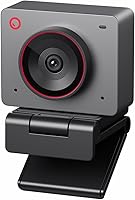
OBSBOT Meet 2 Review: Worth It? (October 2026)
The OBSBOT Meet 2 suits video calls and streaming if you want 4K resolution, AI framing and a compact USB-C camera. Consider the Meet SE for 1080p video or the Tiny 2 Lite if you want a camera with AI tracking.
On this page (8 sections)
- What does the OBSBOT Meet 2 offer?
- How well does the Meet 2 fit video calls?
- What should you know about picture quality?
- Does AI framing make the Meet 2 a tracking camera?
- How do the Meet 2 and its alternatives compare?
- What are the Meet 2’s microphone and software trade-offs?
- Who should choose the OBSBOT Meet 2?
- More questions about the OBSBOT Meet 2
The OBSBOT Meet 2 is a compact 4K webcam for calls and streaming, with a 1/2-inch CMOS sensor, AI framing and autofocus. It fits best if you want those features in a small camera connected by USB-C.
Its main trade-offs are that extra settings use OBSBOT Center software, and OBSBOT notes the camera may get hot during use. If you want privacy controls built into the camera, the Insta360 Link 2C has an easy-access privacy switch.
What does the OBSBOT Meet 2 offer?
The Meet 2 combines 4K video, AI framing and autofocus in a webcam that weighs 40.5 g. It connects through USB-C and includes dual omnidirectional noise-canceling microphones.
OBSBOT Meet 2: Best for compact 4K calls

- 4K resolution
- 1/2-inch CMOS sensor
- AI framing and autofocus
- USB-C connection
- Dual noise-canceling microphones
A compact webcam with 4K resolution, AI framing and autofocus for calls or streams. Its 40.5 g weight may also suit a mobile setup.
Pros
- 4K resolution and 1/2-inch sensor
- AI framing and autofocus
- Gesture controls for framing and zoom
- Dual noise-canceling microphones
- Compact 40.5 g design
Cons
- May get hot during use
- Advanced settings require OBSBOT Center software
AI framing adjusts the composition for a person or a group, while autofocus adjusts focus. Gesture controls can open or close AI framing and control zoom.
The small size may work well if you move between a desk and another workspace. If laptop camera quality is your main concern, compare options in our guide to webcams for laptops with weak cameras.
How well does the Meet 2 fit video calls?
The Meet 2 fits calls where 4K resolution and automatic framing matter more than a built-in privacy switch or advanced tracking. Its compact body and USB-C connection may also suit a laptop setup.
The dual microphones give you audio without a separate mic, but a webcam mic may not suit every room or speaking style. For a closer look at what to expect from built-in audio, see webcams with a built-in microphone.
Before a meeting, check the camera selection and framing in your video app. Our guide on testing a webcam before a call covers a quick setup check.
What should you know about picture quality?
The Meet 2 has UHD 4K resolution and a 1/2-inch CMOS sensor. OBSBOT says the larger light-sensitive area helps capture more light for clearer, brighter images.
A sensor and resolution do not guarantee the same picture in every room. Lighting, background and the camera’s position still affect how you look on screen, so place a light in front of you when the room is dim.
The Meet 2 also has autofocus. That can help when you shift position or hold an item near the camera, though a fixed desk setup may need less frequent focus adjustment.
If the Meet 2 is more camera than you need, the OBSBOT Meet 2 vs Insta360 Link 2C comparison breaks down their feature differences.
Does AI framing make the Meet 2 a tracking camera?
The Meet 2’s AI framing adjusts the composition around people, but it is not the same feature set as a PTZ camera with tracking modes. That distinction matters if you plan to walk around while presenting.
For a mostly seated call, automatic framing can keep the subject in view without manual repositioning. Gesture controls add a way to turn framing on or off and control zoom.
If you need movement tracking, the OBSBOT Tiny 2 Lite has multiple tracking modes and lets you customize tracking and non-tracking areas. It also supports preset positions with separate settings.
How do the Meet 2 and its alternatives compare?
Choose the Insta360 Link 2C for a privacy switch and specialized modes, the OBSBOT Meet 2 for a compact 4K camera with AI framing, or the Tiny 2 Lite for AI tracking. The Meet SE offers 1080p high frame-rate options.
| Webcam | Resolution | Standout feature | Consider it if |
|---|---|---|---|
| Insta360 Link 2C | 4K | Privacy switch, DeskView and Whiteboard modes | Privacy controls or specialized modes matter |
| OBSBOT Meet 2 | 4K | Compact design, AI framing, autofocus | You want a small 4K camera for calls |
| OBSBOT Tiny 2 Lite | 4K | AI tracking and preset positions | You move around while presenting |
| OBSBOT Meet SE | 1080p | Up to 100 fps at 1080p | You want high frame rates without 4K |
The Link 2C also has a 1/2-inch sensor, auto framing and gesture control. Insta360 lists compatibility with major meeting and streaming platforms, but notes that it does not support ARM-based Windows systems or Windows Hello Face Recognition.
The Meet SE gives up 4K resolution but supports 1080p at up to 100 fps. OBSBOT says you need to select More Output Options in its software to use that frame rate.
What are the Meet 2’s microphone and software trade-offs?
The Meet 2 has two omnidirectional microphones with noise reduction, plus optional software for more controls. OBSBOT Center offers deeper feature settings, so the camera’s plug-and-play connection does not mean every control is available without software.
A built-in mic can simplify calls, but background noise and room acoustics affect speech. If people often ask you to repeat yourself, a dedicated headset may be a better fit; our guide to headsets for video calls compares that option.
OBSBOT notes that the Meet 2 may get hot during use and says this is normal and will not damage its functions. Keep that note in mind if you plan long streams or extended calls.
Who should choose the OBSBOT Meet 2?
The Meet 2 is a good match if you want 4K resolution, autofocus and AI framing in a lightweight webcam. Its 40.5 g weight and USB-C connection also suit a compact or mobile setup.
Choose another model if your needs point elsewhere. The Link 2C adds a privacy switch and specialized modes, the Meet SE offers 1080p high frame-rate settings, and the Tiny 2 Lite adds AI tracking.
Pick the Meet 2 for compact 4K calls, or compare webcams for video conferencing at home if you want to weigh more types of camera before deciding.
More questions about the OBSBOT Meet 2
Can the Meet 2 frame a group?
Yes, its AI framing can adjust composition for one person or a group. The camera can also use gestures to open or close AI framing.
Your seating arrangement and distance from the webcam still affect how many people fit comfortably in the frame.
Does the Meet 2 need special software?
The Meet 2 connects through USB-C and is described as plug and play. OBSBOT Center software is available for more personalized settings and deeper feature controls, so you may want it if you plan to adjust the camera beyond basic use.
Can you control the Meet 2 with gestures?
Yes, OBSBOT describes two gesture controls: an open-hand gesture to open or close AI framing, and an index-finger gesture to control zoom. Gesture control can help when the camera is within view and you want to adjust it without reaching for software.
Is the OBSBOT Meet 2 easy to carry?
The Meet 2 weighs 40.5 g and has an ultra-compact form, which may suit people who move between workspaces. It connects by USB-C, so check that you can connect it to the computer or tablet you plan to use.
Frequently asked questions
Is the OBSBOT Meet 2 a 4K webcam?
Yes, the OBSBOT Meet 2 supports UHD 4K resolution and has a 1/2-inch CMOS sensor. It also includes AI framing and autofocus, so it can adjust composition and focus during calls.
Check that your computer and meeting software are set to use the resolution you want.
Does the OBSBOT Meet 2 have a microphone?
Yes, it has dual omnidirectional noise-canceling microphones. OBSBOT says their noise reduction can adjust to the scene and filter sounds such as wind and keyboard typing.
If clear speech is a priority in a noisy room, compare it with a dedicated headset in our guide to headsets for video calls.
Can the OBSBOT Meet 2 follow you around?
The Meet 2 offers AI framing, which dynamically adjusts the composition for one person or a group. It is a compact webcam rather than a PTZ tracking camera like the OBSBOT Tiny 2 Lite, which has AI tracking modes and customizable tracking areas.
Does the OBSBOT Meet 2 connect with USB-C?
Yes, it uses a single USB-C connection for plug-and-play setup. OBSBOT Center software is available for more settings.
Before buying, check that your computer has a compatible port or the adapter you need.