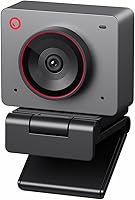
Insta360 Link 2C vs Logitech MX Brio: Which Is Better? (November 2026)
The Logitech MX Brio wins for most people because its 4K sensor, dual noise-reducing mics and rotating privacy cover suit everyday calls and streaming. Pick the Insta360 Link 2C instead if you want auto framing, gesture control and whiteboard modes for presenting.
On this page (9 sections)
- Insta360 Link 2C vs MX Brio: which image looks better?
- How do the microphones and privacy covers compare?
- Which webcam suits presenters and creators?
- Which webcam fits your desk and software?
- Insta360 Link 2C vs Logitech MX Brio: full comparison
- Who should buy the Logitech MX Brio?
- Who should buy the Insta360 Link 2C?
- Is the Logitech C920x still worth it?
- Verdict: which webcam should you buy?
The Logitech MX Brio wins for most people because its 4K sensor, dual noise-reducing mics and rotating privacy cover suit everyday calls and streaming. Pick the Insta360 Link 2C instead if you want auto framing, gesture control and whiteboard modes for presenting.
In this Insta360 Link 2C vs MX Brio comparison, the two cameras aim at slightly different desks. The MX Brio is built for polished meetings and streams, while the Link 2C leans toward demos, teaching and hybrid rooms.
Both shoot 4K. The choice comes down to image tuning, audio, privacy hardware and the smart modes you'll actually use.
We compared the specs to sort out who should buy which.


Insta360 Link 2C vs MX Brio: which image looks better?
The MX Brio is the stronger everyday camera for image quality, while the Link 2C brings smarter framing tools. Both record 4K, so the split is about how each one handles light and composition.
The MX Brio records 4K at 30fps or 1080p at 60fps on what Logitech calls its most advanced webcam sensor yet. Its 70% larger pixels are meant to keep faces sharp when light is poor.
Logitech adds AI enhancements for 2x better face visibility and finer details in difficult light. Auto exposure, auto white balance, noise reduction and autofocus handle the routine adjustments for you.
The Link 2C uses a 1/2-inch sensor with HDR and low-light performance. Insta360 pairs it with phase detection autofocus (PDAF) for quick, crisp focusing and natural bokeh from the Link Controller app.
Fine controls vs smart framing
The MX Brio gives you fine controls for ISO, shutter speed, tint and vibrance, or you can let Auto mode run. That suits streamers who want a consistent look from one session to the next.
The Link 2C puts its effort into auto framing and AI tracking. The camera zooms and adjusts to keep one person or a group in view, and gesture controls start tracking or zoom.
If you sit still in a fixed frame, the MX Brio's manual dials give you more control. If you move around or share a room, the Link 2C's framing does work you'd otherwise do by hand.
The 1080p at 60fps option on the MX Brio also helps when smooth motion matters more than resolution. The Link 2C focuses on 4K UHD quality rather than a high-frame-rate mode.
Lens and focus differences
The MX Brio uses a Logi-designed prime lens with autofocus. Its specs list a 50mm maximum focal length and a 16:9 image aspect ratio, so it's set up for the standard widescreen frame your meetings and streams expect.
The Link 2C pairs a zoom lens with PDAF autofocus. Insta360 gives the lens a maximum aperture of f/1.8, and that wider opening lines up with its low-light and bokeh claims.
The practical split is fixed framing versus flexibility. A prime lens keeps one consistent look, while the Link 2C's zoom supports auto framing and the digital bokeh effect.
How do the microphones and privacy covers compare?
The MX Brio has the edge on audio with dual beamforming mics and a rotating privacy cover. The Link 2C counters with AI noise-canceling audio and a quick privacy switch.
Logitech fits the MX Brio with dual beamforming noise-reducing microphones that use AI to cut background sound. Beamforming points the pickup toward your voice, which helps in shared or noisy rooms.
Insta360 says the Link 2C uses advanced AI noise-canceling algorithms to filter unwanted background noise. That's a software approach rather than a beamforming array, and both are aimed at busy environments.
For privacy, the MX Brio has a built-in cover you rotate to block the lens completely between meetings. The Link 2C uses an easy-access privacy switch, so neither leaves the camera exposed when you're off a call.
Which privacy design is easier to live with?
The MX Brio's rotating cover is a physical barrier over the lens. You turn it and the camera is fully blocked, which is simple to check at a glance.
The Link 2C's switch is just as quick, and it suits desks where you want one motion to cut the feed. Either way, both give you hardware privacy rather than relying on software alone.
Audio is the bigger daily difference. The MX Brio's beamforming design is built around isolating your voice for calls and streams, so it's the safer default if you speak on meetings all day.
Which webcam suits presenters and creators?
The Insta360 Link 2C is the better fit for presenters because its smart modes are built for demos and teaching. The MX Brio still covers streaming, but its strengths are manual control and audio.
The Link 2C includes DeskView and Whiteboard modes, plus gesture and smartphone control. You can start AI tracking or auto framing, zoom in or out and trigger Whiteboard Mode with simple hand gestures.
That matters if you teach, sketch, or walk through physical documents on camera. DeskView and Whiteboard modes keep your work visible without repositioning the camera by hand.
The MX Brio has its own answer for sharing work: Show Mode tilts the lens down so you can show notes and sketches on your desk. It's a single tilt rather than a full set of presentation modes.
Streaming controls and workflow
The MX Brio gives streamers fine controls for lighting and white balance. Pairing it with Logitech software lets you run the stream from a compatible MX keyboard and mouse, which fits if your desk already uses Logitech gear.
The Link 2C's controls live in the free Link Controller software, where you adjust settings and reach the advanced features. Gesture control and the smartphone remote cut down on reaching for the app mid-session.
Choose the Link 2C if your calls involve whiteboards, demos or moving around. Choose the MX Brio if you want a steady, manually tuned frame and smoother 1080p motion.
Recording formats and file types
The MX Brio lists MP4 and AVI among its file formats, so it covers the common containers most editing and streaming tools expect. That's useful if you record clips for later rather than only taking live calls.
The Link 2C lists MP4 as its file format. For most people uploading to a meeting platform or a streaming service, both are fine.
The bigger recording split stays resolution and frame rate. The MX Brio's 1080p at 60fps gives you smoother captured motion, while the Link 2C stays focused on 4K quality.
Which webcam fits your desk and software?
Both are USB webcams that work with the main meeting platforms, but the MX Brio has the wider device story. Check compatibility before you buy, especially if you rely on face login.
The MX Brio connects over USB and works with Windows, macOS, Chrome OS and Linux, according to Logitech. It's certified for Zoom, Microsoft Teams, Google Meet, Chromebook and Streamlabs.
The Link 2C works with major conferencing and streaming software, including Microsoft Teams, Zoom and Twitch. Insta360 notes it isn't compatible with ARM-based Windows systems or Windows Hello face recognition.
That Windows Hello gap is the one real catch for the Link 2C. If you open your PC with face recognition, the MX Brio's broader compatibility keeps that option open.
The MX Brio is also compatible with Nintendo Switch 2's GameChat mode, which is worth knowing if you use the same desk for console chat.
Size and mounting on the desk
The MX Brio is an ultra-compact form factor at about 13.1 oz, with a mount clip and removable adapter in the box. Its bulk is modest, but it's heavier than a basic clip cam.
The Link 2C is compact and ships with a magnetic mount, recognition markers and a USB-C cable plus a USB-C to A adapter. The magnetic mount helps with quick repositioning on a monitor or stand.
If you move your camera between a monitor and a tripod, the Link 2C's magnetic mount is convenient. If you set it once and leave it, either mounting system is fine.
The MX Brio's Show Mode tilt is easier to use with its clip in place. Plan your mount around whether you'll tilt the camera down or move it by hand.
The MX Brio's dimensions run about 5.5 by 5.5 by 2.63 inches, and the budget C920x measures roughly 3.7 by 2.7 by 1.7 inches. Both 4K cams need a little room above your monitor.
Insta360 Link 2C vs Logitech MX Brio: full comparison
The MX Brio leads on image tuning, audio and compatibility; the Link 2C leads on smart presentation modes. The table below lines up the specs that decide the choice.
| Product | Best for | Resolution | Mics | Privacy | Our score |
|---|---|---|---|---|---|
| Logitech MX Brio 4K | everyday calls | 4K at 30fps, 1080p at 60fps | Dual beamforming, AI noise reduction | Built-in rotating cover | 9.1 |
| Insta360 Link 2C | presenters | 4K UHD | Easy-access privacy switch | 8.4 | |
| Logitech C920x | budget backup | 1080p at 30fps | Dual stereo | No privacy shutter | 7.9 |
The MX Brio's fine controls and 1080p at 60fps make it the more flexible everyday camera. The Link 2C's auto framing, gesture control and DeskView modes give presenters more to work with.
Neither is a poor pick. The split is whether you want a manually tuned, audio-focused camera or a smart one that follows the action for you.
Who should buy the Logitech MX Brio?
Buy the Logitech MX Brio if you want one camera for meetings, streaming and everyday desk use. Its 4K sensor, AI image tuning and dual beamforming mics cover the most ground for most people.
The manual controls for ISO, shutter speed, tint and vibrance suit streamers who want a consistent look. The 1080p at 60fps mode helps when you'd rather have smooth motion than more pixels.
The rotating privacy cover and broad software support make it easy to live with. If you use Windows Hello or want a camera that just works across Windows, macOS, Chrome OS and Linux, this is the safer buy.
Its main trade-off is size and weight. At about 13.1 oz it's heavier than compact rivals, though the mount clip and removable adapter keep setup simple.
If you're still weighing 4K options, our Insta360 Link 2C vs Logitech Brio 4K comparison covers the older Brio against the same Insta360 camera. It helps if you're upgrading from an older Logitech model.
Who should buy the Insta360 Link 2C?
Buy the Insta360 Link 2C if you present, teach or demo and want the camera to follow you. Auto framing, gesture control and Whiteboard Mode do the framing work so you can focus on the room.
The 1/2-inch sensor with HDR and low-light help suits rooms with uneven lighting. PDAF autofocus keeps the picture crisp when you move between a whiteboard and your desk.
Gesture and smartphone control cut down on app switching mid-call. DeskView and Whiteboard modes make it a practical camera for lessons, tutorials and hybrid meetings.
The catch is compatibility. Insta360 says the Link 2C isn't compatible with ARM-based Windows systems or Windows Hello face recognition, so check your setup first.
Our full Insta360 Link 2C review goes deeper on its smart modes and software. If you're comparing small 4K cameras more broadly, our OBSBOT Meet 2 vs Insta360 Link 2C breakdown covers another close rival.
Is the Logitech C920x still worth it?
The Logitech C920x is the budget backup if 1080p is enough for your calls. It's a simpler camera than either 4K model, and it skips some of the extras.
The C920x records 1080p at 30fps with autofocus and automatic light correction. Dual stereo mics sit on either side of the lens, and it includes a 3-month XSplit VCam license for background blur without a green screen.
It doesn't offer 4K or a privacy shutter. If you mainly take video calls and don't need high-resolution recording or smart framing, those gaps may not matter.
Choose it when cost matters more than resolution. If you want manual image controls, smart modes or hardware privacy, spend up on the MX Brio or Link 2C instead.
If you're weighing Logitech's mid-range options, our Logitech Brio 505 vs Brio 500 comparison shows what changed between those two models. It's useful if the MX Brio feels like more camera than you need.
Verdict: which webcam should you buy?
Buy the Logitech MX Brio 4K for most desks, because it balances image quality, audio and privacy better than the Insta360 Link 2C. Its 4K sensor, dual beamforming mics and rotating cover make everyday calls and streams easier.
Pick the Insta360 Link 2C if presenting is your main job. Auto framing, gesture control and Whiteboard Mode are real advantages for teaching and demos, as long as your system isn't ARM-based Windows or dependent on Windows Hello.
The decision rule is simple. Choose the MX Brio for a tuned, audio-focused everyday camera; choose the Link 2C for smart framing and presentation modes.
Either way, match the camera to how you actually spend your call time.
Frequently asked questions
Do both webcams shoot in 4K?
Yes. The MX Brio records 4K at 30fps or 1080p at 60fps, while the Link 2C records 4K UHD with HDR.
The MX Brio's 1080p 60fps option helps if smooth motion matters more than resolution.
Which webcam has better microphones?
The MX Brio has dual beamforming mics with AI noise reduction that cut background sound. The Link 2C uses AI noise-canceling algorithms too, but the MX Brio's beamforming design is built around isolating your voice on calls.
Does the Insta360 Link 2C work with Windows Hello?
No. Insta360 says the Link 2C is not compatible with Windows Hello face recognition or ARM-based Windows systems.
If you rely on face login, keep that in mind before choosing it over the MX Brio.
Which webcam is better for streaming?
Both handle streaming, but the MX Brio gives you manual controls for ISO, shutter speed, tint and vibrance, plus 1080p at 60fps for smooth motion. The Link 2C leans toward presenters with auto framing, gesture control and whiteboard modes.